
 数据结构
数据结构 网络
网络 RDBMS
RDBMS 操作系统
操作系统 Java
Java MS Excel
 iOS
iOS HTML
HTML CSS
CSS Android
 Python
 C 编程
C 编程 C++
C++ C#
C# MongoDB
 MySQL
MySQL Javascript
 PHP
PHP 物理
物理 化学
化学 生物
生物 数学
数学 英语
英语 经济学
经济学 心理学
心理学 社会学
社会学 时尚学
时尚学 法学
法学HTMLcoords 属性
图象区域中的区域坐标可使用 <area> 元素的 cords 属性来设置。将该属性与形状属性配合使用,并设置区域的大小和形状。
以下是语法
<area coords="value">
在以上值下面,你可以通过不同的参数来设置以下的坐标−
| x1,y1,x2,y2 | 矩形左上角和右下角的坐标 (shape="rect") |
| x,y,radius | 圆心的坐标和半径 (shape="circle") |
| x1,y1,x2,y2,..,xn,yn | 多边形的边缘坐标。 |
现在让我们来看一个示例,实现 <area> 元素的 cords 属性 −
示例
<!DOCTYPE html>
<html>
<body>
<h2>Learning</h2>
<p>Learn these technologies with ease....</p>
<img src = /images/usemap.gif alt = "usemap" border = "0" usemap = "#tutorials"/>
<map name = "tutorials">
   <area shape = "poly" coords = "74,0,113,29,98,72,52,72,38,27"
      href = "/perl/index.htm" alt = "Perl Tutorial" target = "_blank" />
   <area shape = "rect" coords = "22,83,126,125" alt = "HTML Tutorial"
      href = "/html/index.htm" target = "_blank" />
   <area shape = "circle" coords = "73,168,32" alt = "PHP Tutorial"
      href = "/php/index.htm" target = "_blank" />
</map>
</body>
</html>
输出
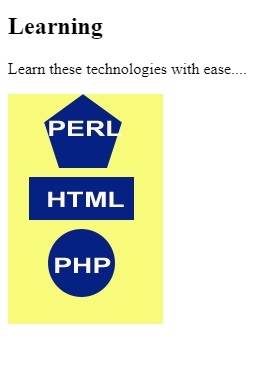
在以上示例中,我们已经对下面的图像设置了映射 −
<img src = /images/usemap.gif alt = "usemap" border = "0" usemap = "#tutorials"/>
现在,我们已经为形状设置了映射和其中的区域 −
<map name = "tutorials">
   <area shape = "poly" coords = "74,0,113,29,98,72,52,72,38,27"
      href = "/perl/index.htm" alt = "Perl Tutorial" target = "_blank" />
   <area shape = "rect" coords = "22,83,126,125" alt = "HTML Tutorial"
      href = "/html/index.htm" target = "_blank" />
   <area shape = "circle" coords = "73,168,32" alt = "PHP Tutorial"
      href = "/php/index.htm" target = "_blank" />
</map>
在设置区域时,我们已经使用 cords 属性设置了区域的坐标 −
<area shape = "rect" coords = "22,83,126,125" alt = "HTML Tutorial"
   href = "/html/index.htm" target = "_blank" />

更新日期: 2019-07-30
449 次浏览

广告