
 数据结构
数据结构 网络
网络 RDBMS
RDBMS 操作系统
操作系统 Java
Java MS Excel
 iOS
iOS HTML
HTML CSS
CSS Android
 Python
 C 编程
C 编程 C++
C++ C#
C# MongoDB
 MySQL
MySQL JavaScript
 PHP
PHP 物理
物理 化学
化学 生物
生物 数学
数学 英语
英语 经济学
经济学 心理学
心理学 社会科学
社会科学 设计研究
设计研究 法律研究
法律研究HTML onkeydown 事件属性
用户按键盘上的键时,触发 HTML onkeydown 事件属性。
语法
语法如下 −
<tagname onkeydown=”script”>Content</tagname>
我们来看看 HTML onkeydown 事件属性示例 −
示例
<!DOCTYPE html>
<html>
<head>
<style>
   body {
      color: #000;
      height: 100vh;
      background: linear-gradient(62deg, #FBAB7E 0%, #F7CE68 100%) no-repeat;
      text-align: center;
      padding: 20px;
   }
   .show {
      font-size: 1.2rem;
   }
</style>
</head>
<body>
<h1>HTML onkeydown Event Attribute Demo</h1>
<textarea class="" placeholder="Enter your message here" rows="5" cols="40" onkeydown="keyFn()"></textarea>
<div class="show"></div>
<script>
   function keyFn() {
      document.querySelector(".show").innerHTML = 'You enter: ' + document.querySelector("textarea").value;
   }
</script>
</body>
</html>
输出
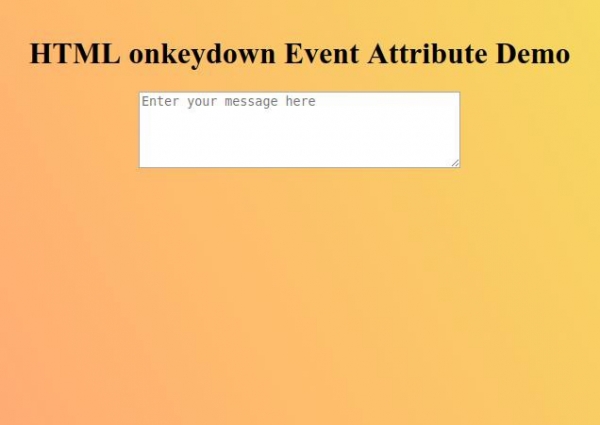
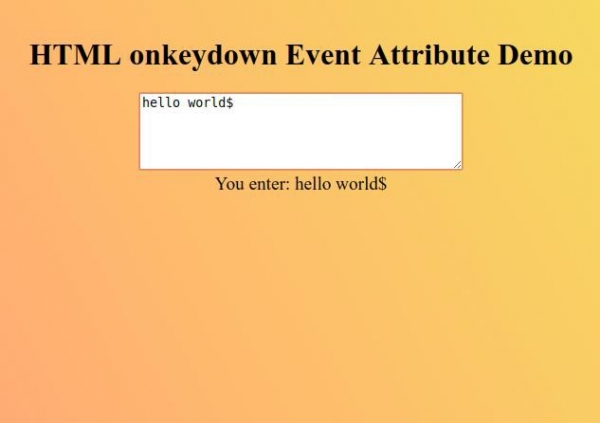
在白色文本区域输入你的消息以观察 onkeydown 事件属性如何工作。

更新于: 2019 年 9 月 26 日
127 浏览量

广告