
- JSF 教程
- JSF - 首页
- JSF - 概述
- JSF - 环境设置
- JSF - 架构
- JSF - 生命周期
- JSF - 第一个应用程序
- JSF - 托管Bean
- JSF - 页面导航
- JSF - 基本标签
- JSF - Facelet标签
- JSF - 转换器标签
- JSF - 验证器标签
- JSF - 数据表
- JSF - 组合组件
- JSF - Ajax
- JSF - 事件处理
- JSF - JDBC集成
- JSF - Spring集成
- JSF - 表达式语言
- JSF - 国际化
- JSF 有用资源
- JSF - 快速指南
- JSF - 有用资源
- JSF - 讨论
JSF - 组合组件
JSF 为开发者提供了强大的能力,可以定义他们自己的自定义组件,这些组件可用于呈现自定义内容。
定义自定义组件
在 JSF 中定义自定义组件是一个两步过程。
| 步骤 | 描述 |
|---|---|
| 1a | 创建一个 resources 文件夹。 在 resources 文件夹中创建一个具有组合命名空间的 xhtml 文件。 |
| 1b | 使用组合标签composite:interface、composite:attribute 和 composite:implementation 来定义组合组件的内容。在composite:implementation 中使用cc.attrs 获取在composite:interface 中使用composite:attribute 定义的变量。 |
步骤 1a:创建自定义组件:loginComponent.xhtml
在 resources 文件夹下创建一个名为 tutorialspoint 的文件夹,并在其中创建一个名为 loginComponent.xhtml 的文件。
在 html 头部使用组合命名空间。
<html xmlns = "http://www.w3.org/1999/xhtml"
   xmlns:h = "http://java.sun.com/jsf/html"
   xmlns:f = "http://java.sun.com/jsf/core"
   xmlns:composite = "http://java.sun.com/jsf/composite">
...
</html>
步骤 1b:使用组合标签:loginComponent.xhtml
下表描述了组合标签的用法。
| 序号 | 标签 & 描述 |
|---|---|
| 1 | composite:interface 声明要在 composite:implementation 中使用的可配置值。 |
| 2 | composite:attribute 使用此标签声明配置值。 |
| 3 | composite:implementation 声明 JSF 组件。可以使用 #{cc.attrs.attribute-name} 表达式访问在 composite:interface 中定义的可配置值。 |
<composite:interface>
   <composite:attribute name = "usernameLabel" />
   <composite:attribute name = "usernameValue" />
</composite:interface>

<composite:implementation>
<h:form>
   #{cc.attrs.usernameLabel} :
   <h:inputText id = "username" value = "#{cc.attrs.usernameValue}" />
</h:form>
使用自定义组件
在 JSF 中使用自定义组件是一个简单的过程。
| 步骤 | 描述 |
|---|---|
| 2a | 创建一个 xhtml 文件并使用自定义组件的命名空间。命名空间将是http://java.sun.com/jsf/<folder-name>,其中folder-name 是 resources 目录中包含自定义组件的文件夹。 |
| 2b | 像使用普通 JSF 标签一样使用自定义组件 |
步骤 2a:使用自定义命名空间:home.xhtml
<html xmlns = "http://www.w3.org/1999/xhtml"
   xmlns:h = "http://java.sun.com/jsf/html"
   xmlns:ui = "http://java.sun.com/jsf/facelets">
   xmlns:tp = "http://java.sun.com/jsf/composite/tutorialspoint">
步骤 2b:使用自定义标签:home.xhtml 并传递值
<h:form>
   <tp:loginComponent
      usernameLabel = "Enter User Name: "
      usernameValue = "#{userData.name}" />
</h:form>
示例应用程序
让我们创建一个测试 JSF 应用程序来测试 JSF 中的自定义组件。
| 步骤 | 描述 |
|---|---|
| 1 | 按照JSF - 第一个应用程序章节的说明,创建一个名为helloworld的项目,放在com.tutorialspoint.test包下。 |
| 2 | 在src → main文件夹下创建resources文件夹。 |
| 3 | 在src → main → resources文件夹下创建tutorialspoint文件夹。 |
| 4 | 在src → main → resources → tutorialspoint文件夹下创建loginComponent.xhtml文件。 |
| 5 | 修改UserData.java文件,如下所示。 |
| 6 | 修改home.xhtml文件,如下所示。保持其余文件不变。 |
| 7 | 编译并运行应用程序,以确保业务逻辑按要求工作。 |
| 8 | 最后,将应用程序构建成 war 文件,并将其部署到 Apache Tomcat Web 服务器。 |
| 9 | 使用最后一步中说明的相应 URL 启动您的 Web 应用程序。 |
loginComponent.xhtml
<?xml version = "1.0" encoding = "UTF-8"?>
<!DOCTYPE html PUBLIC "-//W3C//DTD XHTML 1.0 Transitional//EN"
"http://www.w3.org/TR/xhtml1/DTD/xhtml1-transitional.dtd">

<html xmlns = "http://www.w3.org/1999/xhtml"
   xmlns:h = "http://java.sun.com/jsf/html"
   xmlns:f = "http://java.sun.com/jsf/core"
   xmlns:composite = "http://java.sun.com/jsf/composite">

   <composite:interface>
      <composite:attribute name = "usernameLabel" />
      <composite:attribute name = "usernameValue" />
      <composite:attribute name = "passwordLabel" />
      <composite:attribute name = "passwordValue" />
      <composite:attribute name = "loginButtonLabel" />
      <composite:attribute name = "loginButtonAction"
         method-signature = "java.lang.String login()" />
   </composite:interface>

   <composite:implementation>
      <h:form>
         <h:message for = "loginPanel" style = "color:red;" />

         <h:panelGrid columns = "2" id = "loginPanel">
            #{cc.attrs.usernameLabel} :
            <h:inputText id = "username" value = "#{cc.attrs.usernameValue}" />
            #{cc.attrs.passwordLabel} :
            <h:inputSecret id = "password" value = "#{cc.attrs.passwordValue}" />
         </h:panelGrid>

         <h:commandButton action = "#{cc.attrs.loginButtonAction}"
            value = "#{cc.attrs.loginButtonLabel}"/>
      </h:form>
   </composite:implementation>
</html>
UserData.java
package com.tutorialspoint.test;

import java.io.Serializable;

import javax.faces.bean.ManagedBean;
import javax.faces.bean.SessionScoped;

@ManagedBean(name = "userData", eager = true)
@SessionScoped
public class UserData implements Serializable {
   private static final long serialVersionUID = 1L;
   private String name;
   private String password;

   public String getName() {
      return name;
   }

   public void setName(String name) {
      this.name = name;
   }

   public String getPassword() {
      return password;
   }

   public void setPassword(String password) {
      this.password = password;
   }

   public String login() {
      return "result";
   }
}
home.xhtml
<?xml version = "1.0" encoding = "UTF-8"?>
<!DOCTYPE html PUBLIC "-//W3C//DTD XHTML 1.0 Transitional//EN"
"http://www.w3.org/TR/xhtml1/DTD/xhtml1-transitional.dtd">

<html xmlns = "http://www.w3.org/1999/xhtml"
   xmlns:h = "http://java.sun.com/jsf/html"
   xmlns:f = "http://java.sun.com/jsf/core"
   xmlns:tp = "http://java.sun.com/jsf/composite/tutorialspoint">

   <h:head>
      <title>JSF tutorial</title>
   </h:head>

   <h:body>
      <h2>Custom Component Example</h2>

      <h:form>
      <tp:loginComponent
         usernameLabel = "Enter User Name: "
         usernameValue = "#{userData.name}"
         passwordLabel = "Enter Password: "
         passwordValue = "#{userData.password}"
         loginButtonLabel = "Login"
         loginButtonAction = "#{userData.login}" />
      </h:form>
   </h:body>
</html>
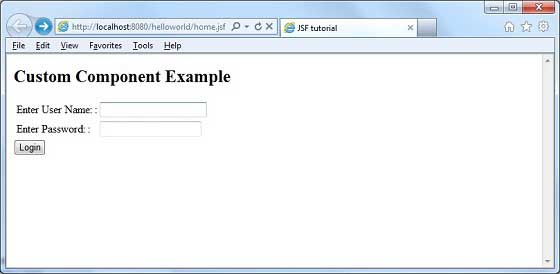
完成所有更改后,让我们像在 JSF - 第一个应用程序章节中那样编译并运行应用程序。如果您的应用程序一切正常,这将产生以下结果。
广告