
- MomentJS 教程
- MomentJS - 首页
- MomentJS - 概述
- MomentJS - 环境设置
- MomentJS - 简介
- MomentJS - 解析日期和时间
- MomentJS - 日期验证
- MomentJS - Getter/Setter
- 操作日期和时间
- 格式化日期和时间
- MomentJS - 日期查询
- MomentJS - 国际化
- MomentJS - 自定义
- MomentJS - 时长
- MomentJS - 工具函数
- MomentJS - 插件
- MomentJS - 示例
- MomentJS 有用资源
- MomentJS - 快速指南
- MomentJS - 有用资源
- MomentJS - 讨论
MomentJS - 简介
在本章中,我们将讨论如何使用RequireJS 和 MomentJS 以及MomentJS 和 TypeScript 来操作MomentJS。
MomentJS 和 RequireJS
要了解使用 RequireJS 操作 MomentJS 的工作原理,让我们分析一个使用 MomentJS 和 RequireJS 的工作示例。相应应用程序的文件夹结构如下所示:
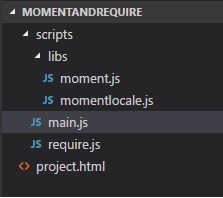
您可以从 RequireJS 官方网站获取 require.js 文件 − https://requirejs.node.org.cn/docs/download.html. 请观察以下代码以更好地理解:
示例 project.html
<!DOCTYPE html>
<html>
   <head>
      <title>RequireJS and MomentJS</title>
      <!-- data-main attribute tells require.js to load
         scripts/main.js after require.js loads. -->
      <script data-main="scripts/main" src="scripts/require.js"></script>
   </head>
   <body>
      <h1>RequireJS and MomentJS</h1>
      <div id="datedisplay" style="font-size:25px;"></div>
   </body>
</html>
main.js
require.config({
   paths:{
      'momentlocale':'libs/momentlocale',
   },
});
require(['momentlocale'], function (moment) {
   moment.locale('fr');
   var a = moment().format("LLLL");
   document.getElementById("datedisplay").innerHTML = a;
});
请注意,Moment.js 和 momentlocale.js 位于 libs 文件夹中。
以下是您在浏览器中观察到的 project.html 的输出:

MomentJS 和 TypeScript
构建 MomentJS 和 Typescript 项目使用的代码如下所示:
package.json
{
   "name": "momenttypescript",
   "version": "1.0.0",
   "description": "",
   "main": "index.js",
   "dependencies": {
      "browserify": "^16.2.0",
      "gulp": "^3.9.1",
      "gulp-connect": "^5.5.0",
      "gulp-typescript": "^4.0.2",
      "moment": "^2.22.1",
      "tsify": "^4.0.0",
      "typescript": "^2.8.3",
      "vinyl-source-stream": "^2.0.0"
   },
   "devDependencies": {},
   "scripts": {
      "test": "echo \"Error: no test specified\" && exit 1"
   },
   "author": "",
   "license": "ISC"
}
请注意,package.json 中提供的依赖项需要使用 npm install 进行安装。
main.ts
import * as moment from 'moment';
let now = moment().format('LLLL');
document.getElementById("datedisplay").innerHTML = now;
您需要使用 Gulp 将文件从 TypeScript 构建到 JavaScript,即从 main.ts 构建到 main.js。以下代码显示了用于构建文件的 gulpfile.js。请注意,我们使用了 gulp-connect 包,它打开一个本地服务器来显示输出。
gulpfile.js
var gulp = require("gulp");
var connect = require("gulp-connect");
var browserify = require("browserify");
var tsify = require("tsify");
var source = require("vinyl-source-stream");
gulp.task("build", function (cb) {
   runSequence("browserify", "minify", cb);
});
gulp.task("startserver", ["browserify", "connect"]);
gulp.task("browserify", function () {
var b = browserify({
   insertGlobals: true,
   debug: false
}) .add("src/main.ts") .plugin(tsify, { typescript: require("typescript") });
return b
   .bundle()
   .pipe(source("main.js"))
   .pipe(gulp.dest("build/"));
});
gulp.task("connect", function () {
   connect.server({
      root: ".",
      // port: '80',
      livereload: true
   });
});
这是您运行上面给出的代码时观察到的输出:
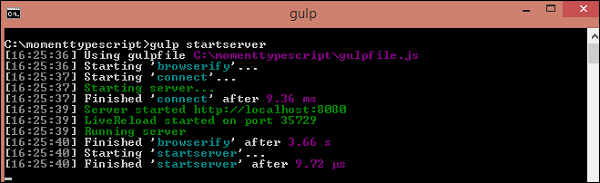
您可以看到文件夹结构如下所示:
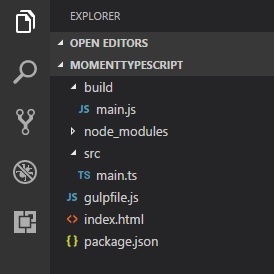
index.html 的代码如下所示:
<html>
   <head></head>
   <body>
      <h1>MomentJS and typescript</h1>
      <div id="datedisplay" style="font-size:30px;"></div>
      <script src="build/main.js"></script>
   </body>
</html>
现在,如果您打开 https://127.0.0.1:8080/,您将看到如下所示的输出:

广告