
 数据结构
数据结构 网络
网络 关系数据库管理系统
 操作系统
操作系统 Java
Java MS Excel
 iOS
iOS HTML
HTML CSS
CSS Android
 Python
 C 编程
C 编程 C++
C++ C#
C# MongoDB
 MySQL
MySQL Javascript
 PHP
PHP 物理学
物理学 化学
化学 生物学
生物学 数学
数学 英语
英语 经济学
经济学 心理学
心理学 社会学
社会学 服装设计
服装设计 法律研究
法律研究在 Matplotlib 中绘制多个绘图
Python 提供了一个名为 Matplotlib 的强大库,该库以绘图和图形的形式创建视觉表示。该库的众多功能之一是能够在一个图形中绘制多个绘图,这在比较不同的数据集或可视化多个变量之间的关系时非常有用。我们将探索 Matplotlib 的名为“subplots()”的内置方法,该方法用于绘制多个绘图。
在 Matplotlib 中绘制多个绘图的 Python 程序
在直接跳到程序之前,让我们先熟悉一下 Matplotlib 的 subplots() 方法。
subplots() 方法
通过一次调用“subplots()”方法,我们可以在单个图形中创建一个或多个子图。它提供了对绘图的适当控制,并且还允许我们自定义其布局和外观。
语法
subplots(numOfrows, numOfcols)
这里,'numOfrows' 和 'numOfcols' 分别指定网格的行数和列数。
但是,我们也可以根据需要添加一些其他属性。
示例 1
在以下示例中,我们将绘制正弦和余弦函数的两个子图。
方法
首先,我们将导入 matplotlib 和 numpy。matplotlib 将用于可视化 numpy 生成的数据。
使用 NumPy 的内置方法“linspace()”生成一个从 0 到 10 之间 100 个等间距值的数组。然后,计算 x 数组中每个元素的正弦和余弦值,并将它们分别存储在 y1 和 y2 中。
现在,使用“subplots()”方法创建两个垂直排列的子图。此方法将返回一个名为“fig”的图形对象和一个子图轴“ax1”和“ax2”的元组。这里,“figsize”设置图形的大小。
在第一个子图 ax1 上绘制 x 值相对于 y1 值的图形。
同样,在第二个子图 ax2 上绘制 x 值相对于 y2 值的图形。
使用“tight_layout()”方法调整子图之间的间距,以防止重叠。
最后,显示绘图并退出。
import matplotlib.pyplot as plt
import numpy as np
# generating some random data for plotting
val = np.linspace(0, 10, 100)
pl1 = np.sin(val)
pl2 = np.cos(val)
# Creating subplots
fig, (axs1, axs2) = plt.subplots(2, 1, figsize = (6, 4))
# Plotting of the first subplot
axs1.plot(val, pl1, 'r', label = 'Sin')
axs1.set_xlabel('Axis-X')
axs1.set_ylabel('Axis-Y')
axs1.legend()
# Plotting of the second subplot
axs2.plot(val, pl2, 'b', label = 'Cos')
axs2.set_xlabel('Axis-X')
axs2.set_ylabel('Axis-Y')
axs2.legend()
# for adjusting the space between subplots
plt.tight_layout()
# to display the plots
plt.show()
输出

示例 2
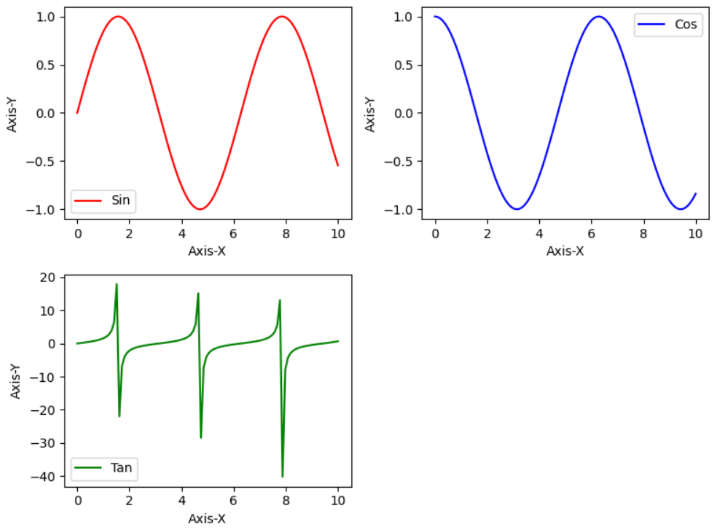
在以下示例中,我们将更改先前示例的代码以添加一个正切函数的绘图。
import matplotlib.pyplot as plt
import numpy as np
# generating some random data for plotting
val = np.linspace(0, 10, 100)
pl1 = np.sin(val)
pl2 = np.cos(val)
pl3 = np.tan(val)
# Creating the subplots using above data
fig, axs = plt.subplots(2, 2, figsize = (8, 6))
# Plotting of the first subplot
axs[0, 0].plot(val, pl1, 'r', label = 'Sin')
axs[0, 0].set_xlabel('Axis-X')
axs[0, 0].set_ylabel('Axis-Y')
axs[0, 0].legend()
# To plot on the second subplot
axs[0, 1].plot(val, pl2, 'b', label = 'Cos')
axs[0, 1].set_xlabel('Axis-X')
axs[0, 1].set_ylabel('Axis-Y')
axs[0, 1].legend()
# Plotting of the third subplot
axs[1, 0].plot(val, pl3, 'g', label = 'Tan')
axs[1, 0].set_xlabel('Axis-X')
axs[1, 0].set_ylabel('Axis-Y')
axs[1, 0].legend()
# To remove the empty subplot
fig.delaxes(axs[1, 1])
# for adjusting the space between subplots
plt.tight_layout()
# Displaying all plots
plt.show()
输出
结论
我们从介绍 Matplotlib 及其内置方法“subplots()”开始本文。在下一节中,我们将详细解释此方法。此外,我们还讨论了两个示例程序以展示“subplots()”方法在绘制多个绘图中的用法。

3K+ 浏览量
