
 数据结构
数据结构 网络
网络 关系数据库管理系统 (RDBMS)
 操作系统
操作系统 Java
Java MS Excel
 iOS
iOS HTML
HTML CSS
CSS Android
 Python
 C语言编程
C语言编程 C++
C++ C#
C# MongoDB
 MySQL
MySQL Javascript
 PHP
PHP 物理
物理 化学
化学 生物
生物 数学
数学 英语
英语 经济学
经济学 心理学
心理学 社会学
社会学 服装设计
服装设计 法学
法学wxPython中的弹出菜单
在本文中,我们将了解wxPython,并创建一个程序来制作弹出式菜单项。
弹出菜单是图形用户界面 (GUI),允许我们显示一些特定的项目和选项。在本教程中,我们将学习如何在wxPython中创建和实现弹出菜单。它是一个用于Python语言的GUI工具包,它为我们提供了一组绑定,并允许开发人员创建具有原生界面的跨平台应用程序。
使用pip命令安装wxPython
pip install wxPython
如果安装失败,请执行以下命令。
pip install -U -f https://extras.wxpython.org/wxPython4/extras/linux/gtk3/ubuntu-18.04/ wxPython
为了显示消息框,我们将使用easygui中的messagebox。
要安装easygui,请执行以下命令。
pip install easygui
EasyGUI
它也是一个图形用户界面,它为我们提供了一组预构建的对话框和小部件,可以轻松使用,而无需像Tkinter或wxPython那样编写其核心功能部分的代码。使用EasyGUI,我们可以创建更多字段,例如消息框、文本字段、按钮和其他组件。
示例
import wx
import easygui

class PopUpMenu(wx.Menu):
   def __init__(self):
      super().__init__()

   # Add a menu item
      self.item1 = self.Append(wx.ID_ANY, "Mango")

   # Bind an event handler to the mango menu item
      self.Bind(wx.EVT_MENU, self.mango, self.item1)

   # Add another menu item
      self.item2 = self.Append(wx.ID_ANY, "Litchi")

   # Bind an event handler to the litchi menu item
      self.Bind(wx.EVT_MENU, self.litchi, self.item2)

   # Add another menu item
      self.item3 = self.Append(wx.ID_ANY, "Apple")

   # Bind an event handler to the apple menu item
      self.Bind(wx.EVT_MENU, self.apple, self.item3)

   def mango(self, event):
      easygui.msgbox("You choose Mango!", title="msg")

   def litchi(self, event):
      easygui.msgbox("You choose Litchi!", title="msg")

   def apple(self, event):
      easygui.msgbox("You choose Apple!", title="msg")


class FrameClass(wx.Frame):
   def __init__(self):
      super().__init__(None, title="Frame Simple")

   # Create a menu bar
      self.menubar = wx.MenuBar()

   # Add the pop-up menu to the menu bar
      self.menubar.Append(PopUpMenu(), "Fruit Menu")

   # Set the menu bar as the frame's menu bar
      self.SetMenuBar(self.menubar)

   # Bind a mouse event handler to the frame
      self.Bind(wx.EVT_RIGHT_DOWN, self.on_right_click)

   def on_right_click(self, event):
      self.PopupMenu(self.menubar, event.GetPosition())


if __name__ == "__main__":
   app = wx.App()

   # Creating a frame
   frame = FrameClass()

   # Show the frame
   frame.Show()

   app.MainLoop()
输出
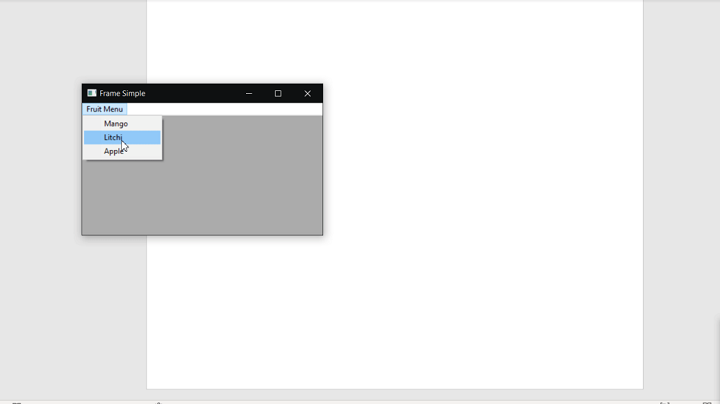
解释
在上面的程序中,我们使用菜单栏创建一个框架。当您单击框架时,将显示一个弹出菜单。在菜单栏中,它将有一个水果项目的弹出菜单,例如“芒果”、“荔枝”、“苹果”。当您单击或选择菜单栏中列出的任何项目时,它将显示一个包含所选水果项目名称的消息作为操作。
在这里,在PopUpMenu类中,我们正在创建一个弹出菜单。该类包含一个构造函数,用于创建一个没有菜单项的弹出菜单。在类中,它具有不同名称的水果名称的方法。假设您单击名为“芒果”的项目,那么它将调用名为“mango”的方法,此方法将打印弹出消息“您选择了芒果”。同样,选择其他菜单项将通过调用其自身函数来执行相同的操作。
因此,我们了解了如何在wxPython中创建弹出菜单项,以及如何在选择任何指定的菜单项后实现操作。

更新于:2023年10月13日
250 次浏览

广告