
 数据结构
数据结构 网络
网络 关系数据库管理系统
 操作系统
操作系统 Java
Java MS Excel
 iOS
iOS HTML
HTML CSS
CSS Android
 Python
 C 语言编程
 C++
C++ C#
C# MongoDB
 MySQL
MySQL Javascript
 PHP
PHP 物理
物理 化学
化学 生物
生物 数学
数学 英语
英语 经济学
经济学 心理学
心理学 社会研究
社会研究 时尚研究
时尚研究 法律研究
法律研究Python Pandas - 从数据帧中选择行子集
要选择行的子集,请使用条件和提取数据。
假设以下是我们在 Microsoft Excel 中打开的 CSV 文件的内容 -
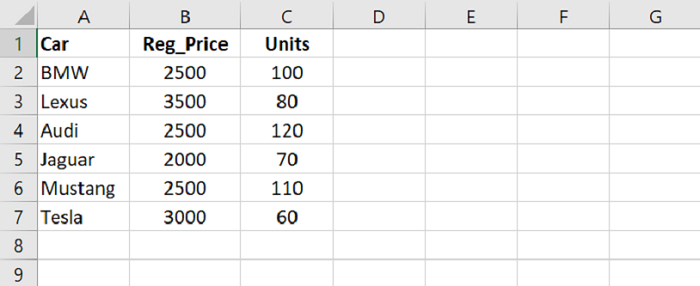
首先,将数据从 CSV 文件加载到 Pandas DataFrame 中 -
dataFrame = pd.read_csv("C:\Users\amit_\Desktop\SalesData.csv")假设我们想要将“单位”大于 100 的汽车记录(即行的子集)。为此,使用 -
dataFrame[dataFrame["Units"] > 100]
现在,假设我们想要将“Regular Price”小于 100 的汽车记录(即行的子集)。为此,使用 -
dataFrame[dataFrame["Reg_Price"] < 3000]
范例
以下是代码 -
import pandas as pd

# Load data from a CSV file into a Pandas DataFrame
dataFrame = pd.read_csv("C:\Users\amit_\Desktop\SalesData.csv")
print("\nReading the CSV file...\n",dataFrame)

# displaying two columns
res2 = dataFrame[['Reg_Price','Units']];
print("\nDisplaying two columns : \n",res2)

# selecting a subset of rows
print("\nSelect cars with Units more than 100: \n",dataFrame[dataFrame["Units"] > 100])

# selecting a subset of rows
print("\nSelect cars with Reg_Price less than 3000: \n",dataFrame[dataFrame["Reg_Price"] < 3000])
输出
这将生成以下输出 -
Reading the CSV file...
       Car   Reg_Price   Units
0      BMW        2500     100
1    Lexus        3500      80
2     Audi        2500     120
3   Jaguar        2000      70
4  Mustang        2500     110

Displaying only one column Car :
    Reg_Price   Units
0        2500     100
1        3500      80
2        2500     120
3        2000      70
4        2500     110
Name: Car, dtype: object

Select cars with Units more than 100:
       Car   Reg_Price   Units
2     Audi        2500     120
4  Mustang        2500     110

Select cars with Reg_Price less than 3000:
       Car   Reg_Price   Units
0      BMW        2500     100
2     Audi        2500     120
3   Jaguar        2000      70
4  Mustang        2500     110

更新于: 2021 年 9 月 29 日
1k+ 浏览量

广告