
 数据结构
数据结构 网络
网络 关系型数据库管理系统 (RDBMS)
 操作系统
操作系统 Java
Java MS Excel
 iOS
iOS HTML
HTML CSS
CSS Android
 Python
 C语言编程
C语言编程 C++
C++ C#
C# MongoDB
 MySQL
MySQL Javascript
 PHP
PHP 物理学
物理学 化学
化学 生物学
生物学 数学
数学 英语
英语 经济学
经济学 心理学
心理学 社会学
社会学 服装研究
服装研究 法学研究
法学研究使用PCA降低数据维度 - Python
机器学习算法中使用的任何数据集都可能具有多个维度。然而,并非所有维度都有助于获得有效的输出,而只是由于数据集大小和复杂性的增加而导致机器学习模型性能下降。因此,从数据集中消除这些特征变得非常重要。为此,我们使用一种称为PCA的降维算法。
PCA或主成分分析有助于去除那些无助于优化结果的数据集维度;从而创建一个更小、更简单的,包含大部分原始有用信息的数据集。PCA基于特征提取的概念,该概念指出,当高维空间中的数据映射到低维空间中的数据时,后者的方差应该最大。
语法
pca = PCA(n_components = number)
这里,PCA是执行降维的类,pca是由它创建的对象。它只接受一个参数 - 我们希望作为输出的主成分数量。
此外,当与fit()、DataFrame()和head()函数一起使用时,它将返回具有主成分作为表格的新数据集,我们将在示例中看到。
算法
步骤 1 - 导入Python的sklearn和pandas库以及相关的子模块。
步骤 2 - 加载所需的数据集并将其更改为pandas数据框。
步骤 3 - 使用Standard Scaler标准化特征,并将新数据集存储为pandas数据框。
步骤 4 - 在缩放后的数据集中使用PCA类并创建一个对象。另外,传递组件的数量并拟合并相应地显示结果数据。
示例 1
在这个例子中,我们将使用Python sklearn库中已有的load_diabetes数据集来查看如何执行PCA。为此,我们将使用PCA类,但在那之前,我们需要处理和标准化数据集。
#import the required libraries
from sklearn import datasets  #to get the load_diabetes dataset
from sklearn.preprocessing import StandardScaler #this standardizes the dimensions
from sklearn.decomposition import PCA  #to perform PCA
from sklearn.datasets import load_diabetes #the dataset that we will use to perform PCA
import pandas as pd  #to work with the dataframes

#load the dataset as pandas dataframe
diabetes = datasets.load_diabetes()
df = pd.DataFrame(diabetes['data'], columns = diabetes['feature_names'])
df.head()  #displays the data frame when run in a different cell

#standardize the dimensions by creating the object of StandardScaler
scalar = StandardScaler()
scaled_data = pd.DataFrame(scalar.fit_transform(df))
scaled_data  #displays the dataframe after standardization when run in a different cell

#apply pca
pca = PCA(n_components = 4)
pca.fit(scaled_data)
data_pca = pca.transform(scaled_data)
data_pca = pd.DataFrame(data_pca,columns=['PC1','PC2','PC3', 'PC4'])
data_pca.head()
加载糖尿病数据,它返回一个类似于字典的对象,从中将数据提取到Pandas Dataframe中。我们使用StandardScaler标准化数据,并对创建的Pandas Dataframe应用fit_transform()方法。
在存储在单独数据框中的标准化数据上调用fit()方法以执行PCA分析。结果数据再次存储在单独的数据框中,并如下所示打印。
输出
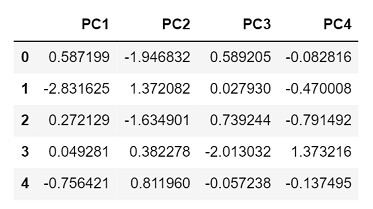
由于我们选择了4个主成分,因此返回的输出具有4列,分别代表每个成分。
示例 2
在这个例子中,我们将从sklearn库中使用load_wine数据集。此外,这次我们将主成分的数量设置为只有3个。
#import the required libraries
from sklearn import datasets  #to get the load_wine dataset
from sklearn.preprocessing import StandardScaler #this standardizes the dimensions
from sklearn.decomposition import PCA  #to perform PCA
from sklearn.datasets import load_wine #the dataset that we will use to perform PCA
import pandas as pd  #to work with the dataframes

#load the dataset as pandas dataframe
wine = datasets.load_wine()
df = pd.DataFrame(wine['data'], columns = wine['feature_names'])
df.head()  #displays the dataframe when run in a different cell

#standardize the dimensions by creating the object of StandardScaler
scalar = StandardScaler()
scaled_data = pd.DataFrame(scalar.fit_transform(df))
scaled_data  #displays the dataframe after standardization when run in a different cell

#apply pca
pca = PCA(n_components = 3)
pca.fit(scaled_data)
data_pca = pca.transform(scaled_data)
data_pca = pd.DataFrame(data_pca,columns=['PC1','PC2','PC3'])
data_pca.head()
输出
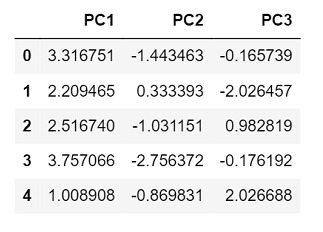
由于这次我们只选择了3个主成分,因此返回的输出只有3列,分别代表每个成分。
结论
PCA不仅使数据集的组件彼此独立,而且通过减少数据集的特征数量来解决过拟合问题。然而,降维并不仅限于PCA。还有其他方法,如LDA - 线性判别分析和GDA - 广义判别分析,有助于实现相同的目标。

浏览量:165
