
 数据结构
数据结构 网络
网络 RDBMS
RDBMS 操作系统
操作系统 Java
Java MS Excel
 iOS
iOS HTML
HTML CSS
CSS Android
 Python
 C 编程
C 编程 C++
C++ C#
C# MongoDB
 MySQL
MySQL Javascript
 PHP
PHP 物理学
物理学 化学
化学 生物学
生物学 数学
数学 英语
英语 经济学
经济学 心理学
心理学 社会学
社会学 时尚学
时尚学 法律学
法律学在 Tkinter Python 中设置按钮的位置?
有几种方法可以通过 Tkinter 小组件放置在窗口中。Tkinter 几何管理程序有三个方法,pack()、place() 和 grid(),我们可通过这些方法设置小组件在应用程序窗口中的位置。每种方法都有其局限性和用途。要设置 Tkinter 应用程序窗口中按钮的位置,我们优先考虑使用 place(x 坐标, y 坐标) 方法。它采用定义小组件位置所需的 x 和 y 坐标值。
示例
示例代码包含一个按钮小组件,它使用 place(x, y) 方法将按钮放置在窗口中。
# Import the Tkinter library
from tkinter import *
from tkinter import ttk
# Create an instance of Tkinter frame
win = Tk()
# Define the geometry
win.geometry("750x250")
def close_win():
   win.destroy()
# Create Buttons in the frame
button = ttk.Button(win, text="Click", command=close_win)
button.place(x=325, y=125)
#Create a Label
Label(win, text="Click the Button to Close the Window", font=('Consolas 15')).pack()
win.mainloop()
输出
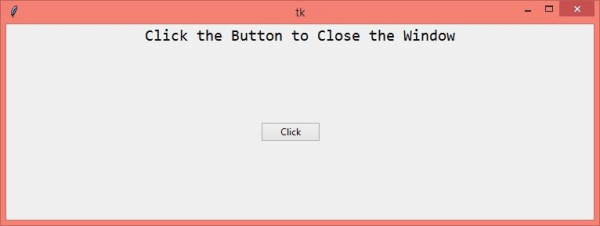
运行以上代码将显示一个窗口,窗口中心位置有一个按钮。

更新时间: 22-Apr-2021
2K+ 阅读

广告