
 数据结构
数据结构 网络
网络 关系数据库管理系统 (RDBMS)
 操作系统
操作系统 Java
Java MS Excel
 iOS
iOS HTML
HTML CSS
CSS Android
 Python
 C语言编程
C语言编程 C++
C++ C#
C# MongoDB
 MySQL
MySQL Javascript
 PHP
PHP 物理学
物理学 化学
化学 生物学
生物学 数学
数学 英语
英语 经济学
经济学 心理学
心理学 社会学
社会学 服装设计
服装设计 法学
法学Swift程序:计算立方体的体积
本教程将讨论如何编写一个Swift程序来计算立方体的体积。
立方体是一个具有六个正方形面的三维立体图形,立方体的所有边长都相等(即长=宽=高)。它也被称为正六面体。它包含12条边和8个顶点。
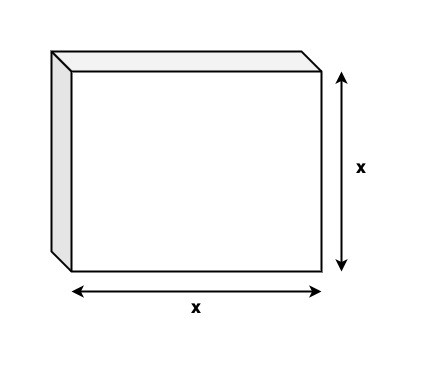
立方体包含的立方单位总数称为立方体的体积。为了计算立方体的体积,我们求长、高和宽的乘积。由于我们知道长=高=宽,因此立方体的体积为x * x * x。这里x是边长。
公式
以下是立方体体积的公式:
Volume = (side)3
下面是相同的演示:
输入
假设我们的给定输入为:
side = 5
输出
期望输出为:
Volume = 5 * 5 * 5 = 125.
Volume = 125
算法
以下是算法:
步骤1 - 声明一个变量,其值为用户定义/预定义值。此变量存储立方体的边长。
步骤2 - 声明另一个名为“cubeVolume”的变量来存储立方体的体积。 var cubeVolume = cubeSide * cubeSide * cubeSide
步骤3 - 打印输出。
示例1
以下程序显示如何找到立方体的体积。
import Foundation
import Glibc

var cubeSide : Int = 4

// Finding the volume of the cube
var cubeVolume = cubeSide * cubeSide * cubeSide

print("Side - ", cubeSide)
print("So, Volume of the cube- ", cubeVolume)
输出
Side - 4 So,
Volume of the cube- 64
在上面的代码中,我们使用以下公式来计算立方体的体积:
var cubeVolume = cubeSide * cubeSide * cubeSide
并显示立方体的体积为64(V = 4 * 4 * 4 = 64)。
示例2
以下程序显示如何使用用户定义的输入来查找立方体的体积。
import Foundation
import Glibc

print("Please enter the side")
var cubeSide = Double(readLine()!)!

// Finding the volume of the cube
var cubeVolume = pow(cubeSide, 3)

print("Side - ", cubeSide)
print("So, Volume of the cube- ", cubeVolume)
标准输入
Please enter the side
6
输出
Side - 6.0 So,
Volume of the cube- 216.0
在上面的代码中,我们使用以下公式来计算立方体的体积:
var cubeVolume = pow(cubeSide, 3)
在这里,我们使用pow()函数来计算给定cubeSide的立方。因此,用户输入的cubeSide值为3,因此立方体的体积为27 (3*3*3=27)。

更新于:2022年8月25日
浏览量:384

广告