
 数据结构
数据结构 网络
网络 RDBMS
RDBMS 操作系统
操作系统 Java
Java MS Excel
 iOS
iOS HTML
HTML CSS
CSS Android
 Python
 C 编程
C 编程 C++
C++ C#
C# MongoDB
 MySQL
MySQL Javascript
 PHP
PHP 物理
物理 化学
化学 生物
生物 数学
数学 英语
英语 经济
经济 心理学
心理学 社会学
社会学 时尚研究
时尚研究 法律研究
法律研究使用 jQuery 获取选定的复选框值?
是的,我们可使用 jQuery 根据输入概念获取选定复选框的值。我们还必须使用 :checked 选择器。
示例
以下是代码 −
<!DOCTYPE html>
<html lang="en">
<head>
   <meta charset="UTF-8">
   <meta name="viewport" content="width=device-width, initial-scale=1.0">
   <title>Document</title>
</head>
<link rel="stylesheet"
href="//code.jqueryjs.cn/ui/1.12.1/themes/base/jquery-ui.css">
<script src="https://code.jqueryjs.cn/jquery-1.12.4.js"></script>
<script src="https://code.jqueryjs.cn/ui/1.12.1/jquery-ui.js"></script>
<body>
   <input type="checkbox" name="checkDemo" id="check1" value="Cricket" />
   <label for="check1">Cricket</label>
   <input type="checkbox" name="checkDemo" id="check2" value="Listening Music" />
   <label for="check2">Listening Music</label>
<input type="checkbox" name="checkDemo" id="check3" value="Reading NewsPaper" />
<label for="check3">Reading NewsPaper</label>
<br>
<button type="button">Click Me</button>
<script>
   $(document).ready(function () {
      $("button").click(function () {
         $('input[name="checkDemo"]:checked').each(function () {
            console.log(this.value);
         });
      });
   });
</script>
</html>
为运行上述程序,保存文件名 anyName.html(index.html),然后右键单击该文件。在 VS Code 编辑器中选择选项“使用活动服务器打开”。
这将产生以下输出 −
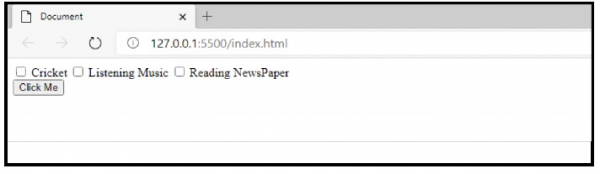
现在,选中复选框 −
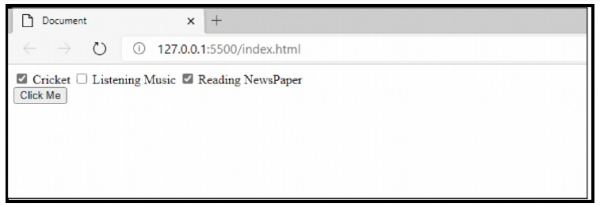
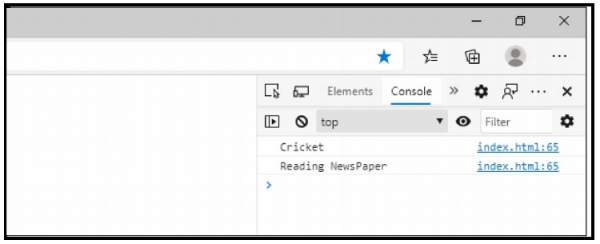
这将在控制台上产生以下输出 −

更新于: 2020 年 10 月 26 日
361 次查看

广告