
 数据结构
数据结构 网络
网络 RDBMS
RDBMS 操作系统
操作系统 Java
Java MS Excel
 iOS
iOS HTML
HTML CSS
CSS Android
 Python
 C 编程
C 编程 C++
C++ C#
C# MongoDB
 MySQL
MySQL Javascript
 PHP
PHP 物理
物理 化学
化学 生物
生物 数学
数学 英语
英语 经济学
经济学 心理学
心理学 社会学
社会学 时尚研究
时尚研究 法律研究
法律研究Java 中有哪些不同类型的 JOptionPane 对话框?\n
JOptionPane 是JComponent 类的子类,使用简单的代码包含用于创建和自定义模态对话框的静态方法。JOptionPane 用于代替JDialog 以降低代码复杂性。JOptionPane显示带有四个标准图标之一(问题、信息、警告和错误)或用户指定的自定义图标的对话框。
JOptionPane 类用于显示四种类型的对话框
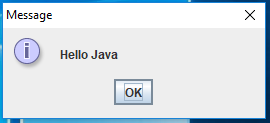
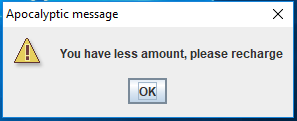
- MessageDialog - 可以添加图标以提醒用户的显示消息的对话框。
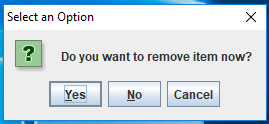
- ConfirmDialog - 除了发送消息之外,还允许用户回答问题的对话框。
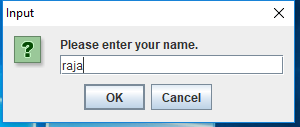
- InputDialog - 除了发送消息之外,还允许输入文本的对话框。
- OptionDialog - 涵盖前三种类型的对话框。
示例
import javax.swing.*;
public class JoptionPaneTest {
   public static void main(String[] args) {
      JFrame frame = new JFrame("JoptionPane Test");
      frame.setSize(200, 200);
      frame.setLocationRelativeTo(null);
      frame.setVisible(true);
      JOptionPane.showMessageDialog(frame, "Hello Java");
      JOptionPane.showMessageDialog(frame, "You have less amount, please recharge","Apocalyptic message", JOptionPane.WARNING_MESSAGE);
      int result = JOptionPane.showConfirmDialog(null, "Do you want to remove item now?");
      switch (result) {
         case JOptionPane.YES_OPTION:
         System.out.println("Yes");
         break;
         case JOptionPane.NO_OPTION:
         System.out.println("No");
         break;
         case JOptionPane.CANCEL_OPTION:
         System.out.println("Cancel");
         break;
         case JOptionPane.CLOSED_OPTION:
         System.out.println("Closed");
         break;
      }
      String name = JOptionPane.showInputDialog(null, "Please enter your name.");
      System.out.println(name);
      JTextField userField = new JTextField();
      JPasswordField passField = new JPasswordField();
      String message = "Please enter your user name and password.";
      result = JOptionPane.showOptionDialog(frame, new Object[] {message, userField, passField},
      "Login", JOptionPane.OK_CANCEL_OPTION, JOptionPane.QUESTION_MESSAGE, null, null, null);
      if (result == JOptionPane.OK_OPTION)
      System.out.println(userField.getText() + " " + new String(passField.getPassword()));
      System.exit(0);
   }
}
输出
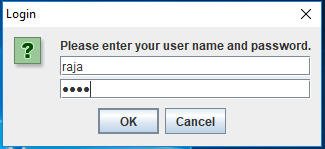

更新于: 2020-02-07
10K+ 次浏览

广告