
- Apache Bench 教程
- Apache Bench - 首页
- Apache Bench - 概述
- Apache Bench - 环境设置
- 测试我们的示例应用程序
- 并发测试多个URL
- 动态页面测试准备
- 动态页面的顺序测试用例
- 输出比较
- Apache Bench 有用资源
- Apache Bench - 快速指南
- Apache Bench - 有用资源
- Apache Bench - 讨论
测试我们的示例应用程序
在上一章中,我们了解了使用 Apache Bench 测试第三方网站的基本用法。在本节中,我们将使用此工具测试我们自己服务器上的 Web 应用程序。为了尽可能使本教程自成一体,我们选择安装一个 Python 应用程序进行演示;您可以根据自己的专业水平选择其他语言,例如 PHP 或 Ruby。
安装 Python
通常,Linux 服务器默认安装了 Python。
安装 Bottle 框架并创建一个简单的应用程序
Bottle 是一个用 Python 编写的微型框架,用于创建 Web 应用程序,pip 是一个 Python 包管理器。在终端中输入以下命令以安装 Bottle:
$ sudo apt-get install python-pip
$ sudo pip install bottle
现在让我们创建一个小的 Bottle 应用程序。为此,创建一个目录并进入其中:
$ mkdir webapp
$ cd webapp
我们将在 webapp 目录中创建一个新的 Python 脚本,**app.py**:
$ vim app.py
现在,在 app.py 文件中写入以下代码:
from bottle import Bottle, run

app = Bottle()

@app.route('/')
@app.route('/hello')
def hello():
   return "Hello World!"

run(app, host = 'localhost', port = 8080)
添加上述代码行后,保存并关闭文件。保存文件后,我们可以运行 Python 脚本来启动应用程序:
$ python app.py
输出
Bottle v0.12.7 server starting up (using WSGIRefServer())...
Listening on https://:8080/
Hit Ctrl-C to quit.
此输出显示我们的应用程序正在本地机器上的主机 **https://** 上运行,并在端口 **8080** 上监听。
让我们检查一下我们的应用程序是否能够正确响应 HTTP 请求。由于此终端在不停止 Bottle 应用程序服务的情况下无法接收任何输入,我们需要使用另一个终端登录到我们的 VPS。使用另一个终端登录到 VPS 后,您可以通过在新的终端中输入以下代码来导航到您的应用程序。
$ lynx https://:8080/
Lynx 是一个命令行浏览器,通常在各种 Linux 发行版(如 Debian 和 Ubuntu)中默认安装。如果您看到以下输出,则表示您的应用程序运行良好。
输出
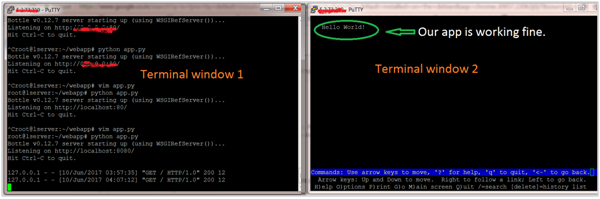
如果您看到上述输出,则表示我们的应用程序已启动并准备进行测试。
使用开发 Web 服务器测试应用程序
请注意,ab 中存在一个错误,它无法测试 localhost 上的应用程序。因此,我们将 app.py 文件中的主机从 localhost 更改为 127.0.0.1。因此,文件将更改为以下内容:
from bottle import Bottle, run

app = Bottle()

@app.route('/')
@app.route('/hello')
def hello():
   return "Hello World!"

run(app, host = '127.0.0.1', port = 8080)
现在,让我们在运行 lynx 命令的同一终端中输入以下命令来测试我们的应用程序:
$ ab -n 100 -c 10 http://127.0.0.1:8080/hello
输出
This is ApacheBench, Version 2.3 <$Revision: 1604373 $>
Copyright 1996 Adam Twiss, Zeus Technology Ltd, http://www.zeustech.net/
Licensed to The Apache Software Foundation, https://apache.org/

Benchmarking 127.0.0.1 (be patient).....done


Server Software:        WSGIServer/0.1
Server Hostname:        127.0.0.1
Server Port:            8080

Document Path:          /hello
Document Length:        12 bytes

Concurrency Level:      10
Time taken for tests:   0.203 seconds
Complete requests:      100
Failed requests:        0
Total transferred:      16500 bytes
HTML transferred:       1200 bytes
Requests per second:    493.78 [#/sec] (mean)
Time per request:       20.252 [ms] (mean)
Time per request:       2.025 [ms] (mean, across all concurrent requests)
Transfer rate:          79.56 [Kbytes/sec] received

Connection Times (ms)
              min  mean[+/-sd] median   max
Connect:        0    0   0.1      0       0
Processing:     1    6  28.2      2     202
Waiting:        1    6  28.2      2     202
Total:          1    6  28.2      2     202

Percentage of the requests served within a certain time (ms)
  50%      2
  66%      2
  75%      2
  80%      2
  90%      2
  95%      2
  98%    202
  99%    202
 100%    202 (longest request)
而第一个终端的输出将为(100 次)如下:
...
127.0.0.1 - - [10/Jun/2017 04:30:26] "GET /hello HTTP/1.0" 200 12
127.0.0.1 - - [10/Jun/2017 04:30:26] "GET /hello HTTP/1.0" 200 12
127.0.0.1 - - [10/Jun/2017 04:30:26] "GET /hello HTTP/1.0" 200 12
...
您可以观察到与初始测试相比,ab 结果的各种值发生了怎样的变化。
使用多线程 Web 服务器测试应用程序
在之前的 ab 测试中,我们使用了 Bottle 框架中捆绑的默认 Web 服务器。
现在,我们将使用多线程 Web 服务器替换单线程默认 Web 服务器。因此,让我们安装一个多线程 Web 服务器库,例如 **cherrypy** 或 **gunicorn**,并告诉 Bottle 使用它。在这里,我们选择 gunicorn 进行演示(您也可以选择其他一些):
$ sudo apt-get install gunicorn
并修改文件,即从默认 Web 服务器更改为 gunicorn:
...
run(server = 'gunicorn'...)
...
让我们在第二个终端中测试该应用程序。
$ ab -n 100 -c 10 http://127.0.0.1:8080/hello
输出
This is ApacheBench, Version 2.3 <$Revision: 1604373 $>
Copyright 1996 Adam Twiss, Zeus Technology Ltd, http://www.zeustech.net/
Licensed to The Apache Software Foundation, https://apache.org/

Benchmarking 127.0.0.1 (be patient).....done


Server Software:        gunicorn/19.0.0
Server Hostname:        127.0.0.1
Server Port:            8080

Document Path:          /hello
Document Length:        12 bytes

Concurrency Level:      10
Time taken for tests:   0.031 seconds
Complete requests:      100
Failed requests:        0
Total transferred:      17200 bytes
HTML transferred:       1200 bytes
Requests per second:    3252.77 [#/sec] (mean)
Time per request:       3.074 [ms] (mean)
Time per request:       0.307 [ms] (mean, across all concurrent requests)
Transfer rate:          546.36 [Kbytes/sec] received

Connection Times (ms)
              min  mean[+/-sd] median   max
Connect:        0    1   0.9      0       4
Processing:     1    2   0.7      3       4
Waiting:        0    2   0.8      2       3
Total:          2    3   0.6      3       5
WARNING: The median and mean for the initial connection time are not within a normal
        deviation These results are probably not that reliable.
WARNING: The median and mean for the processing time are not within a normal deviation
        These results are probably not that reliable.

Percentage of the requests served within a certain time (ms)
  50%      3
  66%      3
  75%      3
  80%      3
  90%      4
  95%      5
  98%      5
  99%      5
 100%      5 (longest request)
观察每秒请求数如何从 493 增加到 3252。这意味着 gunicorn 适用于作为 Python 应用程序的生产服务器。