
- Apex编程教程
- Apex - 首页
- Apex - 概述
- Apex - 环境
- Apex - 示例
- Apex - 数据类型
- Apex - 变量
- Apex - 字符串
- Apex - 数组
- Apex - 常量
- Apex - 决策制定
- Apex - 循环
- Apex - 集合
- Apex - 类
- Apex - 方法
- Apex - 对象
- Apex - 接口
- Apex - DML
- Apex - 数据库方法
- Apex - SOSL
- Apex - SOQL
- Apex - 安全性
- Apex - 调用
- Apex - 触发器
- Apex - 触发器设计模式
- Apex - 控制限制
- Apex - 批处理
- Apex - 调试
- Apex - 测试
- Apex - 部署
- Apex 有用资源
- Apex - 快速指南
- Apex - 资源
- Apex - 讨论
Apex - 批处理
在本章中,我们将了解 Apex 中的批处理。考虑这样一种情况,我们每天都需要处理大量记录,可能是数据清理,也可能是删除一些未使用的 数据。
什么是批处理 Apex?
批处理 Apex 是 Apex 代码的异步执行,专门设计用于处理大量记录,并且与同步代码相比,在控制限制方面具有更大的灵活性。
何时使用批处理 Apex?
当您希望每天或在特定时间间隔内处理大量记录时,您可以选择批处理 Apex。
此外,当您希望操作异步执行时,您可以实现批处理 Apex。批处理 Apex 以接口的形式公开,开发人员必须实现该接口。批处理作业可以通过 Apex 在运行时以编程方式调用。批处理 Apex 对少量记录进行操作,覆盖整个记录集,并将处理分解成可管理的数据块。
使用批处理 Apex
当我们使用批处理 Apex 时,必须实现 Salesforce 提供的接口 Database.Batchable,然后以编程方式调用该类。
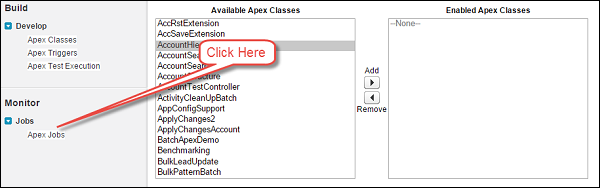
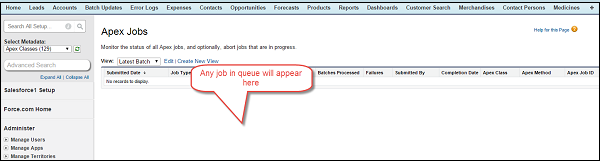
您可以按照以下步骤监控该类:
要监控或停止批处理 Apex 批处理作业的执行,请转到“设置”→“监控”→“Apex 作业”或“作业”→“Apex 作业”。
Database.Batchable 接口具有以下三个需要实现的方法:
- 开始
- 执行
- 完成
现在让我们详细了解每个方法。
开始
Start 方法是 Database.Batchable 接口的三个方法之一。
语法
global void execute(Database.BatchableContext BC, list<sobject<) {}
此方法将在批处理作业开始时调用,并收集批处理作业将要操作的数据。
请考虑以下几点以了解该方法:
当您使用简单查询生成批处理作业中使用的对象的范围时,请使用 **Database.QueryLocator** 对象。在这种情况下,将绕过 SOQL 数据行限制。
当您有复杂的条件来处理记录时,请使用可迭代对象。Database.QueryLocator 确定应处理的记录范围。
执行
现在让我们了解 Database.Batchable 接口的 Execute 方法。
语法
global void execute(Database.BatchableContext BC, list<sobject<) {}
其中,list<sObject< 由 Database.QueryLocator 方法返回。
此方法在 Start 方法之后调用,并执行批处理作业所需的所有处理。
完成
现在我们将讨论 Database.Batchable 接口的 Finish 方法。
语法
global void finish(Database.BatchableContext BC) {}
此方法在结束时调用,您可以执行一些完成活动,例如发送一封包含有关批处理作业处理的记录和状态的信息的电子邮件。
批处理 Apex 示例
让我们考虑我们现有的化工公司的一个示例,并假设我们需要更新已标记为活动且创建日期为今天的客户记录的“客户状态”和“客户描述”字段。这应该每天执行一次,并且应向用户发送一封关于批处理状态的电子邮件。将“客户状态”更新为“已处理”,将“客户描述”更新为“通过批处理作业更新”。
// Batch Job for Processing the Records
global class CustomerProessingBatch implements Database.Batchable<sobject> {
   global String [] email = new String[] {'test@test.com'};
   // Add here your email address here

   // Start Method
   global Database.Querylocator start (Database.BatchableContext BC) {
      return Database.getQueryLocator('Select id, Name, APEX_Customer_Status__c,
      APEX_Customer_Decscription__c From APEX_Customer__c WHERE createdDate = today
      AND APEX_Active__c = true');
      // Query which will be determine the scope of Records fetching the same
   }

   // Execute method
   global void execute (Database.BatchableContext BC, List<sobject> scope) {
      List<apex_customer__c> customerList = new List<apex_customer__c>();
      List<apex_customer__c> updtaedCustomerList = new List<apex_customer__c>();

      // List to hold updated customer
      for (sObject objScope: scope) {
         APEX_Customer__c newObjScope = (APEX_Customer__c)objScope ;

         // type casting from generic sOject to APEX_Customer__c
         newObjScope.APEX_Customer_Decscription__c = 'Updated Via Batch Job';
         newObjScope.APEX_Customer_Status__c = 'Processed';
         updtaedCustomerList.add(newObjScope); // Add records to the List
         System.debug('Value of UpdatedCustomerList '+updtaedCustomerList);
      }

      if (updtaedCustomerList != null && updtaedCustomerList.size()>0) {
         // Check if List is empty or not
         Database.update(updtaedCustomerList); System.debug('List Size '
          + updtaedCustomerList.size());
         // Update the Records
      }
   }

   // Finish Method
   global void finish(Database.BatchableContext BC) {
      Messaging.SingleEmailMessage mail = new Messaging.SingleEmailMessage();

      // Below code will fetch the job Id
      AsyncApexJob a = [Select a.TotalJobItems, a.Status, a.NumberOfErrors,
      a.JobType, a.JobItemsProcessed, a.ExtendedStatus, a.CreatedById,
      a.CompletedDate From AsyncApexJob a WHERE id = :BC.getJobId()];

      // get the job Id
      System.debug('$$$ Jobid is'+BC.getJobId());

      // below code will send an email to User about the status
      mail.setToAddresses(email);
      mail.setReplyTo('test@test.com'); // Add here your email address
      mail.setSenderDisplayName('Apex Batch Processing Module');
      mail.setSubject('Batch Processing '+a.Status);
      mail.setPlainTextBody('The Batch Apex job processed'
         + a.TotalJobItems+'batches with '+a.NumberOfErrors+'failures'+'Job Item
      processed are'+a.JobItemsProcessed);
      Messaging.sendEmail(new Messaging.Singleemailmessage [] {mail});
   }
}
要执行此代码,请先保存它,然后将以下代码粘贴到“执行匿名”中。这将创建类的对象,并且 Database.execute 方法将执行批处理作业。作业完成后,将向指定的电子邮件地址发送一封电子邮件。确保您有一个客户记录,其“活动”已选中。
// Paste in Developer Console
CustomerProessingBatch objClass = new CustomerProessingBatch();
Database.executeBatch (objClass);
执行此类后,检查您提供的电子邮件地址,您将在其中收到包含信息的电子邮件。此外,您可以通过“监控”页面和上面提供的步骤来检查批处理作业的状态。
如果您检查调试日志,则可以找到指示已处理多少条记录的列表大小。
限制
我们一次只能有 5 个批处理作业正在处理。这是批处理 Apex 的限制之一。
使用 Apex 详细信息页面计划 Apex 批处理作业
您可以通过以下方式使用 Apex 详细信息页面计划 Apex 类:
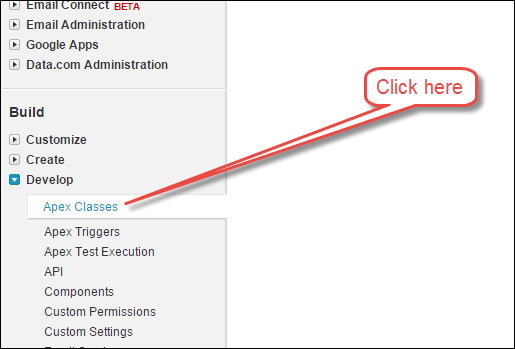
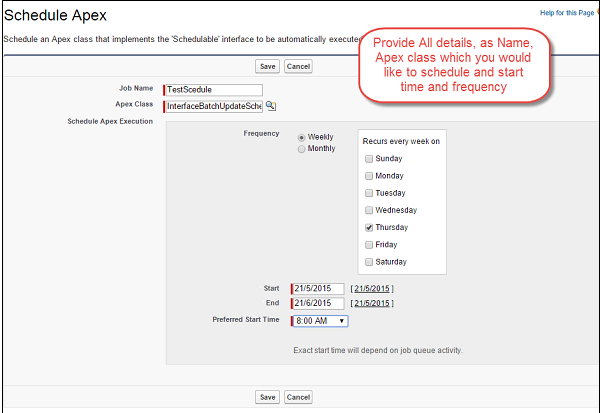
**步骤 1** - 转到“设置”⇒“Apex 类”,单击“Apex 类”。
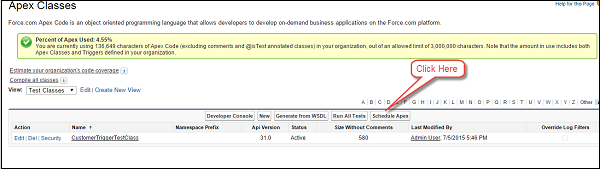
**步骤 2** - 单击“计划 Apex”按钮。
**步骤 3** - 提供详细信息。
使用 Schedulable 接口计划 Apex 批处理作业
您可以通过以下方式使用 Schedulable 接口计划 Apex 批处理作业:
// Batch Job for Processing the Records
global class CustomerProessingBatch implements Database.Batchable<sobject> {
   global String [] email = new String[] {'test@test.com'};
   // Add here your email address here

   // Start Method
   global Database.Querylocator start (Database.BatchableContext BC) {
      return Database.getQueryLocator('Select id, Name, APEX_Customer_Status__c,
      APEX_Customer_Decscription__c From APEX_Customer__c WHERE createdDate = today
      AND APEX_Active__c = true');
      // Query which will be determine the scope of Records fetching the same
   }

   // Execute method
   global void execute (Database.BatchableContext BC, List<sobject> scope) {
      List<apex_customer__c> customerList = new List<apex_customer__c>();
      List<apex_customer__c> updtaedCustomerList = new
      List<apex_customer__c>();//List to hold updated customer

      for (sObject objScope: scope) {
         APEX_Customer__c newObjScope = (APEX_Customer__c)objScope ;//type
         casting from generic sOject to APEX_Customer__c
         newObjScope.APEX_Customer_Decscription__c = 'Updated Via Batch Job';
         newObjScope.APEX_Customer_Status__c = 'Processed';
         updtaedCustomerList.add(newObjScope);//Add records to the List
         System.debug('Value of UpdatedCustomerList '+updtaedCustomerList);
      }

      if (updtaedCustomerList != null && updtaedCustomerList.size()>0) {
         // Check if List is empty or not
         Database.update(updtaedCustomerList); System.debug('List Size'
            + updtaedCustomerList.size());
         // Update the Records
      }
   }

   // Finish Method
   global void finish(Database.BatchableContext BC) {
      Messaging.SingleEmailMessage mail = new Messaging.SingleEmailMessage();

      // Below code will fetch the job Id
      AsyncApexJob a = [Select a.TotalJobItems, a.Status, a.NumberOfErrors,
      a.JobType, a.JobItemsProcessed, a.ExtendedStatus, a.CreatedById,
      a.CompletedDate From AsyncApexJob a WHERE id = :BC.getJobId()];//get the job Id
      System.debug('$$$ Jobid is'+BC.getJobId());

      // below code will send an email to User about the status
      mail.setToAddresses(email);
      mail.setReplyTo('test@test.com');//Add here your email address
      mail.setSenderDisplayName('Apex Batch Processing Module');
      mail.setSubject('Batch Processing '+a.Status);
      mail.setPlainTextBody('The Batch Apex job processed'
         + a.TotalJobItems+'batches with '+a.NumberOfErrors+'failures'+'Job Item
      processed are'+a.JobItemsProcessed);
      Messaging.sendEmail(new Messaging.Singleemailmessage [] {mail});
   }

   // Scheduler Method to scedule the class
   global void execute(SchedulableContext sc) {
      CustomerProessingBatch conInstance = new CustomerProessingBatch();
      database.executebatch(conInstance,100);
   }
}

// Paste in Developer Console
CustomerProessingBatch objClass = new CustomerProcessingBatch();
Database.executeBatch (objClass);