
- Apex 编程教程
- Apex - 首页
- Apex - 概述
- Apex - 环境
- Apex - 示例
- Apex - 数据类型
- Apex - 变量
- Apex - 字符串
- Apex - 数组
- Apex - 常量
- Apex - 决策制定
- Apex - 循环
- Apex - 集合
- Apex - 类
- Apex - 方法
- Apex - 对象
- Apex - 接口
- Apex - DML
- Apex - 数据库方法
- Apex - SOSL
- Apex - SOQL
- Apex - 安全性
- Apex - 调用
- Apex - 触发器
- Apex - 触发器设计模式
- Apex - 限制
- Apex - 批处理
- Apex - 调试
- Apex - 测试
- Apex - 部署
- Apex 有用资源
- Apex - 快速指南
- Apex - 资源
- Apex - 讨论
Apex - 测试
测试是 Apex 或任何其他应用程序开发的集成部分。在 Apex 中,我们有单独的测试类来开发所有单元测试。
测试类
在 SFDC 中,代码必须具有 75% 的代码覆盖率才能部署到生产环境。此代码覆盖率由测试类执行。测试类是测试其他 Apex 类功能的代码片段。
让我们为我们之前编写的代码之一编写一个测试类。我们将编写测试类来覆盖我们的触发器和辅助类代码。以下是需要覆盖的触发器和辅助类。
// Trigger with Helper Class
trigger Customer_After_Insert on APEX_Customer__c (after update) {
   CustomerTriggerHelper.createInvoiceRecords(Trigger.new, trigger.oldMap);
      //Trigger calls the helper class and does not have any code in Trigger
}

// Helper Class:
public class CustomerTriggerHelper {
   public static void createInvoiceRecords (List<apex_customer__c>

      customerList, Map<id, apex_customer__c> oldMapCustomer) {
      List<apex_invoice__c> InvoiceList = new List<apex_invoice__c>();

      for (APEX_Customer__c objCustomer: customerList) {
         if (objCustomer.APEX_Customer_Status__c == 'Active' &&
            oldMapCustomer.get(objCustomer.id).APEX_Customer_Status__c == 'Inactive') {

            // condition to check the old value and new value
            APEX_Invoice__c objInvoice = new APEX_Invoice__c();
            objInvoice.APEX_Status__c = 'Pending';
            objInvoice.APEX_Customer__c = objCustomer.id;
            InvoiceList.add(objInvoice);
         }
      }
      insert InvoiceList;  // DML to insert the Invoice List in SFDC
   }
}
创建测试类
在本节中,我们将了解如何创建测试类。
数据创建
我们需要在测试类本身中为测试类创建数据。测试类默认情况下无法访问组织数据,但如果您设置 @isTest(seeAllData = true),则它也将能够访问组织的数据。
@isTest 注解
通过使用此注解,您声明这是一个测试类,并且它不会计入组织的代码总限制。
testMethod 关键字
单元测试方法是不带参数、不向数据库提交数据、不发送电子邮件并在方法定义中使用 testMethod 关键字或 isTest 注解声明的方法。此外,测试方法必须在测试类中定义,即使用 isTest 注解的类。
我们在示例中使用了“myUnitTest”测试方法。
Test.startTest() 和 Test.stopTest()
这些是可用于测试类的标准测试方法。这些方法包含我们将模拟测试的事件或操作。例如,在本例中,我们将测试我们的触发器和辅助类以模拟通过更新记录来触发触发器,就像我们已完成的启动和停止块一样。这还为启动和停止块中的代码提供了单独的限制。
System.assert()
此方法检查所需的输出与实际输出。在本例中,我们期望插入一个发票记录,因此我们添加了断言来检查相同的内容。
示例
/**
* This class contains unit tests for validating the behavior of Apex classes
* and triggers.
*
* Unit tests are class methods that verify whether a particular piece
* of code is working properly. Unit test methods take no arguments,
* commit no data to the database, and are flagged with the testMethod
* keyword in the method definition.
*
* All test methods in an organization are executed whenever Apex code is deployed
* to a production organization to confirm correctness, ensure code
* coverage, and prevent regressions. All Apex classes are
* required to have at least 75% code coverage in order to be deployed
* to a production organization. In addition, all triggers must have some code coverage.
*
* The @isTest class annotation indicates this class only contains test
* methods. Classes defined with the @isTest annotation do not count against
* the organization size limit for all Apex scripts.
*
* See the Apex Language Reference for more information about Testing and Code Coverage.
*/

@isTest
private class CustomerTriggerTestClass {
   static testMethod void myUnitTest() {
      //Create Data for Customer Objet
      APEX_Customer__c objCust = new APEX_Customer__c();
      objCust.Name = 'Test Customer';
      objCust.APEX_Customer_Status__c = 'Inactive';
      insert objCust;

      // Now, our trigger will fire on After update event so update the Records
      Test.startTest();    // Starts the scope of test
      objCust.APEX_Customer_Status__c = 'Active';
      update objCust;
      Test.stopTest();     // Ends the scope of test

      // Now check if it is giving desired results using system.assert
      // Statement.New invoice should be created
      List<apex_invoice__c> invList = [SELECT Id, APEX_Customer__c FROM
         APEX_Invoice__c WHERE APEX_Customer__c = :objCust.id];
      system.assertEquals(1,invList.size());
      // Check if one record is created in Invoivce sObject
   }
}
运行测试类
按照以下步骤运行测试类:
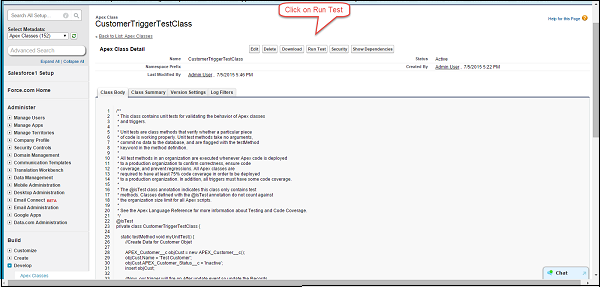
步骤 1 - 转到 Apex 类 ⇒ 点击类名“CustomerTriggerTestClass”。
步骤 2 - 点击“运行测试”按钮,如图所示。
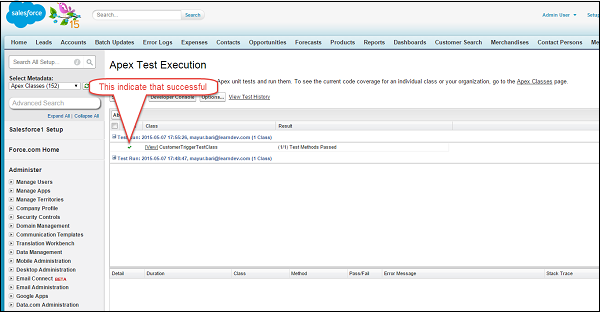
步骤 3 - 检查状态
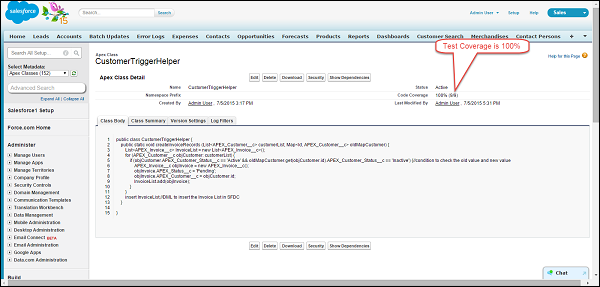
步骤 4 - 现在检查我们为其编写了测试的类和触发器
类
触发器
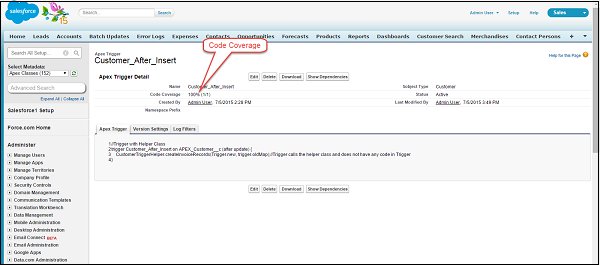
我们的测试已成功完成。