
 数据结构
数据结构 网络
网络 RDBMS
RDBMS 操作系统
操作系统 Java
Java MS Excel
 iOS
iOS HTML
HTML CSS
CSS Android
 Python
 C 编程
C 编程 C++
C++ C#
C# MongoDB
 MySQL
MySQL Javascript
 PHP
PHP 物理
物理 化学
化学 生物
生物 数学
数学 英语
英语 经济
经济 心理学
心理学 社会研究
社会研究 时尚研究
时尚研究 法律研究
法律研究使用 Matplotlib 显示水平条形图
在这个程序中,我们将使用 matplotlib 库绘制条形图。使用 matplotlib 库解决 matplotlib 相关问题的最重要步骤是导入 matplotlib 库。语法是
import matplotlib.pyplot as plt
Pyplot 是一个命令样式函数的集合,使 Matplotlib 像 MATLAB 一样工作。我们将使用函数 barh() 来绘制水平条形图
算法
Step 1: Define a list of values.
Step 2: Use the barh() function in the matplotlib.pyplot library and define different parameters like height width, etc.
Step 3: Label the axes using xlabel() and ylabel().
Step 3: Plot the graph using show().
示例代码
import matplotlib.pyplot as plt

data_x = ['Mumbai', 'Delhi', 'Ahmedabad', 'Banglore']
data_y = [40, 35, 29, 32]

plt.xlabel("CITY")
plt.ylabel("POPULATION")
plt.title("BAR PLOT")
plt.barh(data_x, data_y, color='red')
plt.show()
输出
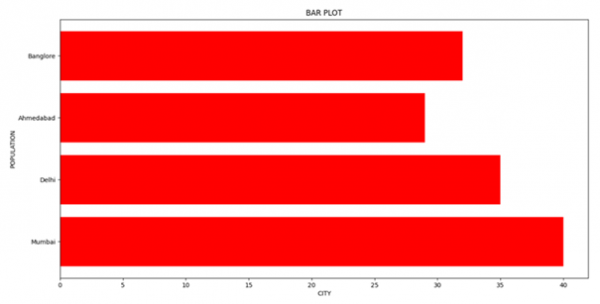

更新于: 16-3-2021
803 浏览

广告