
- DocumentDB SQL 教程
- DocumentDB SQL - 首页
- DocumentDB SQL - 概述
- DocumentDB SQL - SELECT 语句
- DocumentDB SQL - FROM 语句
- DocumentDB SQL - WHERE 语句
- DocumentDB SQL - 运算符
- DocumentDB - BETWEEN 关键字
- DocumentDB SQL - IN 关键字
- DocumentDB SQL - VALUE 关键字
- DocumentDB SQL - ORDER BY 语句
- DocumentDB SQL - 迭代
- DocumentDB SQL - 连接
- DocumentDB SQL - 别名
- DocumentDB SQL - 数组创建
- DocumentDB - 标量表达式
- DocumentDB SQL - 参数化
- DocumentDB SQL - 内置函数
- LINQ to SQL 转换
- JavaScript 集成
- 用户自定义函数
- 组合SQL查询
- DocumentDB SQL 有用资源
- DocumentDB SQL - 快速指南
- DocumentDB SQL - 有用资源
- DocumentDB SQL - 讨论
DocumentDB SQL - 组合SQL查询
组合查询使您可以组合来自现有查询的数据,然后应用筛选器、聚合等,然后再呈现报告结果,这些结果显示组合数据集。组合查询检索现有查询中多个级别的相关信息,并将组合数据呈现为单个扁平化的查询结果。
使用组合查询,您还可以选择:
选择SQL剪枝选项,根据用户的属性选择删除不需要的表和字段。
设置ORDER BY和GROUP BY子句。
将WHERE子句设置为组合查询结果集的过滤器。
上述运算符可以组合起来形成更强大的查询。由于DocumentDB支持嵌套集合,因此组合可以是串联的或嵌套的。
让我们考虑以下文档作为此示例。
AndersenFamily 文档如下所示。
{
   "id": "AndersenFamily",
   "lastName": "Andersen",

   "parents": [
      { "firstName": "Thomas", "relationship":  "father" },
      { "firstName": "Mary Kay", "relationship":  "mother" }
   ],

   "children": [
      {
         "firstName": "Henriette Thaulow",
         "gender": "female",
         "grade": 5,
         "pets": [ { "givenName": "Fluffy", "type":  "Rabbit" } ]
      }
   ],

   "location": { "state": "WA", "county": "King", "city": "Seattle" },
   "isRegistered": true
}
SmithFamily 文档如下所示。
{
   "id": "SmithFamily",

   "parents": [
      { "familyName": "Smith", "givenName": "James" },
      { "familyName": "Curtis", "givenName": "Helen" }
   ],

   "children": [
      {
         "givenName": "Michelle",
         "gender": "female",
         "grade": 1
      },

      {
         "givenName": "John",
         "gender": "male",
         "grade": 7,

         "pets": [
            { "givenName": "Tweetie", "type": "Bird" }
         ]
      }
   ],

   "location": {
      "state": "NY",
      "county": "Queens",
      "city": "Forest Hills"
   },

   "isRegistered": true
}
WakefieldFamily 文档如下所示。
{
   "id": "WakefieldFamily",

   "parents": [
      { "familyName": "Wakefield", "givenName": "Robin" },
      { "familyName": "Miller", "givenName": "Ben" }
   ],

   "children": [
      {
         "familyName": "Merriam",
         "givenName": "Jesse",
         "gender": "female",
         "grade": 6,

         "pets": [
            { "givenName": "Charlie Brown", "type": "Dog" },
            { "givenName": "Tiger", "type": "Cat" },
            { "givenName": "Princess", "type": "Cat" }
         ]
      },

      {
         "familyName": "Miller",
         "givenName": "Lisa",
         "gender": "female",
         "grade": 3,

         "pets": [
            { "givenName": "Jake", "type": "Snake" }
         ]
      }
   ],

   "location": { "state": "NY", "county": "Manhattan", "city": "NY" },
   "isRegistered": false
}
让我们来看一个串联查询的示例。
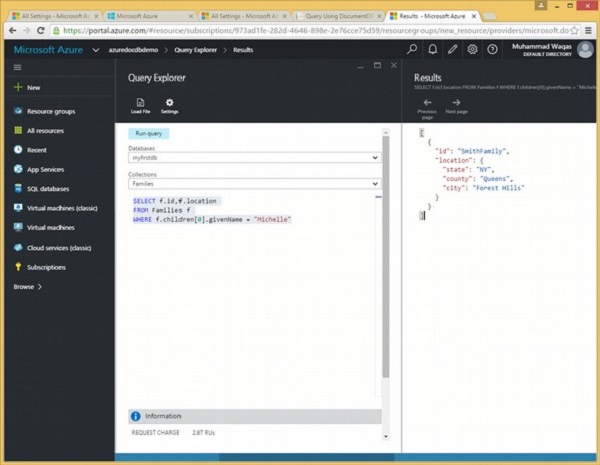
以下是将检索第一个孩子的givenName为Michelle的家庭的id和位置的查询。
SELECT f.id,f.location
FROM Families f
WHERE f.children[0].givenName = "Michelle"
执行上述查询时,将产生以下输出。
[
   {
      "id": "SmithFamily",
      "location": {
         "state": "NY",
         "county": "Queens",
         "city": "Forest Hills"
      }
   }
]
让我们考虑另一个串联查询的示例。
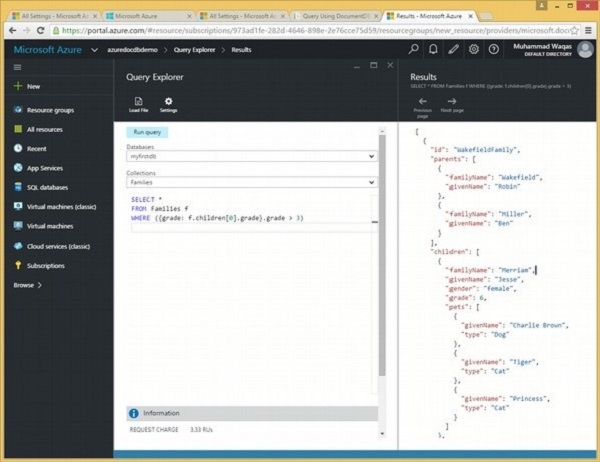
以下是将返回第一个孩子的年级大于3的所有文档的查询。
SELECT *
FROM Families f
WHERE ({grade: f.children[0].grade}.grade > 3)
执行上述查询时,将产生以下输出。
[
   {
      "id": "WakefieldFamily",
      "parents": [
         {
            "familyName": "Wakefield",
            "givenName": "Robin"
         },

         {
            "familyName": "Miller",
            "givenName": "Ben"
         }
      ],

      "children": [
         {
            "familyName": "Merriam",
            "givenName": "Jesse",
            "gender": "female",
            "grade": 6,

            "pets": [
               {
                  "givenName": "Charlie Brown",
                  "type": "Dog"
               },

               {
                  "givenName": "Tiger",
                  "type": "Cat"
               },

               {
                  "givenName": "Princess",
                  "type": "Cat"
               }
            ]
         },

         {
            "familyName": "Miller",
            "givenName": "Lisa",
            "gender": "female",
            "grade": 3,

            "pets": [
               {
                  "givenName": "Jake",
                  "type": "Snake"
               }
            ]
         }
      ],

      "location": {
         "state": "NY",
         "county": "Manhattan",
         "city": "NY"
      },

      "isRegistered": false,
      "_rid": "Ic8LAJFujgECAAAAAAAAAA==",
      "_ts": 1450541623,
      "_self": "dbs/Ic8LAA==/colls/Ic8LAJFujgE=/docs/Ic8LAJFujgECAAAAAAAAAA==/",
      "_etag": "\"00000500-0000-0000-0000-567582370000\"",
      "_attachments": "attachments/"
   },

   {
      "id": "AndersenFamily",
      "lastName": "Andersen",

      "parents": [
         {
            "firstName": "Thomas",
            "relationship": "father"
         },

         {
            "firstName": "Mary Kay",
            "relationship": "mother"
         }
      ],

      "children": [
         {
            "firstName": "Henriette Thaulow",
            "gender": "female",
            "grade": 5,

            "pets": [
               {
                  "givenName": "Fluffy",
                  "type": "Rabbit"
               }
            ]
         }
      ],

      "location": {
         "state": "WA",
         "county": "King",
         "city": "Seattle"
      },

      "isRegistered": true,
      "_rid": "Ic8LAJFujgEEAAAAAAAAAA==",
      "_ts": 1450541624,
      "_self": "dbs/Ic8LAA==/colls/Ic8LAJFujgE=/docs/Ic8LAJFujgEEAAAAAAAAAA==/",
      "_etag": "\"00000700-0000-0000-0000-567582380000\"",
      "_attachments": "attachments/"
   }
]
让我们来看一个示例嵌套查询。
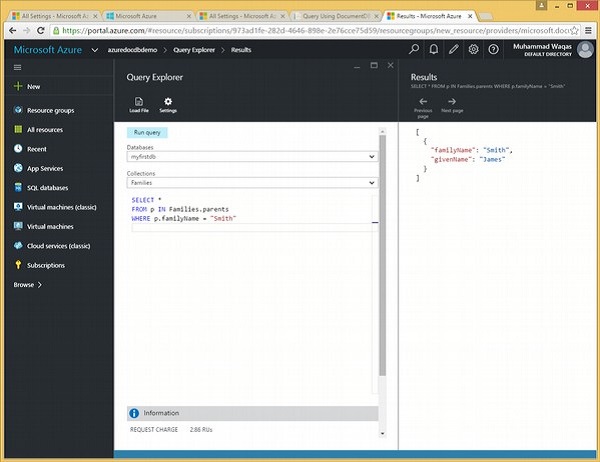
以下是将迭代所有父母,然后返回familyName为Smith的文档的查询。
SELECT *
FROM p IN Families.parents
WHERE p.familyName = "Smith"
执行上述查询时,将产生以下输出。
[
   {
      "familyName": "Smith",
      "givenName": "James"
   }
]
让我们考虑另一个示例嵌套查询。
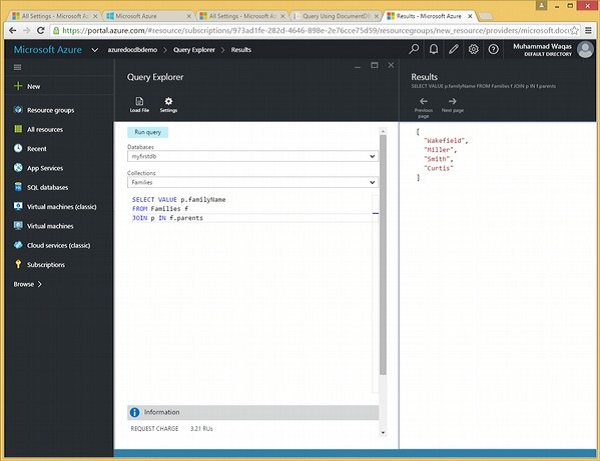
以下是将返回所有familyName的查询。
SELECT VALUE p.familyName
FROM Families f
JOIN p IN f.parents
执行上述查询时,将产生以下输出。
[
   "Wakefield",
   "Miller",
   "Smith",
   "Curtis"
]
广告