
- DocumentDB SQL 教程
- DocumentDB SQL - 首页
- DocumentDB SQL - 概述
- DocumentDB SQL - 选择子句
- DocumentDB SQL - FROM 子句
- DocumentDB SQL - WHERE 子句
- DocumentDB SQL - 运算符
- DocumentDB - BETWEEN 关键字
- DocumentDB SQL - IN 关键字
- DocumentDB SQL - VALUE 关键字
- DocumentDB SQL - ORDER BY 子句
- DocumentDB SQL - 迭代
- DocumentDB SQL - 连接
- DocumentDB SQL - 别名
- DocumentDB SQL - 数组创建
- DocumentDB - 标量表达式
- DocumentDB SQL - 参数化
- DocumentDB SQL - 内置函数
- LINQ to SQL 转换
- JavaScript 集成
- 用户自定义函数
- 复合 SQL 查询
- DocumentDB SQL 有用资源
- DocumentDB SQL - 快速指南
- DocumentDB SQL - 有用资源
- DocumentDB SQL - 讨论
DocumentDB SQL - 选择子句
Azure 门户提供了一个查询资源管理器,允许我们对 DocumentDB 数据库运行任何 SQL 查询。我们将使用查询资源管理器来演示查询语言的许多不同功能和特性,从最简单的查询开始。
步骤 1 - 打开 Azure 门户,在数据库边栏选项卡中,点击查询资源管理器边栏选项卡。
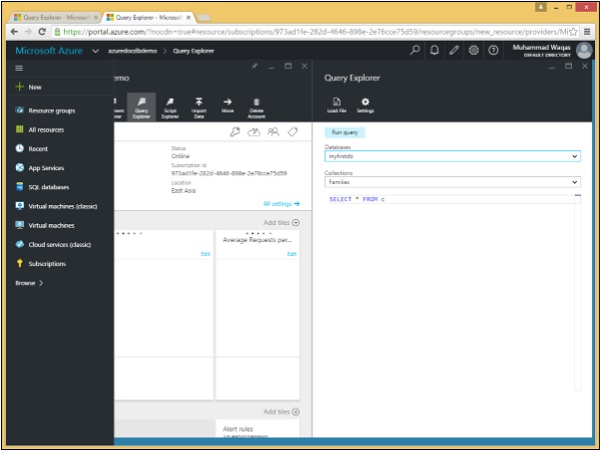
请记住,查询在集合的范围内运行,因此查询资源管理器允许我们在这个下拉列表中选择集合。我们将保持它设置为我们的 Families 集合,其中包含三个文档。让我们在这个例子中考虑这三个文档。
以下是 AndersenFamily 文档。
{
   "id": "AndersenFamily",
   "lastName": "Andersen",

   "parents": [
      { "firstName": "Thomas", "relationship":  "father" },
      { "firstName": "Mary Kay", "relationship":  "mother" }
   ],

   "children": [
      {
         "firstName": "Henriette Thaulow",
         "gender": "female",
         "grade": 5,
         "pets": [ { "givenName": "Fluffy", "type":  "Rabbit" } ]
      }
   ],

   "location": { "state": "WA", "county": "King", "city": "Seattle" },
   "isRegistered": true
}
以下是 SmithFamily 文档。
{
   "id": "SmithFamily",

   "parents": [
      { "familyName": "Smith", "givenName": "James" },
      { "familyName": "Curtis", "givenName": "Helen" }
   ],

   "children": [
      {
         "givenName": "Michelle",
         "gender": "female",
         "grade": 1
      },

      {
         "givenName": "John",
         "gender": "male",
         "grade": 7,

         "pets": [
            { "givenName": "Tweetie", "type": "Bird" }
         ]

      }
   ],

   "location": {
      "state": "NY",
      "county": "Queens",
      "city": "Forest Hills"
   },

   "isRegistered": true
}
以下是 WakefieldFamily 文档。
{
   "id": "WakefieldFamily",

   "parents": [
      { "familyName": "Wakefield", "givenName": "Robin" },
      { "familyName": "Miller", "givenName": "Ben" }
   ],

   "children": [
      {
         "familyName": "Merriam",
         "givenName": "Jesse",
         "gender": "female",
         "grade": 6,

         "pets": [
            { "givenName": "Charlie Brown", "type": "Dog" },
            { "givenName": "Tiger", "type": "Cat" },
            { "givenName": "Princess", "type": "Cat" }
         ]
      },

      {
         "familyName": "Miller",
         "givenName": "Lisa",
         "gender": "female",
         "grade": 3,

         "pets": [
            { "givenName": "Jake", "type": "Snake" }
         ]

      }
   ],

   "location": { "state": "NY", "county": "Manhattan", "city": "NY" },
   "isRegistered": false
}
查询资源管理器以这个简单的查询 `SELECT * FROM c` 打开,它简单地检索集合中的所有文档。虽然它很简单,但它仍然与关系数据库中的等效查询非常不同。
步骤 2 - 在关系数据库中,`SELECT *` 表示返回所有列,而在 DocumentDB 中,这意味着您希望结果中的每个文档都按照其在数据库中的存储方式返回。
但是,当您选择特定的属性和表达式而不是简单地发出 `SELECT *` 时,您就会投影一个新的形状,您希望结果中的每个文档都具有该形状。
步骤 3 - 点击“运行”以执行查询并打开结果边栏选项卡。
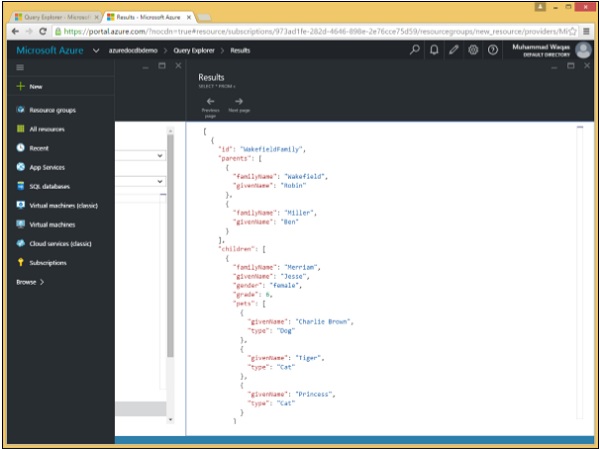
可以看到,WakefieldFamily、SmithFamily 和 AndersonFamily 都被检索到了。
以下是作为 `SELECT * FROM c` 查询的结果而检索到的三个文档。
[
   {
      "id": "WakefieldFamily",
      "parents": [
         {
            "familyName": "Wakefield",
            "givenName": "Robin"
         },

         {
            "familyName": "Miller",
            "givenName": "Ben"
         }
      ],

      "children": [
         {
            "familyName": "Merriam",
            "givenName": "Jesse",
            "gender": "female",
            "grade": 6,

            "pets": [
               {
                  "givenName": "Charlie Brown",
                  "type": "Dog"
               },

               {
                  "givenName": "Tiger",
                  "type": "Cat"
               },

               {
                  "givenName": "Princess",
                  "type": "Cat"
               }
            ]
         },

         {
            "familyName": "Miller",
            "givenName": "Lisa",
            "gender": "female",
            "grade": 3,

            "pets": [
               {
                  "givenName": "Jake",
                  "type": "Snake"
               }
            ]
         }
      ],

      "location": {
         "state": "NY",
         "county": "Manhattan",
         "city": "NY"
      },

      "isRegistered": false,
      "_rid": "Ic8LAJFujgECAAAAAAAAAA==",
      "_ts": 1450541623,
      "_self": "dbs/Ic8LAA==/colls/Ic8LAJFujgE=/docs/Ic8LAJFujgECAAAAAAAAAA==/",
      "_etag": "\"00000500-0000-0000-0000-567582370000\"",
      "_attachments": "attachments/"
   },

   {
      "id": "SmithFamily",
      "parents": [
         {
            "familyName": "Smith",
            "givenName": "James"
         },

         {
            "familyName": "Curtis",
            "givenName": "Helen"
         }
      ],

      "children": [
         {
            "givenName": "Michelle",
            "gender": "female",
            "grade": 1
         },

         {
            "givenName": "John",
            "gender": "male",
            "grade": 7,

            "pets": [
               {
                  "givenName": "Tweetie",
                  "type": "Bird"
               }
            ]
         }
      ],

      "location": {
         "state": "NY",
         "county": "Queens",
         "city": "Forest Hills"
      },

      "isRegistered": true,
      "_rid": "Ic8LAJFujgEDAAAAAAAAAA==",
      "_ts": 1450541623,
      "_self": "dbs/Ic8LAA==/colls/Ic8LAJFujgE=/docs/Ic8LAJFujgEDAAAAAAAAAA==/",
      "_etag": "\"00000600-0000-0000-0000-567582370000\"",
      "_attachments": "attachments/"
   },

   {
      "id": "AndersenFamily",
      "lastName": "Andersen",

      "parents": [
         {
            "firstName": "Thomas",
            "relationship": "father"
         },

         {
            "firstName": "Mary Kay",
            "relationship": "mother"
         }
      ],

      "children": [
         {
            "firstName": "Henriette Thaulow",
            "gender": "female",
            "grade": 5,

            "pets": [
               "givenName": "Fluffy",
               "type": "Rabbit"
            ]
         }
      ],

      "location": {
         "state": "WA",
         "county": "King",
         "city": "Seattle"
      },

      "isRegistered": true,
      "_rid": "Ic8LAJFujgEEAAAAAAAAAA==",
      "_ts": 1450541624,
      "_self": "dbs/Ic8LAA==/colls/Ic8LAJFujgE=/docs/Ic8LAJFujgEEAAAAAAAAAA==/",
      "_etag": "\"00000700-0000-0000-0000-567582380000\"",
      "_attachments": "attachments/"
   }
]
但是,这些结果还包括所有以下划线字符为前缀的系统生成的属性。
广告