
- DocumentDB SQL 教程
- DocumentDB SQL - 主页
- DocumentDB SQL - 概述
- DocumentDB SQL - Select 子句
- DocumentDB SQL - From 子句
- DocumentDB SQL - Where 子句
- DocumentDB SQL - 运算符
- DocumentDB - Between 关键字
- DocumentDB SQL - In 关键字
- DocumentDB SQL - 值关键字
- DocumentDB SQL - Order By 子句
- DocumentDB SQL - 迭代
- DocumentDB SQL - 联接
- DocumentDB SQL - 别名
- DocumentDB SQL - 数组创建
- DocumentDB - 标量表达式
- DocumentDB SQL - 参数化
- DocumentDB SQL - 内置函数
- Linq 转为 SQL 转换
- JavaScript 集成
- 用户定义函数
- 复合 SQL 查询
- DocumentDB SQL 有用资源
- DocumentDB SQL - 快速指南
- DocumentDB SQL - 有用资源
- DocumentDB SQL - 讨论
DocumentDB SQL - 值关键字
当你了解到自己只返回一个值时,VALUE 关键字就可以通过避免创建成熟对象而帮助生成瘦身结果集。 VALUE 关键字提供了一个返回 JSON 值的方法。
让我们看一个简单的例子。
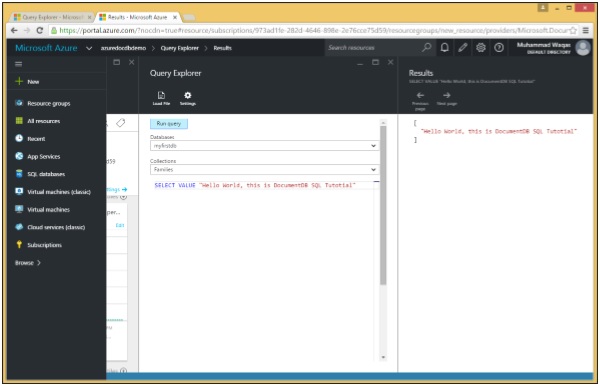
下面是具有 VALUE 关键字的查询。
SELECT VALUE "Hello World, this is DocumentDB SQL Tutorial"
当执行此查询时,它返回标量"Hello World, this is DocumentDB SQL Tutorial"。
[
   "Hello World, this is DocumentDB SQL Tutorial"
]
在另一个示例中,让我们考虑前一个示例中的三个文档。
以下是 AndersenFamily 文档。
{
   "id": "AndersenFamily",
   "lastName": "Andersen",

   "parents": [
      { "firstName": "Thomas", "relationship":  "father" },
      { "firstName": "Mary Kay", "relationship":  "mother" }
   ],

   "children": [
      {
         "firstName": "Henriette Thaulow",
         "gender": "female",
         "grade": 5,
         "pets": [ { "givenName": "Fluffy", "type":  "Rabbit" } ]
      }
   ],

   "location": { "state": "WA", "county": "King", "city": "Seattle" },
   "isRegistered": true
}
以下是 SmithFamily 文档。
{
   "id": "SmithFamily",

   "parents": [
      { "familyName": "Smith", "givenName": "James" },
      { "familyName": "Curtis", "givenName": "Helen" }
   ],

   "children": [
      {
         "givenName": "Michelle",
         "gender": "female",
         "grade": 1
      },

      {
         "givenName": "John",
         "gender": "male",
         "grade": 7,

         "pets": [
            { "givenName": "Tweetie", "type": "Bird" }
         ]
      }
   ],

   "location": {
      "state": "NY",
      "county": "Queens",
      "city": "Forest Hills"
   },

   "isRegistered": true
}
以下是 WakefieldFamily 文档。
{
   "id": "WakefieldFamily",

   "parents": [
      { "familyName": "Wakefield", "givenName": "Robin" },
      { "familyName": "Miller", "givenName": "Ben" }
   ],

   "children": [
      {
         "familyName": "Merriam",
         "givenName": "Jesse",
         "gender": "female",
         "grade": 6,

         "pets": [
            { "givenName": "Charlie Brown", "type": "Dog" },
            { "givenName": "Tiger", "type": "Cat" },
            { "givenName": "Princess", "type": "Cat" }
         ]
      },

      {
         "familyName": "Miller",
         "givenName": "Lisa",
         "gender": "female",
         "grade": 3,

         "pets": [
            { "givenName": "Jake", "type": "Snake" }
         ]
      }
   ],

   "location": { "state": "NY", "county": "Manhattan", "city": "NY" },
   "isRegistered": false
}
以下是查询。
SELECT VALUE f.location
FROM Families f
当执行此查询时,它会返回没有位置标签的地址。
[
   {
      "state": "NY",
      "county": "Manhattan",
      "city": "NY"
   },

   {
      "state": "NY",
      "county": "Queens",
      "city": "Forest Hills"
   },

   {
      "state": "WA",
      "county": "King",
      "city": "Seattle"
   }
]
如果我们现在不使用 VALUE Keyword 指定相同的查询,则它将返回带有位置标签的地址。以下是查询。
SELECT f.location
FROM Families f
当执行此查询时,它会生成以下输出。
[
   {
      "location": {
         "state": "NY",
         "county": "Manhattan",
         "city": "NY"
      }
   },

   {
      "location": {
         "state": "NY",
         "county": "Queens",
         "city": "Forest Hills"
      }
   },

   {
      "location": {
         "state": "WA",
         "county": "King",
         "city": "Seattle"
      }
   }
]
广告