
 数据结构
数据结构 网络
网络 关系型数据库管理系统
 操作系统
操作系统 Java
Java MS Excel
 iOS
iOS HTML
HTML CSS
CSS Android
 Python
 C 编程
C 编程 C++
C++ C#
C# MongoDB
 MySQL
MySQL Javascript
 PHP
PHP 物理学
物理学 化学
化学 生物学
生物学 数学
数学 英语
英语 经济学
经济学 心理学
心理学 社会学
社会学 时尚研究
时尚研究 法律研究
法律研究JavaFX 中设置 ChoiceBox 动作监听器(行为)的示例
选择框包含少量多个选项,并且只允许选择其中一个。它将具有两种状态:显示和不显示。显示时,您可以在选择框中看到选项列表;不显示时,它将显示当前的选择。默认情况下,选择框中未选择任何选项。
在 JavaFX 中,选择框由类 javafx.scene.control.ChoiceBox<T> 表示。您可以通过实例化此类来创建选择框。
此类的 selectionModel 属性保存当前选择框的选择模型,您可以使用 getSelectionModel() 方法获取其值(始终为 SingleSelectionModel)。
SelectionModel 类有两个属性,分别是 selectedIndex 和 selectedItem,分别指定选定的索引和选定的项目。要执行在选择项目时执行的操作,您可以通过使用 addListener() 方法向这两个属性中的任何一个添加操作监听器来实现,如下所示:
getSelectionModel().selectedIndexProperty().addListener()
or,
getSelectionModel().selectedItemProperty().addListener()
示例
import javafx.application.Application;
import javafx.beans.value.ObservableValue;
import javafx.collections.ObservableList;
import javafx.scene.Group;
import javafx.scene.Scene;
import javafx.scene.control.ChoiceBox;
import javafx.scene.control.Label;
import javafx.scene.paint.Color;
import javafx.scene.text.Font;
import javafx.scene.text.FontPosture;
import javafx.scene.text.FontWeight;
import javafx.scene.text.Text;
import javafx.stage.Stage;
public class ChoiceBoxAction extends Application {
   public void start(Stage stage) {
      //Creating a choice box
      ChoiceBox<String> choiceBox = new ChoiceBox<String>();
      //Retrieving the observable list
      ObservableList<String> list = choiceBox.getItems();
      //Adding items to the list
      list.add("English");
      list.add("Hindi");
      list.add("Telugu");
      //Setting the position of the choice box
      choiceBox.setTranslateX(200);
      choiceBox.setTranslateY(15);
      //Setting the label
      Label label = new Label("Select Display Language:");
      Font font = Font.font("verdana", FontWeight.BOLD, FontPosture.REGULAR, 12);
      label.setFont(font);
      label.setTranslateX(20);
      label.setTranslateY(20);
      //Setting the text for message
      Text text = new Text(25.0, 130.0, "");
      text.setFont(Font.font("Britannic Bold", 33));
      text.setFill(Color.BROWN);
      String language[] = new String[]{
         "Welcome to Tutorilaspoint",
         "टुटोरियल्स पॉइन्ट को आप का स्वागत है",
         "ట్యూ టోరియల్స్ పాయింట్ కి స్వా గతిం"
      };
      //Adding action to the choice box
      choiceBox.getSelectionModel().selectedIndexProperty().addListener(
         (ObservableValue<? extends Number> ov, Number old_val, Number new_val) -> {
            text.setText(language[new_val.intValue()]);
      });
      //Adding the choice box to the group
      Group root = new Group(choiceBox, label, text);
      //Setting the stage
      Scene scene = new Scene(root, 595, 170, Color.BEIGE);
      stage.setTitle("Choice Box Example");
      stage.setScene(scene);
      stage.show();
   }
   public static void main(String args[]){
      launch(args);
   }
}
输出
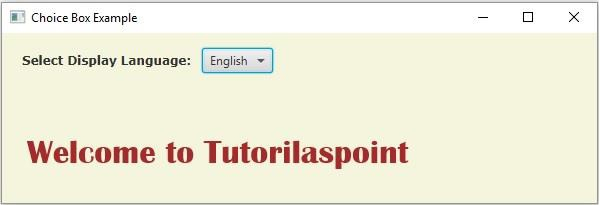
选择英语时 -
选择印地语时 -

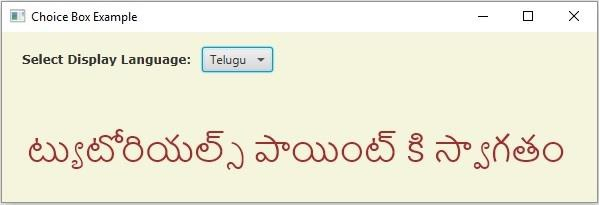
选择泰卢固语时 -

更新于: 2020年5月18日
1K+ 次查看

广告