
 数据结构
数据结构 网络
网络 关系数据库管理系统 (RDBMS)
 操作系统
操作系统 Java
Java MS Excel
 iOS
iOS HTML
HTML CSS
CSS Android
 Python
 C 编程
C 编程 C++
C++ C#
C# MongoDB
 MySQL
MySQL Javascript
 PHP
PHP 物理学
物理学 化学
化学 生物学
生物学 数学
数学 英语
英语 经济学
经济学 心理学
心理学 社会学
社会学 服装设计
服装设计 法学
法学Firebase 与 Web 集成
Firebase 由 Google 于 2014 年启动,为用户提供后端服务。它提供各种高质量的服务,可用于开发移动和 Web 应用程序。例如,它提供实时数据库、用户身份验证、云存储等。此外,它还提供分析功能来分析应用程序的流量。由于其快速设置,它非常受欢迎。
在本教程中,我们将学习如何将 Firebase 身份验证集成到单页 Web 应用程序中。
用户应按照以下步骤设置 Firebase 帐户并将其与单页 Web 应用程序集成。
步骤 1 − 首先,访问 Firebase 网站并创建一个帐户。
步骤 2 − 现在,访问 https://console.firebase.google.com/u/0/ 打开 Firebase 控制台。
步骤 3 − 现在,单击“创建项目”按钮以开始创建新项目。
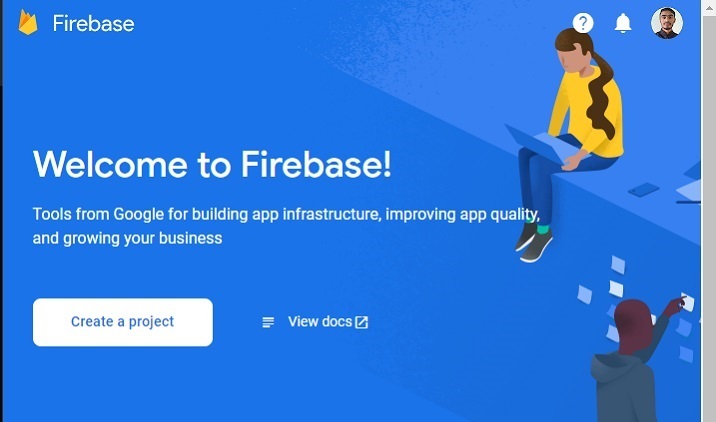
步骤 4 − 在这里,填写所需详细信息并单击“继续”按钮。我们在这里创建一个“测试”应用程序。

步骤 5 − 选择首选位置,接受条款和条件,然后单击“创建项目”按钮。之后,请等待它为您创建一个项目。

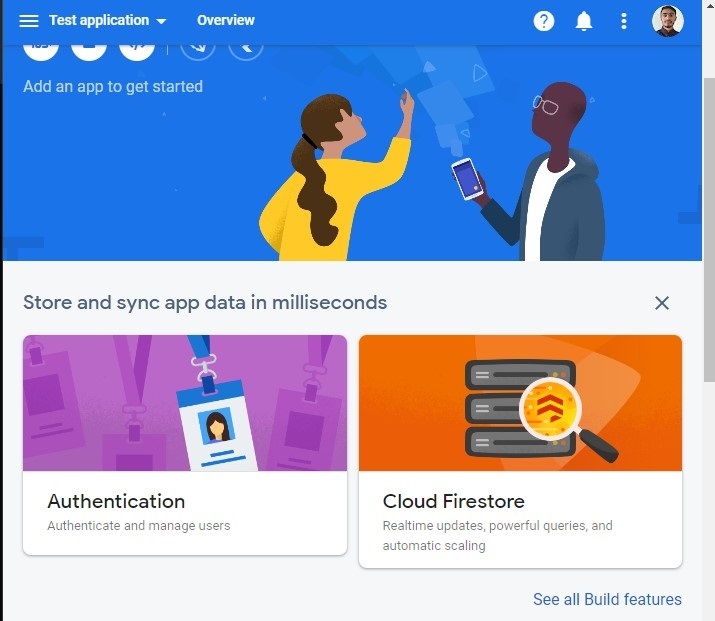
步骤 6 − 它会将您重定向到以下页面。在这里,单击“身份验证”卡片元素。之后,单击“开始使用”按钮。
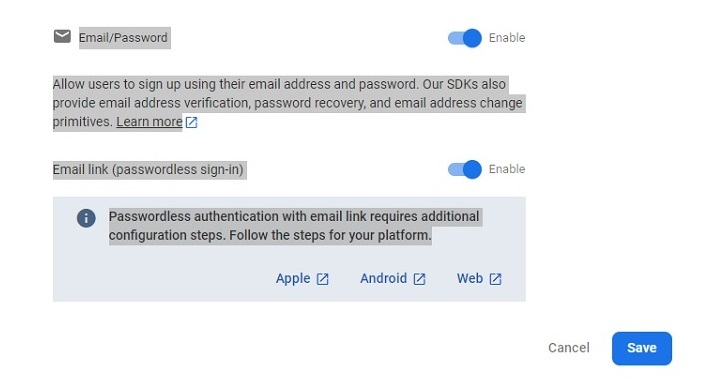
步骤 7 − 转到“登录方法”选项卡,然后单击“电子邮件/密码”字段。之后,启用“电子邮件/密码”方法,然后单击“保存”按钮。用户也可以从此处启用其他身份验证 Web 应用程序的方法。
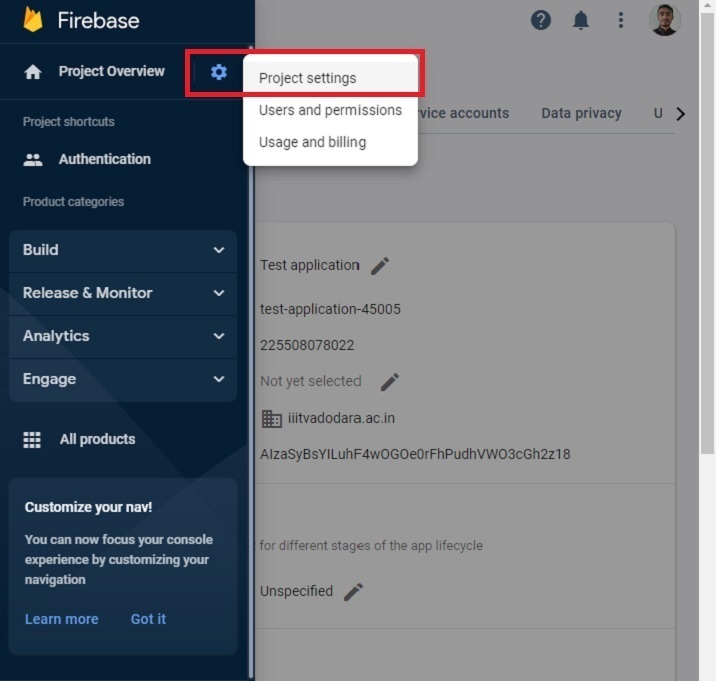
步骤 8 − 现在,单击“项目设置”,然后从中获取 API 和项目 ID。将其存储在某个位置。我们将在下面的示例中使用它。
创建单页静态应用程序
现在,Firebase 项目的设置已完成。接下来,我们将创建一个单页静态应用程序。
步骤
步骤 1 − 通过任何一种方式将 Firebase 添加到您的项目中。在这里,我们使用 CDN 添加了它。开发人员还可以根据他们当前正在使用的项目使用 SDK。
步骤 2 − 现在,构建一个简单的 HTML 模板,其中包含电子邮件和密码输入。另外,添加注册、登录和注销按钮。
步骤 3 − 在 JavaScript 中,使用 API 密钥和项目 ID 初始化 Firebase 配置。
步骤 4 − 使用 onAuthStateChanged() 方法在身份验证状态更改时打印消息。
步骤 5 − 使用 Firebase 的 auth() 方法初始化身份验证。
步骤 6 − 现在,创建一个 addUsers() 函数以将用户添加到 Firebase。访问函数中的电子邮件和密码,并使用 createUserWithEmailAndPassword() 方法将用户添加到 Firebase。
步骤 7 − 现在,创建一个 logIn() 函数,并使用 signInWithEmailAndPassword() 方法使用电子邮件和密码登录应用程序。
步骤 8 − 同样,创建一个 logout() 函数,该函数使用 signOut() 方法结束当前会话。
示例
在下面的示例中,我们创建了一个带有两个输入字段的简单表单。每当用户单击 signUp 按钮时,它都会调用 addUsers() 函数,该函数将用户添加到 Firebase。如果用户输入弱密码或错误的电子邮件地址,Firebase 会返回错误。
此外,当用户单击登录按钮时,它会调用“login()”函数,允许用户登录应用程序。如果用户输入错误的密码或电子邮件,Firebase 会返回错误。当用户单击 signOut 按钮时,它会执行 signOut() 函数,结束当前会话。
注意 − 在这里,开发人员需要根据他们的项目更改 API 密钥、项目 ID 和项目域名。以下凭据仅用于测试目的。
<html>
<head>
   <script src = "https://www.gstatic.com/firebasejs/8.2.7/firebase-app.js">
   </script>
   <script src = "https://www.gstatic.com/firebasejs/8.2.7/firebase-auth.js">
   </script>
   <style>
      button {
         width: 100px;
         height: auto;
         padding: 5px 10px;
         background-color: aqua;
         border: 2px solid green;
         border-radius: 12px;
      }
   </style>
</head>
<body>
   <h2>
      Using the <i> Firebase auth </i> to add authentication in a single page static website.
   </h2>
   <div class = "container">
      <h2>Enter the email and password below.</h2>
      <input type = "email" placeholder = "abcd@gamil.com" id = "email" />
      <br /> <br />
      <input type = "password" placeholder = "Add password" id = "password" />
      <br /> <br />
      <button onclick = "addUsers()" id = "signUp">
         SignUp
      </button>
      <button onclick = "login()" id = "logIp">
         SignIn
      </button>
      <button onclick = "logout()" id = "logOut">
         SignOut
      </button>
      <br> <br>
      <div id = "output"> </div>
   </div>
   <script>
      let output = document.getElementById('output');
      // Your web app's Firebase configuration
      var initialConfig = {
         apiKey: "AIzaSyBsYILuhF4wOGOe0rFhPudhVWO3cGh2z18", // change API keu
         authDomain: "localhost", // change domain
         projectId: "test-application-45005", // change project Id
      };

      // Initialize Firebase
      firebase.initializeApp(initialConfig);
      const authenticate = firebase.auth();

      // Check if there are any active users
      firebase.auth().onAuthStateChanged((user) => {
         if (user) {
            var email = user.email;
            output.innerHTML = "Active user is " + email + "<br>";
         } else {
            output.innerHTML = "No active users" + "<br>";
         }
      });

      // add users
      function addUsers() {
         var email = document.getElementById("email").value;
         var password = document.getElementById("password").value;

         // adding users via the promise
         authenticate.createUserWithEmailAndPassword(
            email,
            password
         ).then((userCredential) => {
            output.innerHTML = "User added successfully and user id is " + userCredential.user.uid + "<br>";
         }).catch((e) => {
            output.innerHTML = "Some error occurred - " + e.message + "<br>";
         });
      }

      // login function
      function login() {
         var email = document.getElementById("email").value;
         var password = document.getElementById("password").value;
         authenticate.signInWithEmailAndPassword(
         email, password).then((userCredential) => {
            output.innerHTML = "User login successfully and user id is " + userCredential.user.uid + "<br>";
         }).catch((e) => {
            output.innerHTML = "Some error occurred - " + e.message + "<br>";
         });
      }

      // logout currently logged-in user
      function logout() {
         authenticate.signOut();
         output.innerHTML = "User logout successfully";
      }

   </script>
</body>
</html>
用户学习了如何将 Firebase 与 Web 应用程序集成。对于经验丰富的开发人员来说,将 Firebase 与任何 Web 应用程序集成几乎只需 15 分钟。此外,如果用户在登录应用程序时输入弱密码,它会返回错误,并且它管理开发人员无需担心的所有其他内容。
此外,开发人员可以将 Firebase 的数据库与任何 Web 或移动应用程序一起使用。

474 次查看
