
 数据结构
数据结构 网络
网络 关系型数据库管理系统 (RDBMS)
 操作系统
操作系统 Java
Java MS Excel
 iOS
iOS HTML
HTML CSS
CSS Android
 Python
 C 编程
C 编程 C++
C++ C#
C# MongoDB
 MySQL
MySQL Javascript
 PHP
PHP 物理
物理 化学
化学 生物
生物 数学
数学 英语
英语 经济学
经济学 心理学
心理学 社会学
社会学 服装设计
服装设计 法律研究
法律研究使用 Cypress 处理 Web 表格
可以使用 Cypress 处理 Web 表格。Web 表格可以分为两种类型:静态和动态。静态 Web 表格的行数和列数是固定的。而动态 Web 表格的行数和列数则不是固定的。
为了在表格中识别特定列的值,我们需要借助 CSS 选择器。表格结构的 HTML 由 <table> 标签、<tr> 标签和 <td> 标签组成。行由 <tr> 表示,列值由 <td> 表示。
借助 CSS 中的 nth-child 概念,我们可以识别特定列的所有值。例如,对于一个有两列的表格,为了获取第一列的所有值,CSS 应该为 tr td:nth-child(1)。下面显示了表格 HTML 结构示例:
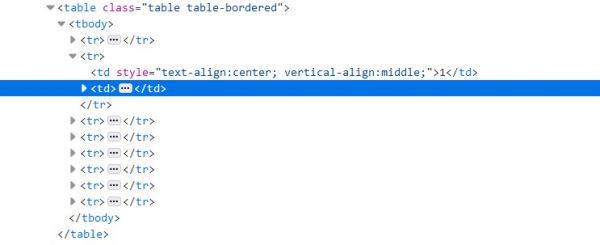
现在,要检索同一行下一列单元格中的值,我们必须移动到第二列。在 Cypress 中,我们有 next() 命令可以移动到 DOM 中紧跟其后的兄弟节点。next() 命令只有与 get() 命令一起使用时才有效。
语法
.next() , without arguments.
.next(selector/options), with argument.
next(selector, options), with arguments.
如下所示,可能有两种类型的选项可以修改 .next() 命令的默认行为:
log – log 的默认值为 true。
timeout – timeout 参数的默认值为 defaultCommandTimeout(4000 毫秒)。这是等待 .next() 完成的持续时间。
示例
处理 Web 表格的代码实现。
describe('Tutorialspoint Test', function () {
   // test case
   it('Test Case4', function (){
      cy.visit("https://tutorialspoint.com/plsql/plsql_dbms_output.htm");
      // identify the second column for all the rows
      cy.get('.table.table-bordered > tbody > tr > td:nth-child(1)').each(($el,
      index, $list) => {
         // grabbing all text from second column
         const txt = $el.text();
         // checking the matching condition
         if (txt.includes('1')){
            // capturing the next sibling with the help of next() method
            cy.get('.table.table-bordered > tbody > tr > td:nth-child(1)')
            .eq(index).next().then(function(desc){
               // capturing the text of next sibling
               const rsl = desc.text();
               //assertion to verify the text
               expect(rsl).to.contains('DBMS_OUTPUT.DISABLE');
            })
         }
      })
   });
});
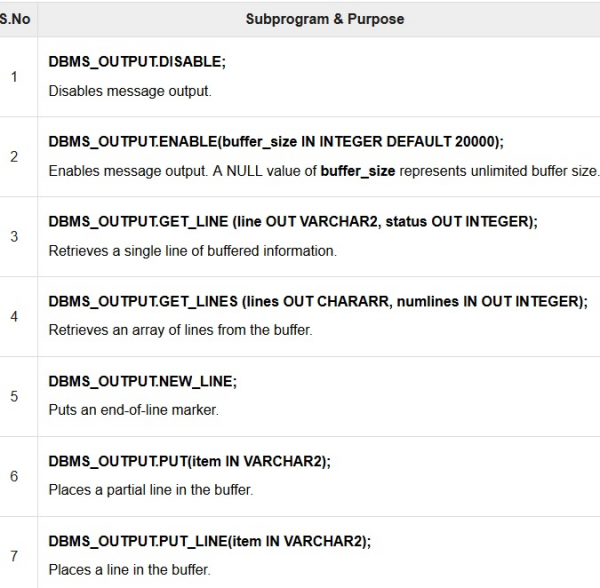
上面代码实现中使用的 Web 表格:

更新于:2020年8月5日
2K+ 次浏览

广告