
 数据结构
数据结构 网络
网络 关系数据库管理系统
 操作系统
操作系统 Java
Java MS Excel
 iOS
iOS HTML
HTML CSS
CSS Android
 Python
 C 编程
C 编程 C++
C++ C#
C# MongoDB
 MySQL
MySQL Javascript
 PHP
PHP 物理学
物理学 化学
化学 生物学
生物学 数学
数学 英语
英语 经济学
经济学 心理学
心理学 社会学
社会学 时尚研究
时尚研究 法律研究
法律研究如何使用 Python 中的 Matplotlib 创建三维等高线图?
Matplotlib 是一个流行的 Python 包,用于数据可视化。可视化数据是一个关键步骤,因为它有助于理解数据中正在发生的事情,而无需实际查看数字并执行复杂的计算。它有助于有效地将定量见解传达给受众。
Matplotlib 用于使用数据创建二维图。它带有一个面向对象的 API,有助于将绘图嵌入 Python 应用程序中。Matplotlib 可以与 IPython shell、Jupyter notebook、Spyder IDE 等一起使用。
它用 Python 编写。它是使用 NumPy 创建的,NumPy 是 Python 中的数值 Python 包。
可以使用以下命令在 Windows 上安装 Python:
pip install matplotlib
Matplotlib 的依赖项为:
Python ( greater than or equal to version 3.4)
NumPy
Setuptools
Pyparsing
Libpng
Pytz
Free type
Six
Cycler
Dateutil
创建三维图是为了查看数据点的 x-、y- 和 z- 轴。它也可用于了解梯度下降函数的工作原理,以及为算法找到系数的最佳值。
让我们了解如何使用 Matplotlib 创建三维等高线图:
示例
from mpl_toolkits import mplot3d
import numpy as np
import matplotlib.pyplot as plt
def fun(x, y):
return np.sin(np.sqrt(x ** 2 + y ** 2))

x = np.linspace(−5, 5, 30)
y = np.linspace(−5, 5, 30)

X, Y = np.meshgrid(x, y)
Z = fun (X, Y)

fig = plt.figure()
ax = plt.axes(projection='3d')
ax.contour3D(X, Y, Z, 50, cmap='binary')
ax.set_ylabel("Y−axis")
ax.set_xlabel("X−axis")
ax.set_zlabel("Z−axis")

ax.set_title('A sample 3D contour plot')
plt.show()
输出
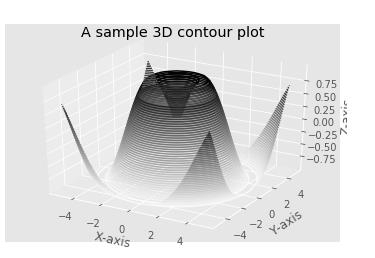
解释
导入所需的包并定义其别名以方便使用。
创建一个名为“fun”的函数,该函数使用两个变量使用“sin”函数生成数据。
使用 NumPy 库创建数据值。
使用“figure”函数创建一个空图形。
使用“axes”函数创建绘制图形的轴。
“contour3D”用于指定正在使用已创建的数据可视化 3 维等高线图。
使用 set_xlabel、set_ylabel、'z_label' 和 set_title 函数为 X 轴、Y 轴、Z 轴和标题提供标签。
使用“show”函数在控制台上显示。

更新于:2021 年 1 月 18 日
220 次查看

广告