
 数据结构
数据结构 网络
网络 关系数据库管理系统 (RDBMS)
 操作系统
操作系统 Java
Java MS Excel
 iOS
iOS HTML
HTML CSS
CSS Android
 Python
 C语言编程
C语言编程 C++
C++ C#
C# MongoDB
 MySQL
MySQL Javascript
 PHP
PHP 物理学
物理学 化学
化学 生物学
生物学 数学
数学 英语
英语 经济学
经济学 心理学
心理学 社会学
社会学 时尚研究
时尚研究 法学研究
法学研究如何更改Pygame图标?
在开发视频游戏时,我们经常尝试为开发的游戏设置图像或徽标。Python在pygame中提供了一个名为set_icon()的函数,可以根据需要设置图标。
Pygame是一组模块,允许我们开发游戏和多媒体应用程序。它构建在SDL(简单直接媒体层)库之上,该库可以通过OpenGL和Direct3D低访问音频键盘、鼠标、操纵杆和图形硬件。
语法
以下是为游戏设置图标的语法:
pygame_icon = pygame.image_load(“image_name”)
pygame.display.set_icon(pygame_icon)
其中:
pygame_icon是变量的名称。
pygame是库。
image_load是加载图像的函数。
image_name是我们上传的图像。
display.set_icon是设置所需图标的函数。
为了为开发的游戏设置图标,我们必须按照以下步骤操作。
首先,我们必须安装pygame库
pip install pygame
安装成功后,我们将得到以下输出:
Collecting pygame
  Downloading pygame-2.3.0-cp39-cp39-win_amd64.whl (10.6 MB)
     ---------------------------------------- 10.6/10.6 MB 4.5 MB/s eta 0:00:00
Installing collected packages: pygame
Successfully installed pygame-2.3.0
Note: you may need to restart the kernel to use updated packages.
现在,我们必须初始化pygame的图形用户界面 (GUI)。
pygame.init()
上述代码段的输出如下。
(5, 0)
接下来,我们必须通过指定宽度和高度来设置构建的GUI游戏的尺寸
size = pygame.display.set_mode([5,5])
print(size)
以下是设置GUI游戏尺寸的输出。
<Surface(5x5x32 SW)>
现在将我们想设置为图标的图像传递给image.load()函数。
img = pygame.image.load('image.png')
print(img)
以下是根据我们的要求上传图像的输出。
<Surface(5x5x32 SW)>
接下来,我们必须将上传的图像传递给display.set_icon()函数,然后在游戏运行时,图像将设置在左上角。
pygame.display.set_icon(img)
现在,我们必须将游戏的运行状态设置为True。
running = True
现在,我们已经设置了在游戏运行时想要执行的操作。
while running:
    for event in pygame.event.get():
        if event.type == pygame.QUIT:
            running = False
接下来,我们必须通过将RGB颜色传递给fill()函数来填充背景。
size.fill((150,150,0)
现在,我们必须更新我们所做的所有更改。
pygame.display.update()
最后,我们必须退出GUI游戏
pygame.quit()
完整示例
现在让我们一次性查看整个代码。
import pygame
pygame.init()
size = pygame.display.set_mode([200,200])
img = pygame.image.load('image.png')
pygame.display.set_icon(img)
running = True
while running:
    for event in pygame.event.get():
        if event.type == pygame.QUIT:
            running = False
    size.fill((200,200,0))
    pygame.draw.circle(size, (0, 0, 0), (100, 100), 100)
    pygame.display.update()
pygame.quit()
输出
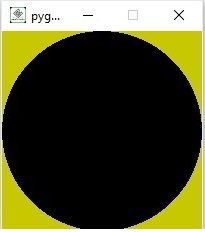
以下是我们在窗口左上角设置的图标的输出。在输出中,我们可以观察到左侧顶部的图标。
示例
让我们再看一个在GUI控制台中设置图标的示例。
import pygame
pygame.init()
size = pygame.display.set_mode([400,200])
img = pygame.image.load('download.jpg')
pygame.display.set_icon(img)
running = True
while running:
    for event in pygame.event.get():
        if event.type == pygame.QUIT:
            running = False
    size.fill((200,200,0))
    pygame.draw.circle(size, (0, 0, 0), (100, 120), 50)
    pygame.display.update()
pygame.quit()
输出
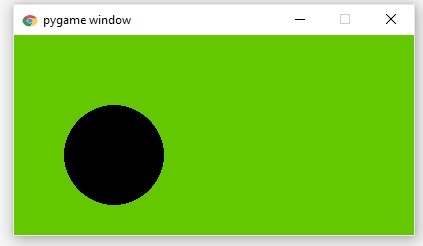
以下是放置在窗口左上角的图标的输出。
更新于:2023年8月9日
1K+ 次浏览

广告