
 数据结构
数据结构 网络
网络 RDBMS
RDBMS 操作系统
操作系统 Java
Java MS Excel
 iOS
iOS HTML
HTML CSS
CSS Android
 Python
 C 编程
C 编程 C++
C++ C#
C# MongoDB
 MySQL
MySQL Javascript
 PHP
PHP 物理学
物理学 化学
化学 生物学
生物学 数学
数学 英语
英语 经济学
经济学 心理学
心理学 社会学
社会学 时尚研究
时尚研究 法律研究
法律研究如何使用 C++ 来反转 OpenCV 中的二进制图像?
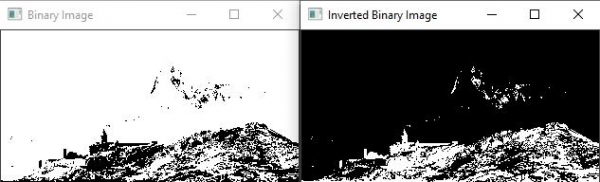
反转二进制图像意味着反转像素值。从视觉角度来看,当我们反转一张二进制图像时,白色像素会转换为黑色,黑色像素会转换为白色。
此函数的基本形式为 -
cvtColor(original_image, grayscale_image, COLOR_BGR2GRAY);
下一行将灰度图像转换为二进制图像,并将转换后的图像存储到“binary_image”矩阵中。
threshold(grayscale_image, binary_image, 100, 255, THRESH_BINARY);
此处'grayscale_image'是源矩阵,'binary_image'是目标矩阵。之后,有两个值 100 和 255。这两个值代表阈值范围。在此行中,阈值范围表示要转换的灰度像素值。
bitwise_not(source matrix, destination matrix);
bitwise_not() 函数反转源矩阵的像素值并将其存储在目标矩阵中。源矩阵是'binary_image',目标矩阵是'inverted_binary_image'。
以下程序执行二进制图像反转 -
示例
#include<iostream>
#include<opencv2/highgui/highgui.hpp>
#include<opencv2/imgproc/imgproc.hpp>
using namespace cv;
using namespace std;
int main(int argc, char** argv) {
   Mat original_image;//declaring a matrix to load the original image//
   Mat grayscale_image;//declaring a matrix to store converted image//
   Mat binary_image;//declaring a matrix to store the binary image
   Mat inverted_binary_image;//declaring a matrix to store inverted binary image
   namedWindow("Binary Image");//declaring window to show binary image//
   namedWindow("Inverted Binary Image");//declaring window to show inverted binary image//
    original_image = imread("mountain.jpg");//loading image into matrix//
   cvtColor(original_image, grayscale_image,COLOR_BGR2GRAY);//Converting BGR to Grayscale image and storing it into 'converted' matrix//
   threshold(grayscale_image, binary_image, 100, 255, THRESH_BINARY);//converting grayscale image stored in 'converted' matrix into binary image//
   bitwise_not(binary_image, inverted_binary_image);//inverting the binary image and storing it in inverted_binary_image matrix//
   imshow("Binary Image", binary_image);//showing binary image//
   imshow("Inverted Binary Image", inverted_binary_image);//showing inverted binary image//
   waitKey(0);
   return 0;
}
输出

更新于: 10-3 月 2021 年
4K+ 次浏览

广告