
 数据结构
数据结构 网络
网络 关系数据库管理系统 (RDBMS)
 操作系统
操作系统 Java
Java MS Excel
 iOS
iOS HTML
HTML CSS
CSS Android
 Python
 C 编程
C 编程 C++
C++ C#
C# MongoDB
 MySQL
MySQL Javascript
 PHP
PHP 物理学
物理学 化学
化学 生物学
生物学 数学
数学 英语
英语 经济学
经济学 心理学
心理学 社会学
社会学 服装学
服装学 法学
法学如何在 OpenCV 中使用 C++ 将图像分割成不同的通道?
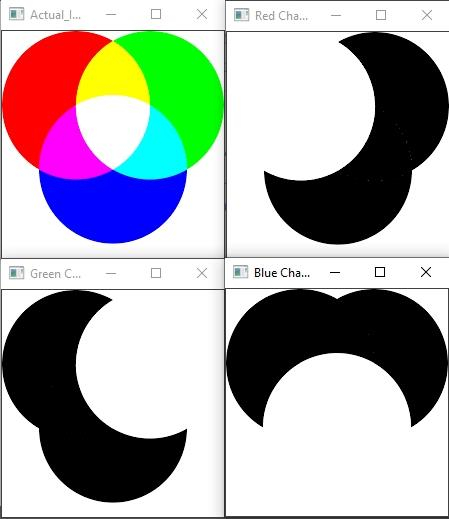
RGB图像有三个通道——红、绿、蓝。红色、绿色和蓝色通道表示图像的颜色空间称为 RGB 颜色空间。在 OpenCV 中,使用 BGR 序列而不是 RGB。这意味着第一个通道是蓝色,第二个通道是绿色,第三个通道是红色。要将 RGB 图像分割成不同的通道,我们需要定义一个 3 通道矩阵。我们使用 'Mat different_Channels[3]' 来定义一个三通道矩阵。
接下来,我们使用 OpenCV 的 'split()' 函数分割加载的图像。此函数的格式为 'split(源矩阵, 目标矩阵)'。 此函数将源矩阵的图像分割成图像的通道,并将它们保存到目标矩阵中。执行此行 – 'split(myImage, different_Channels);'
split 函数已将蓝色、绿色和红色通道加载到 'different_channels' 矩阵中。使用以下几行,我们将存储在不同通道中的图像加载到新的矩阵中。
Mat b = different_Channels[0];//loading blue channels//
Mat g = different_Channels[1];//loading green channels//
Mat r = different_Channels[2];//loading red channels//
最后,我们使用以下几行以不同的方式显示每个通道:
imshow("Blue Channel",b);//showing Blue channel//
imshow("Green Channel",g);//showing Green channel//
imshow("Red Channel",r);//showing Red channel//
这就是我们将图像分割成其通道的方式。
以下程序将 RGB 图像分割成蓝色、绿色和红色通道。
示例
#include<iostream>
#include<opencv2/highgui/highgui.hpp>
#include<opencv2/imgproc/imgproc.hpp>
using namespace cv;
using namespace std;
int main(int argc,const char** argv) {
   Mat myImage;//declaring a matrix to load the image//
   Mat different_Channels[3];//declaring a matrix with three channels//
   myImage= imread("RGB.png");//loading the image in myImage matrix//
   split(myImage, different_Channels);//splitting images into 3 different channels//
   Mat b = different_Channels[0];//loading blue channels//
   Mat g = different_Channels[1];//loading green channels//
   Mat r = different_Channels[2];//loading red channels//
   imshow("Blue Channel",b);//showing Blue channel//
   imshow("Green Channel",g);//showing Green channel//
   imshow("Red Channel",r);//showing Red channel//
   imshow("Actual_Image", myImage);//showing actual image//
   waitKey(0);//wait for key stroke
   destroyAllWindows();//closing all windows//
   return 0;
}
输出

更新于: 2021年3月10日
4K+ 次浏览

广告