
 数据结构
数据结构 网络
网络 关系数据库管理系统
 操作系统
操作系统 Java
Java MS Excel
 iOS
iOS HTML
HTML CSS
CSS Android
 Python
 C 编程
C 编程 C++
C++ C#
C# MongoDB
 MySQL
MySQL Javascript
 PHP
PHP 物理学
物理学 化学
化学 生物学
生物学 数学
数学 英语
英语 经济学
经济学 心理学
心理学 社会学
社会学 服装设计
服装设计 法律研究
法律研究如何在 MATLAB 中将数据写入 Excel 电子表格?
MATLAB 提供各种内置函数,使我们能够将表格、矩阵、元胞数组等形式的数据写入 Excel 文件。阅读本文以了解在 MATLAB 中将数据写入 Excel 电子表格的过程。
以下是一些使用 MATLAB 将数据写入 Excel 电子表格的常用方法:
使用“writetable”函数
使用“xlswrite”函数
使用“writematrix”函数
使用“writecell”函数
让我们借助示例详细讨论每种方法。
在 MATLAB 中使用“writetable”函数
在 MATLAB 中,“writetable”是一个内置函数,可用于将表格数据写入 Excel 电子表格。此函数是建议在较新版本的 MATLAB 中将数据写入 Excel 电子表格的方法。
以下是其**语法**:
writetable(data_table, excel_file_name);
这里,“data_table”是一个包含表格形式的实际数据的变量。
示例
让我们举一个例子来了解如何使用“writetable”函数将数据写入 Excel 电子表格。
% MATLAB code to write data to excel spreadsheet using writetable function
% Create some sample data
data = randn(4, 3);		% generating random matrix of data

% Create column headers
col_headers = {'Col1', 'Col2', 'Col3'};

% Convert the data to a data table format
data_table = array2table(data, 'VariableNames', col_headers);

% Specify a file name for excel spreadsheet
file_name = 'excel_file_1.xlsx';

% Write the data table to the Excel spreadsheet
writetable(data_table, file_name);

% Display a conformation message
disp('Data has been written to the excel spreadsheet successfully.');
输出
它将产生以下输出:
Data has been written to the excel spreadsheet successfully.

在 MATLAB 中使用“xlswrite”函数
在 MATLAB 中,我们还有另一个名为“xlswrite”的内置函数可用于将数据写入 Excel 电子表格。此函数是 MATLAB 中将数据写入 Excel 电子表格的旧方法。
此函数在“writetable”函数上有一些限制。因此,如果您使用的是较新版本的 MATLAB,建议使用“writetable”函数而不是“xlswrite”函数。
以下是其**语法**:
xlswrite(file_name, data, sheet_name);
示例
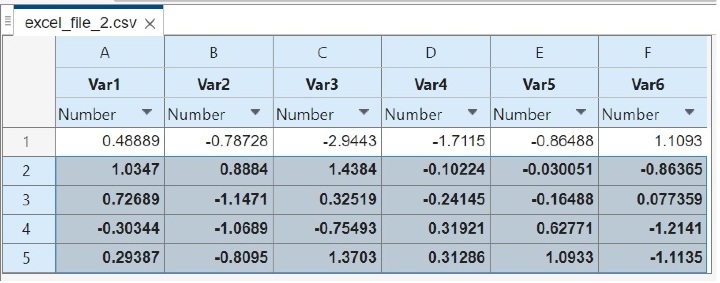
让我们看一个示例来了解如何使用“xlswrite”函数将数据写入电子表格。
% MATLAB code to write data to excel spreadsheet using "xlswrite" function
% Create sample data
data = randn(5, 6);  	% generating random data

% Specify the name of the Excel file
file_name = 'excel_file_2.xlsx';

% Specify the name for spreadsheet
sheet_name = 'Sample_Sheet';

% Write the data to the Excel spreadsheet
xlswrite(file_name, data, sheet_name);

% Show a conformation message
disp('Data has been written to the excel spreadsheet successfully.');
输出
它将产生以下输出:
Data has been written to the excel spreadsheet successfully.
在 MATLAB 中使用“writematrix”函数
在 MATLAB 中,“writematrix”函数用于将矩阵写入 Excel 电子表格。此函数也建议在较新版本的 MATLAB 中使用。
其**语法**如下:
writematrix(mat, file_name);
示例
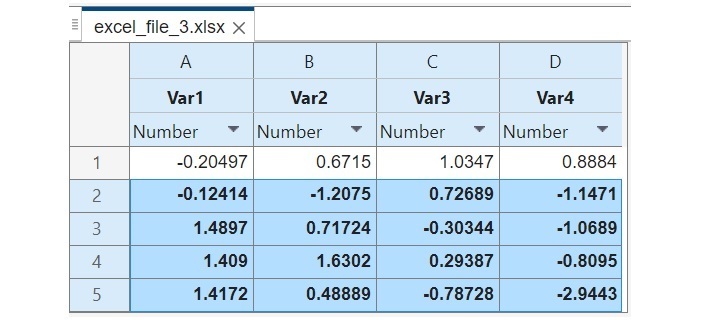
以下示例演示了如何使用“writematrix”函数将矩阵数据写入 Excel 电子表格。
% MATLAB code to write data to excel spreadsheet using "writematrix" function
% Create a sample matrix of data
mat = randn(5, 4);	% generating a random matrix

% Specify the file name for excel spreadsheet
file_name = 'excel_file_3.xlsx';

% Write the matrix data to the Excel spreadsheet
writematrix(mat, file_name);

% Show a conformation message
disp('Data has been written to the excel spreadsheet successfully.');
输出
它将产生以下输出:
Data has been written to the excel spreadsheet successfully.
在 MATLAB 中使用“writematrix”函数
在 MATLAB 中,“writecell”函数用于将元胞数组数据写入 Excel 电子表格。元胞数组包含不同数据类型的元素。“writecell”函数提供了一种有效处理不同类型数据的方法。
“writecell”函数在 MATLAB R2019a 和更高版本的 MATLAB 中可用。在旧版本的 MATLAB 中,我们必须使用“xlswrite”函数将元胞数组的数据写入 Excel 电子表格。
以下是其**语法**:
writecell(cell_array, file_name);
示例
让我们举一个例子来了解如何使用“writecell”函数将元胞数组写入 Excel 电子表格。
% MATLAB code to write data to excel spreadsheet using writecell function
% Create an example cell array
A = {'ID', 'Course', 'Fee'; 1001, 'MATLAB', 250; 1002, 'Python', 450; 1003, 'HTML', 350; 1004, 'JavaScript', 400;};

% Specify the file name for excel spreadsheet
file_name = 'excel_file_4.xlsx';

% Write the cell array to the Excel spreadsheet
writecell(A, file_name);

% Show a conformation message
disp('Data has been written to the excel spreadsheet successfully.');
输出
它将产生以下输出:
Data has been written to the excel spreadsheet successfully.

结论
总之,MATLAB 提供了多种将数据写入 Excel 电子表格的方法。在本教程中,我解释了所有常用方法,并使用 MATLAB 演示了将数据写入示例的方法。这些示例演示了如何使用不同的函数将不同类型的数据写入 MATLAB 中的 Excel 电子表格。

378 次查看
