
 数据结构
数据结构 网络
网络 RDBMS
RDBMS 操作系统
操作系统 Java
Java MS Excel
 iOS
iOS HTML
HTML CSS
CSS Android
 Python
 C 编程
C 编程 C++
C++ C#
C# MongoDB
 MySQL
MySQL Javascript
 PHP
PHP 物理
物理 化学
化学 生物
生物 数学
数学 英语
英语 经济
经济 心理
心理 社会学
社会学 时尚研究
时尚研究 法学研究
法学研究HTML DOM Input Time readOnly属性
HTML DOM Input Time readOnly 属性会设置/返回 Input Time 是否可修改。
语法
以下为语法 -
- 返回布尔值 - true/false
inputTimeObject.readOnly
- 设置 readOnly 为 booleanValue
inputTimeObject.readOnly = booleanValue
布尔值
此处,“booleanValue”可以是以下值 -
| booleanValue | 详细信息 |
|---|---|
| true | 定义 input time 字段为 readOnly。 |
| false | 定义 input time 字段不为 readOnly 且可修改。 |
示例
下面我们来看一个 Input Time readOnly 属性的示例 -
<!DOCTYPE html>
<html>
<head>
<title>Input Time readOnly</title>
<style>
   form {
      width:70%;
      margin: 0 auto;
      text-align: center;
   }
   * {
      padding: 2px;
      margin:5px;
   }
   input[type="button"] {
      border-radius: 10px;
   }
</style>
</head>
<body>
<form>
<fieldset>
<legend>Time-readOnly</legend>
<label for="TimeSelect">Appointment with Supervisor:</label>
<input type="time" id="TimeSelect" value="12:45" readOnly>
<input type="button" onclick="changeMeeting()" value="Edit Time">
<div id="divDisplay"></div>
</fieldset>
</form>
<script>
   var divDisplay = document.getElementById("divDisplay");
   var inputTime = document.getElementById("TimeSelect");
   function changeMeeting() {
      if(inputTime.readOnly === true)
         divDisplay.textContent = 'The meeting time cannot be altered';
      else
         divDisplay.textContent = 'The meeting time fixed at: '+inputTime.value;
   }
</script>
</body>
</html>
输出
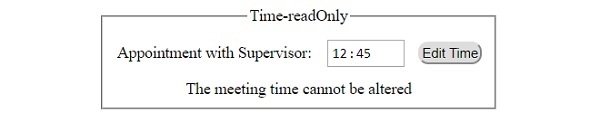
它将生成以下输出 -
点击 “编辑时间” 按钮之前 -

点击 “编辑时间” 按钮之后 -

更新于: 2019-07-30
71 次浏览

广告