
 数据结构
数据结构 网络
网络 RDBMS
RDBMS 操作系统
操作系统 Java
Java MS Excel
 iOS
iOS HTML
HTML CSS
CSS Android
 Python
 C 编程
C 编程 C++
C++ C#
C# MongoDB
 MySQL
MySQL Javascript
 PHP
PHP 物理
物理 化学
化学 生物
生物 数学
数学 英语
英语 经济
经济 心理学
心理学 社会学
社会学 时尚学
时尚学 法律
法律HTML DOM Location reload() 方法
HTML DOM Location reload() 方法用于重新渲染当前文档。它提供与浏览器中的“重新加载”按钮相同的功能。
语法
语法如下 −
location.reload(forceGetParameter)
参数
此处,“forceGetParameter” 可以是以下内容 −
| forceGetParameter | 详细信息 |
|---|---|
| true | 它定义从服务器重新加载当前文档。 |
| false | 它定义从浏览器缓存重新加载当前文档。 |
示例
让我们看一个 Location reload() 属性的示例 −
<!DOCTYPE html>
<html>
<head>
<title>Location reload()</title>
<style>
   form {
      width:70%;
      margin: 0 auto;
   text-align: center;
   }
   * {
      padding: 2px;
      margin:5px;
   }
   input[type="button"] {
      border-radius: 10px;
   }
</style>
</head>
<body>
<form>
<fieldset>
<legend>Location-reload( )</legend>
<label for="urlSelect">Email: </label>
<input type="email" id="emailSelect"><br>
<label for="urlSelect">Password: </label>
<input type="password" id="passSelect"><br>
<input type="button" onclick="doReload()" value="Reload">
<div id="divDisplay"></div>
</fieldset>
</form>
<script>
   var divDisplay = document.getElementById("divDisplay");
   var emailSelect = document.getElementById("emailSelect");
   var passSelect = document.getElementById("passSelect");
   divDisplay.textContent = 'Do not reload, all the details will be lost';
   function doReload(){
      alert('Page reloaded, all the details are lost');
      location.reload();
   }
</script>
</body>
</html>
输出
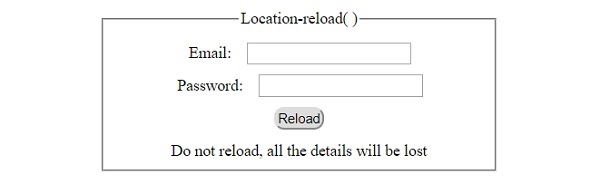
这将产生以下输出 −
单击 “重新加载” 按钮之前 −
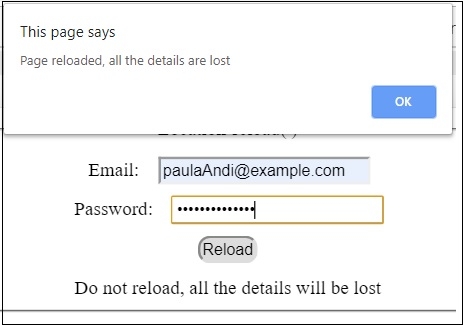
填写详细信息后单击 “重新加载” 按钮 −

更新于: 30-Jul-2019
222 次浏览

广告