
 数据结构
数据结构 网络
网络 RDBMS
RDBMS 操作系统
操作系统 Java
Java MS Excel
 iOS
iOS HTML
HTML CSS
CSS Android
 Python
 C 编程
C 编程 C++
C++ C#
C# MongoDB
 MySQL
MySQL Javascript
 PHP
PHP 物理
物理 化学
化学 生物
生物 数学
数学 英语
英语 经济学
经济学 心理学
心理学 社会研究
社会研究 时尚研究
时尚研究 法律研究
法律研究HTML DOM location replace() 方法
HTML DOM Location replace() 方法用于呈现一个新的文档,替换当前文档。它还从文档历史记录中移除当前文档 URL,禁用导航到旧文档的 “返回” 按钮。
语法
以下为语法 −
location.replace(URLString)
示例
下面是 Location replace() 属性的一个示例 −
<!DOCTYPE html>
<html>
<head>
<title>Location replace()</title>
<style>
   form {
      width:70%;
      margin: 0 auto;
   text-align: center;
   }
   * {
      padding: 2px;
      margin:5px;
   }
   input[type="button"] {
      border-radius: 10px;
   }
</style>
</head>
<body>
<form>
<fieldset>
<legend>Location-replace( )</legend>
<label for="urlSelect">Current URL: </label>
<input type="url" id="urlSelect" value="https://www.example.com"><br>
<label for="newUrlSelect">New URL: </label>
<input type="url" id="newUrlSelect" placeholder="Give new url..."><br>
<input type="button" onclick="doReplace()" value="Go to new URL">
<div id="divDisplay"></div>
</fieldset>
</form>
<script>
   var divDisplay = document.getElementById("divDisplay");
   var urlSelect = document.getElementById("urlSelect");
   var newUrlSelect = document.getElementById("newUrlSelect");
   function doReplace(){
      if(newUrlSelect.value === '')
         divDisplay.textContent = 'Provide new URL';
      else{
         location.replace(newUrlSelect.value);
         divDisplay.textContent = 'Redirecting to new URL';
      }
   }
</script>
</body>
</html>
输出
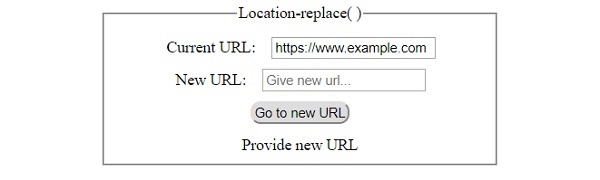
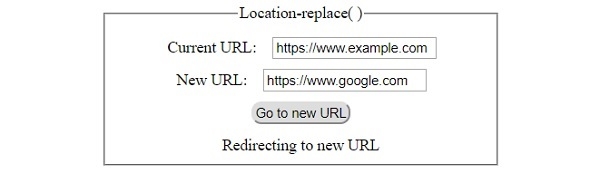
这将产生以下输出 −
单击没有输入的 “Go to new URL” 按钮后 −
填写详细信息后单击 ‘Go to new URL’ 按钮 −

更新时间:30-Jul-2019
167 次浏览

广告