
 数据结构
数据结构 网络
网络 关系型数据库管理系统
 操作系统
操作系统 Java
Java MS Excel
 iOS
iOS HTML
HTML CSS
CSS Android
 Python
 C语言编程
C语言编程 C++
C++ C#
C# MongoDB
 MySQL
MySQL Javascript
 PHP
PHP 物理学
物理学 化学
化学 生物学
生物学 数学
数学 英语
英语 经济学
经济学 心理学
心理学 社会学
社会学 时尚研究
时尚研究 法律研究
法律研究Java OpenCV示例:Canny边缘检测。
Canny边缘检测器被称为最优检测器,因为它仅检测存在的边缘,每个边缘只产生一个响应,并将边缘像素与检测到的像素之间的距离最小化。
Imgproc类的**Canny()**方法对给定图像应用Canny边缘检测算法。此方法接受:
两个Mat对象,分别表示源图像和目标图像。
两个double变量,用于保存阈值。
要使用Canny边缘检测器检测给定图像的边缘,请执行以下操作:
使用Imgcodecs类的imread()方法读取源图像的内容。
使用Imgproc类的cvtColor()方法将其转换为灰度图像。
使用Imgproc类的blur()方法,以3为核大小对生成的(灰度)图像进行模糊处理。
使用Imgproc类的canny()方法对模糊图像应用Canny边缘检测算法。
创建一个所有值为0的空矩阵。
使用Mat类的copyTo()方法将检测到的边缘添加到其中。
示例
import java.awt.Image;
import java.awt.image.BufferedImage;
import java.io.IOException;
import javafx.application.Application;
import javafx.embed.swing.SwingFXUtils;
import javafx.scene.Group;
import javafx.scene.Scene;
import javafx.scene.image.ImageView;
import javafx.scene.image.WritableImage;
import javafx.stage.Stage;
import org.opencv.core.Core;
import org.opencv.core.Mat;
import org.opencv.core.Scalar;
import org.opencv.core.Size;
import org.opencv.highgui.HighGui;
import org.opencv.imgcodecs.Imgcodecs;
import org.opencv.imgproc.Imgproc;
public class EdgeDetection extends Application {
   public void start(Stage stage) throws IOException {
      //Loading the OpenCV core library
      System.loadLibrary( Core.NATIVE_LIBRARY_NAME );
      String file ="D:\Images\win2.jpg";
      Mat src = Imgcodecs.imread(file);
      //Creating an empty matrices to store edges, source, destination
      Mat gray = new Mat(src.rows(), src.cols(), src.type());
      Mat edges = new Mat(src.rows(), src.cols(), src.type());
      Mat dst = new Mat(src.rows(), src.cols(), src.type(), new Scalar(0));
      //Converting the image to Gray
      Imgproc.cvtColor(src, gray, Imgproc.COLOR_RGB2GRAY);
      //Blurring the image
      Imgproc.blur(gray, edges, new Size(3, 3));
      //Detecting the edges
      Imgproc.Canny(edges, edges, 100, 100*3);
      //Copying the detected edges to the destination matrix
      src.copyTo(dst, edges);
      //Converting matrix to JavaFX writable image
      Image img = HighGui.toBufferedImage(dst);
      WritableImage writableImage= SwingFXUtils.toFXImage((BufferedImage) img, null);
      //Setting the image view
      ImageView imageView = new ImageView(writableImage);
      imageView.setX(10);
      imageView.setY(10);
      imageView.setFitWidth(575);
      imageView.setPreserveRatio(true);
      //Setting the Scene object
      Group root = new Group(imageView);
      Scene scene = new Scene(root, 595, 400);
      stage.setTitle("Gaussian Blur Example");
      stage.setScene(scene);
      stage.show();
   }
   public static void main(String args[]) {
      launch(args);
   }
}
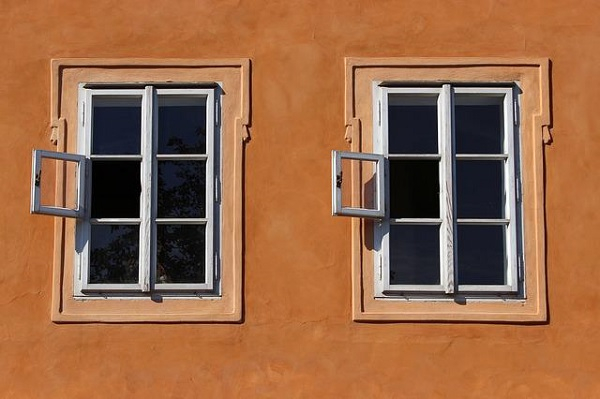
输入图像
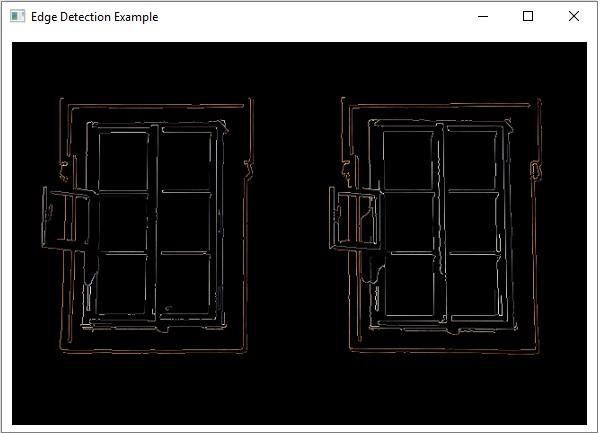
输出
执行上述操作后,将产生以下输出:

更新于: 2020年4月13日
2K+ 浏览量

广告