
- MapReduce 教程
- MapReduce - 首页
- MapReduce - 简介
- MapReduce - 算法
- MapReduce - 安装
- MapReduce - API
- MapReduce - Hadoop 实现
- MapReduce - 分区器
- MapReduce - 组合器
- MapReduce - Hadoop 管理
- MapReduce 资源
- MapReduce - 快速指南
- MapReduce - 有用资源
- MapReduce - 讨论
MapReduce - Hadoop 实现
MapReduce是一个框架,用于编写应用程序,以可靠的方式处理大型商品硬件集群上的海量数据。本章将引导您使用 Java 在 Hadoop 框架中操作 MapReduce。
MapReduce 算法
通常,MapReduce 范例基于将 map-reduce 程序发送到实际数据所在的计算机。
在 MapReduce 作业期间,Hadoop 将 Map 和 Reduce 任务发送到集群中的相应服务器。
该框架管理所有数据传递的细节,例如发出任务、验证任务完成以及在节点之间复制集群中的数据。
大部分计算发生在具有本地磁盘数据的节点上,从而减少了网络流量。
完成给定任务后,集群会收集并减少数据以形成适当的结果,并将其发送回 Hadoop 服务器。
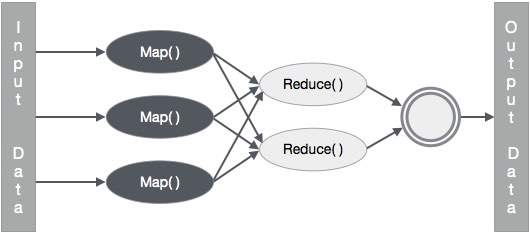
输入和输出(Java 视角)
MapReduce 框架操作键值对,即该框架将作业的输入视为一组键值对,并产生一组键值对作为作业的输出,这些键值对可能属于不同的类型。
键和值类必须由框架序列化,因此需要实现 Writable 接口。此外,键类必须实现 WritableComparable 接口,以方便框架进行排序。
MapReduce 作业的输入和输出格式均为键值对:
(输入) <k1, v1> -> map -> <k2, v2>-> reduce -> <k3, v3> (输出)。
| 输入 | 输出 | |
|---|---|---|
| Map | <k1, v1> | 列表 (<k2, v2>) |
| Reduce | <k2, 列表(v2)> | 列表 (<k3, v3>) |
MapReduce 实现
下表显示了有关组织用电量的数据。该表包括连续五年的月用电量和年平均用电量。
| 一月 | 二月 | 三月 | 四月 | 五月 | 六月 | 七月 | 八月 | 九月 | 十月 | 十一月 | 十二月 | 平均 | |
|---|---|---|---|---|---|---|---|---|---|---|---|---|---|
| 1979 | 23 | 23 | 2 | 43 | 24 | 25 | 26 | 26 | 26 | 26 | 25 | 26 | 25 |
| 1980 | 26 | 27 | 28 | 28 | 28 | 30 | 31 | 31 | 31 | 30 | 30 | 30 | 29 |
| 1981 | 31 | 32 | 32 | 32 | 33 | 34 | 35 | 36 | 36 | 34 | 34 | 34 | 34 |
| 1984 | 39 | 38 | 39 | 39 | 39 | 41 | 42 | 43 | 40 | 39 | 38 | 38 | 40 |
| 1985 | 38 | 39 | 39 | 39 | 39 | 41 | 41 | 41 | 00 | 40 | 39 | 39 | 45 |
我们需要编写应用程序来处理给定表中的输入数据,以查找最大用电量年份、最小用电量年份等等。对于具有有限记录数量的程序员来说,这项任务很容易,因为他们只需编写逻辑来生成所需的输出,并将数据传递到编写的应用程序即可。
现在让我们提高输入数据的规模。假设我们必须分析某个州所有大型工业的用电量。当我们编写应用程序来处理此类海量数据时,
它们将花费大量时间执行。
当我们将数据从源移动到网络服务器时,将产生大量的网络流量。
为了解决这些问题,我们有 MapReduce 框架。
输入数据
以上数据保存为 **sample.txt** 并作为输入提供。输入文件如下所示。
| 1979 | 23 | 23 | 2 | 43 | 24 | 25 | 26 | 26 | 26 | 26 | 25 | 26 | 25 |
| 1980 | 26 | 27 | 28 | 28 | 28 | 30 | 31 | 31 | 31 | 30 | 30 | 30 | 29 |
| 1981 | 31 | 32 | 32 | 32 | 33 | 34 | 35 | 36 | 36 | 34 | 34 | 34 | 34 |
| 1984 | 39 | 38 | 39 | 39 | 39 | 41 | 42 | 43 | 40 | 39 | 38 | 38 | 40 |
| 1985 | 38 | 39 | 39 | 39 | 39 | 41 | 41 | 41 | 00 | 40 | 39 | 39 | 45 |
示例程序
以下示例数据程序使用 MapReduce 框架。
package hadoop;

import java.util.*;
import java.io.IOException;
import java.io.IOException;

import org.apache.hadoop.fs.Path;
import org.apache.hadoop.conf.*;
import org.apache.hadoop.io.*;
import org.apache.hadoop.mapred.*;
import org.apache.hadoop.util.*;

public class ProcessUnits
{
   //Mapper class
   public static class E_EMapper extends MapReduceBase implements
   Mapper<LongWritable,  /*Input key Type */
   Text,                   /*Input value Type*/
   Text,                   /*Output key Type*/
   IntWritable>            /*Output value Type*/
   {
      //Map function
      public void map(LongWritable key, Text value, OutputCollector<Text, IntWritable> output, Reporter reporter) throws IOException
      {
         String line = value.toString();
         String lasttoken = null;
         StringTokenizer s = new StringTokenizer(line,"\t");
         String year = s.nextToken();

         while(s.hasMoreTokens()){
            lasttoken=s.nextToken();
         }

         int avgprice = Integer.parseInt(lasttoken);
         output.collect(new Text(year), new IntWritable(avgprice));
      }
   }

   //Reducer class

   public static class E_EReduce extends MapReduceBase implements
   Reducer< Text, IntWritable, Text, IntWritable >
   {
      //Reduce function
      public void reduce(Text key, Iterator <IntWritable> values, OutputCollector>Text, IntWritable> output, Reporter reporter) throws IOException
      {
         int maxavg=30;
         int val=Integer.MIN_VALUE;
         while (values.hasNext())
         {
            if((val=values.next().get())>maxavg)
            {
               output.collect(key, new IntWritable(val));
            }
         }
      }
   }

   //Main function

   public static void main(String args[])throws Exception
   {
      JobConf conf = new JobConf(Eleunits.class);

      conf.setJobName("max_eletricityunits");

      conf.setOutputKeyClass(Text.class);
      conf.setOutputValueClass(IntWritable.class);

      conf.setMapperClass(E_EMapper.class);
      conf.setCombinerClass(E_EReduce.class);
      conf.setReducerClass(E_EReduce.class);

      conf.setInputFormat(TextInputFormat.class);
      conf.setOutputFormat(TextOutputFormat.class);

      FileInputFormat.setInputPaths(conf, new Path(args[0]));
      FileOutputFormat.setOutputPath(conf, new Path(args[1]));

      JobClient.runJob(conf);
   }
}
将上述程序保存到 **ProcessUnits.java**。程序的编译和执行如下所示。
ProcessUnits 程序的编译和执行
让我们假设我们在 Hadoop 用户的主目录中(例如 /home/hadoop)。
请按照以下步骤编译并执行上述程序。
**步骤 1** - 使用以下命令创建一个目录来存储已编译的 Java 类。
$ mkdir units
**步骤 2** - 下载 Hadoop-core-1.2.1.jar,用于编译和执行 MapReduce 程序。从 mvnrepository.com 下载 jar 包。让我们假设下载文件夹是 /home/hadoop/。
**步骤 3** - 以下命令用于编译 **ProcessUnits.java** 程序并为程序创建一个 jar 包。
$ javac -classpath hadoop-core-1.2.1.jar -d units ProcessUnits.java
$ jar -cvf units.jar -C units/ .
**步骤 4** - 以下命令用于在 HDFS 中创建一个输入目录。
$HADOOP_HOME/bin/hadoop fs -mkdir input_dir
**步骤 5** - 以下命令用于将名为 **sample.txt** 的输入文件复制到 HDFS 的输入目录中。
$HADOOP_HOME/bin/hadoop fs -put /home/hadoop/sample.txt input_dir
**步骤 6** - 以下命令用于验证输入目录中的文件
$HADOOP_HOME/bin/hadoop fs -ls input_dir/
**步骤 7** - 以下命令用于运行 Eleunit_max 应用程序,并从输入目录中获取输入文件。
$HADOOP_HOME/bin/hadoop jar units.jar hadoop.ProcessUnits input_dir output_dir
等待一段时间直到文件执行完毕。执行后,输出包含许多输入拆分、Map 任务、Reducer 任务等。
INFO mapreduce.Job: Job job_1414748220717_0002
completed successfully
14/10/31 06:02:52
INFO mapreduce.Job: Counters: 49

File System Counters

   FILE: Number of bytes read=61
   FILE: Number of bytes written=279400
   FILE: Number of read operations=0
   FILE: Number of large read operations=0
   FILE: Number of write operations=0

   HDFS: Number of bytes read=546
   HDFS: Number of bytes written=40
   HDFS: Number of read operations=9
   HDFS: Number of large read operations=0
   HDFS: Number of write operations=2 Job Counters

   Launched map tasks=2
   Launched reduce tasks=1
   Data-local map tasks=2

   Total time spent by all maps in occupied slots (ms)=146137
   Total time spent by all reduces in occupied slots (ms)=441
   Total time spent by all map tasks (ms)=14613
   Total time spent by all reduce tasks (ms)=44120

   Total vcore-seconds taken by all map tasks=146137
   Total vcore-seconds taken by all reduce tasks=44120

   Total megabyte-seconds taken by all map tasks=149644288
   Total megabyte-seconds taken by all reduce tasks=45178880

Map-Reduce Framework

   Map input records=5

   Map output records=5
   Map output bytes=45
   Map output materialized bytes=67

   Input split bytes=208
   Combine input records=5
   Combine output records=5

   Reduce input groups=5
   Reduce shuffle bytes=6
   Reduce input records=5
   Reduce output records=5

   Spilled Records=10
   Shuffled Maps =2
   Failed Shuffles=0
   Merged Map outputs=2

   GC time elapsed (ms)=948
   CPU time spent (ms)=5160

   Physical memory (bytes) snapshot=47749120
   Virtual memory (bytes) snapshot=2899349504

   Total committed heap usage (bytes)=277684224

File Output Format Counters

   Bytes Written=40
**步骤 8** - 以下命令用于验证输出文件夹中的结果文件。
$HADOOP_HOME/bin/hadoop fs -ls output_dir/
**步骤 9** - 以下命令用于查看 **Part-00000** 文件中的输出。此文件由 HDFS 生成。
$HADOOP_HOME/bin/hadoop fs -cat output_dir/part-00000
以下是 MapReduce 程序生成的输出:
| 1981 | 34 |
| 1984 | 40 |
| 1985 | 45 |
**步骤 10** - 以下命令用于将输出文件夹从 HDFS 复制到本地文件系统。
$HADOOP_HOME/bin/hadoop fs -cat output_dir/part-00000/bin/hadoop dfs -get output_dir /home/hadoop