
 数据结构
数据结构 网络
网络 RDBMS
RDBMS 操作系统
操作系统 Java
Java MS Excel
 iOS
iOS HTML
HTML CSS
CSS Android
 Python
 C 编程
C 编程 C++
C++ C#
C# MongoDB
 MySQL
MySQL Javascript
 PHP
PHP 物理学
物理学 化学
化学 生物学
生物学 数学
数学 英语
英语 经济学
经济学 心理学
心理学 社会学
社会学 时尚研究
时尚研究 法律研究
法律研究另存为 .ps/.eps 时,Matplotlib 绘图会失去透明度
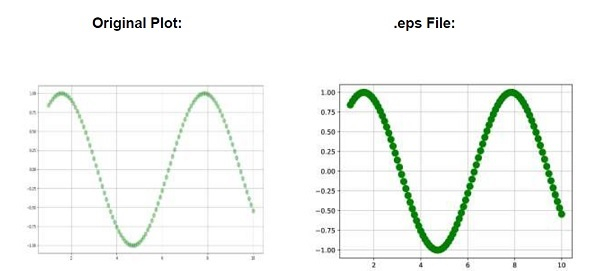
每当绘图另存为.eps/.ps时,绘图的透明度都会丢失。
为了比较,我们可以按照以下步骤进行操作 -
使用 numpy 创建x_data 和y_data 。
使用plot()方法绘制x_data 和y_data (步骤 1),使用较小的 aplha 值,以使其更加透明。
使用grid()方法来证明线的透明度。
以 .eps格式保存创建的绘图。
使用show()方法显示图片。
示例
import numpy as np
from matplotlib import pyplot as plt
plt.rcParams["figure.figsize"] = [7.50, 3.50]
plt.rcParams["figure.autolayout"] = True
x_data = np.linspace(1, 10, 100)
y_data = np.sin(x_data)
plt.plot(x_data, y_data, c='green', marker='o', alpha=.35, ms=10, lw=1)
plt.grid()
plt.savefig("lost_transparency_img.eps")
plt.show()
输出
PostScript 后台不支持透明度;部分透明的部分将呈现为不透明。

更新于: 10-04-2021
1K+ 浏览

广告