- MomentJS 教程
- MomentJS - 主页
- MomentJS - 概览
- MomentJS - 设置环境
- MomentJS - 简介
- MomentJS - 解析日期和时间
- MomentJS - 日期验证
- MomentJS - 获取器/设置器
- 操作日期和时间
- 格式化日期和时间
- MomentJS - 日期查询
- MomentJS - 国际化
- MomentJS - 自定义
- MomentJS - 时间间隔
- MomentJS - 实用程序
- MomentJS - 插件
- MomentJS - 示例
- MomentJS 有用资源
- MomentJS - 快速指南
- MomentJS - 有用资源
- MomentJS - 讨论
MomentJS - 检查当前区域设置
我们可以使用 moment.locale() 检查当前区域设置。
语法
moment.locale();
示例
moment.locale('fr');
var k = moment.locale();
输出

示例
moment.locale('fr');
var k = moment.locale();
moment.locale('ja');
var s = moment.locale();
输出

moment.locales() 提供了所有可适用于使用或已加载的区域设置的列表。观察以下代码行及其输出 -
moment.locales()
输出
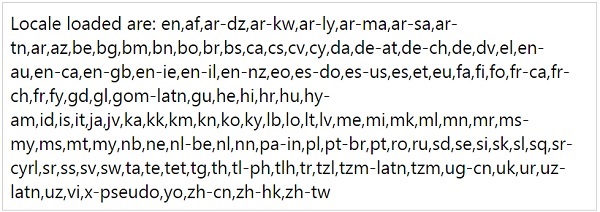
在上面的示例中,我们使用了包含所有区域设置的 locale.min.js,因此 moment.locales() 显示了所有区域设置,如上所示。
momentjs_internationalization.htm
广告