
 数据结构
数据结构 网络
网络 RDBMS
RDBMS 操作系统
操作系统 Java
Java MS Excel
 iOS
iOS HTML
HTML CSS
CSS Android
 Python
 C 编程
C 编程 C++
C++ C#
C# MongoDB
 MySQL
MySQL Javascript
 PHP
PHP 物理学
物理学 化学
化学 生物
生物 数学
数学 英语
英语 经济学
经济学 心理学
心理学 社会学
社会学 时尚研究
时尚研究 法律研究
法律研究JavaScript 中的 Object.keys().map() 与 Array.map()
下面是显示 JavaScript 中的对象 Object.keys().map() 和数组 Array.map() 的代码 −
示例
<!DOCTYPE html>
<html lang="en">
<head>
<meta charset="UTF-8" />
<meta name="viewport" content="width=device-width, initial-scale=1.0" />
<title>Document</title>
<style>
   body {
      font-family: "Segoe UI", Tahoma, Geneva, Verdana, sans-serif;
   }
   .result,.sample {
      font-size: 18px;
      font-weight: 500;
      color: rebeccapurple;
   }
   .result {
      color: red;
   }
</style>
</head>
<body>
<h1>Object.keys().map() VS Array.map()</h1>
<div class="sample">{1:'A',22:'B',55:'C',19:'D'}</div>
<div class="result"></div>
<button class="Btn">CLICK HERE</button>
<h3>Click on the above button to sum the keys of the above object</h3>
<div class="sample">[22,33,11,44]</div>
<div class="result"></div>
<button class="Btn">CLICK HERE</button>
<h3>Click on the above button to double each element of the above array</h3>
<script>
   let resEle = document.querySelectorAll(".result");
   let BtnEle = document.querySelectorAll(".Btn");
   let obj = { 1: "A", 22: "B", 55: "C", 19: "D" };
   let arr = [22, 33, 11, 44];
   let total = 0;
   BtnEle[0].addEventListener("click", () => {
      Object.keys(obj).map((x) => (total += parseInt(x)));
      resEle[0].innerHTML = "The sum of the object keys = " + total;
   });
   BtnEle[1].addEventListener("click", () => {
      resEle[1].innerHTML = arr.map((x) => x * 2);
   });
</script>
</body>
</html>
输出
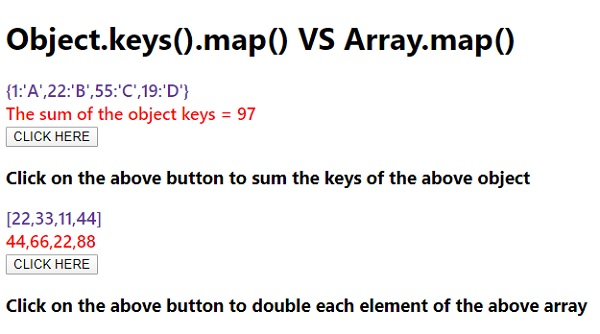
以上的代码将会输出如下内容 −

单击第一个“单击此处”按钮 −

单击第二个“单击此处”按钮 −

更新于: 2020-07-18
747 人浏览

广告