
 数据结构
数据结构 网络
网络 RDBMS
RDBMS 操作系统
操作系统 Java
Java MS Excel
 iOS
iOS HTML
HTML CSS
CSS Android
 Python
 C 编程
C 编程 C++
C++ C#
C# MongoDB
 MySQL
MySQL JavaScript
 PHP
PHP 物理
物理 化学
化学 生物学
生物学 数学
数学 英语
英语 经济学
经济学 心理学
心理学 社会学
社会学 时尚研究
时尚研究 法律研究
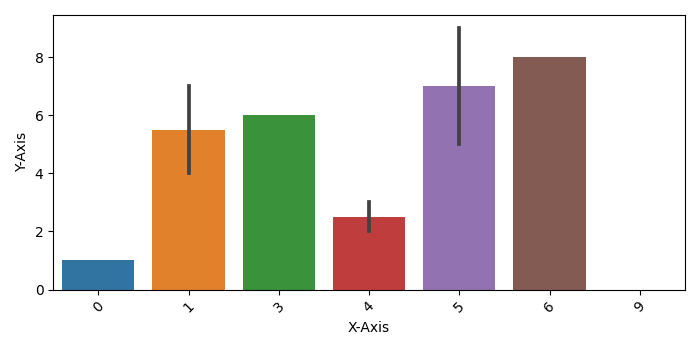
法律研究使用 Seaborn 绘制 Pandas DataFrame 的多列
要使用 Seaborn 绘制 Pandas DataFrame 的多列,我们可以执行以下步骤:
使用 Pandas 制作一个数据框。
使用 Seaborn 的 barplot() 方法绘制一个条形图。
将 xticks 标签旋转 45 度。
使用 show() 方法显示图形。
示例
import pandas
import matplotlib.pylab as plt
import seaborn as sns
import numpy as np
plt.rcParams["figure.figsize"] = [7.00, 3.50]
plt.rcParams["figure.autolayout"] = True
df = pandas.DataFrame({"X-Axis": [np.random.randint(10) for i in range(10)], "YAxis": [i for i in range(10)]})
bar_plot = sns.barplot(x='X-Axis', y='Y-Axis', data=df)
plt.xticks(rotation=45)
plt.show()
输出

更新日期:2021 年 5 月 8 日
1K+ 浏览

广告