
- PyQt5 教程
- PyQt5 - 首页
- PyQt5 - 简介
- PyQt5 - 新特性
- PyQt5 - Hello World
- PyQt5 - 主要类
- PyQt5 - 使用 Qt Designer
- PyQt5 - 信号与槽
- PyQt5 - 布局管理
- PyQt5 - 基本控件
- PyQt5 - QDialog 类
- PyQt5 - QMessageBox
- PyQt5 - 多文档界面
- PyQt5 - 拖放
- PyQt5 - 数据库处理
- PyQt5 - 绘图 API
- PyQt5 - BrushStyle 常量
- PyQt5 - QClipboard
- PyQt5 - QPixmap 类
- PyQt5 有用资源
- PyQt5 - 快速指南
- PyQt5 - 有用资源
- PyQt5 - 讨论
PyQt5 - QComboBox 控件
一个QComboBox对象提供了一个下拉列表供用户选择。它在表单上占用最少的屏幕空间,只显示当前选中的项目。
组合框可以设置为可编辑的;它还可以存储像素图对象。以下方法通常使用:
| 序号 | 方法及描述 |
|---|---|
| 1 |
addItem() 将字符串添加到集合中 |
| 2 |
addItems() 将列表对象中的项目添加到集合中 |
| 3 |
Clear() 删除集合中的所有项目 |
| 4 |
count() 获取集合中项目的数量 |
| 5 |
currentText() 获取当前选中项目的文本 |
| 6 |
itemText() 显示属于特定索引的文本 |
| 7 |
currentIndex() 返回选中项目的索引 |
| 8 |
setItemText() 更改指定索引的文本 |
QComboBox 信号
以下方法通常用于 QComboBox 信号:
| 序号 | 方法及描述 |
|---|---|
| 1 |
activated() 当用户选择一个项目时 |
| 2 |
currentIndexChanged() 无论何时当前索引被用户或程序更改 |
| 3 |
highlighted() 当列表中的项目被高亮显示时 |
示例
让我们看看以下示例中如何实现 QComboBox 控件的一些功能。
项目可以通过 addItem() 方法逐个添加到集合中,或者通过addItems()方法将列表对象中的项目添加到集合中。
self.cb.addItem("C++")
self.cb.addItems(["Java", "C#", "Python"])
QComboBox 对象发出 currentIndexChanged() 信号。它连接到selectionchange()方法。
组合框中的项目使用 itemText() 方法列出每个项目。当前选中项目的标签可以通过currentText()方法访问。
def selectionchange(self,i):
   print "Items in the list are :"

   for count in range(self.cb.count()):
      print self.cb.itemText(count)
   print "Current index",i,"selection changed ",self.cb.currentText()
完整代码如下:
import sys
from PyQt5.QtCore import *
from PyQt5.QtGui import *
from PyQt5.QtWidgets import *

class combodemo(QWidget):
   def __init__(self, parent = None):
      super(combodemo, self).__init__(parent)

      layout = QHBoxLayout()
      self.cb = QComboBox()
      self.cb.addItem("C")
      self.cb.addItem("C++")
      self.cb.addItems(["Java", "C#", "Python"])
      self.cb.currentIndexChanged.connect(self.selectionchange)

      layout.addWidget(self.cb)
      self.setLayout(layout)
      self.setWindowTitle("combo box demo")

   def selectionchange(self,i):
      print "Items in the list are :"

      for count in range(self.cb.count()):
         print self.cb.itemText(count)
      print "Current index",i,"selection changed ",self.cb.currentText()

def main():
   app = QApplication(sys.argv)
   ex = combodemo()
   ex.show()
   sys.exit(app.exec_())

if __name__ == '__main__':
   main()
输出
以上代码产生以下输出:
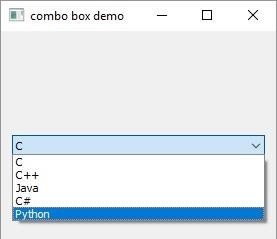
列表中的项目:
C
C++
Java
C#
Python
Current selection index 4 selection changed Python
pyqt_basic_widgets.htm
广告