
- PyQt5 教程
- PyQt5 - 首页
- PyQt5 - 简介
- PyQt5 - 新特性
- PyQt5 - Hello World
- PyQt5 - 主要类
- PyQt5 - 使用 Qt Designer
- PyQt5 - 信号与槽
- PyQt5 - 布局管理
- PyQt5 - 基本控件
- PyQt5 - QDialog 类
- PyQt5 - QMessageBox
- PyQt5 - 多文档界面
- PyQt5 - 拖放操作
- PyQt5 - 数据库操作
- PyQt5 - 绘图 API
- PyQt5 - BrushStyle 常量
- PyQt5 - QClipboard
- PyQt5 - QPixmap 类
- PyQt5 有用资源
- PyQt5 - 快速指南
- PyQt5 - 有用资源
- PyQt5 - 讨论
PyQt5 - QLineEdit 控件
QLineEdit 对象是最常用的输入字段。它提供了一个可以输入单行文本的框。要输入多行文本,需要使用QTextEdit 对象。
下表列出了 QLineEdit 类的一些重要方法:
| 序号 | 方法及描述 |
|---|---|
| 1 |
setAlignment() 根据对齐常量对齐文本 Qt.AlignLeft Qt.AlignRight Qt.AlignCenter Qt.AlignJustify |
| 2 |
clear() 清除内容 |
| 3 |
setEchoMode() 控制框内文本的外观。回显模式值如下: QLineEdit.Normal QLineEdit.NoEcho QLineEdit.Password QLineEdit.PasswordEchoOnEdit |
| 4 |
setMaxLength() 设置输入字符的最大数量 |
| 5 |
setReadOnly() 使文本框不可编辑 |
| 6 |
setText() 以编程方式设置文本 |
| 7 |
text() 检索字段中的文本 |
| 8 |
setValidator() 设置验证规则。可用的验证器有: QIntValidator - 将输入限制为整数 QDoubleValidator - 小数部分限制为指定的小数位数 QRegexpValidator - 根据正则表达式检查输入 |
| 9 |
setInputMask() 应用字符组合的掩码进行输入 |
| 10 |
setFont() 显示 QFont 对象的内容 |
QLineEdit 对象发出以下信号:
以下是信号最常用的方法。
| 序号 | 方法及描述 |
|---|---|
| 1 |
cursorPositionChanged() 光标移动时 |
| 2 |
editingFinished() 按下“Enter”键或字段失去焦点时 |
| 3 |
returnPressed() 按下“Enter”键时 |
| 4 |
selectionChanged() 选中文本发生变化时 |
| 5 |
textChanged() 框中的文本通过输入或以编程方式发生变化时 |
| 6 |
textEdited() 文本被编辑时 |
示例
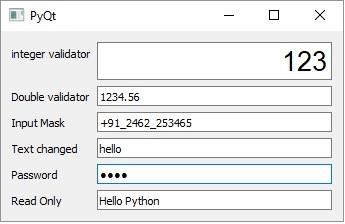
此示例中的 QLineEdit 对象演示了其中一些方法的使用。
第一个字段e1使用自定义字体显示文本,右对齐,并允许整数输入。第二个字段将输入限制为小数点后两位的数字。第三个字段应用了用于输入电话号码的输入掩码。字段e4上的 textChanged() 信号连接到 textchanged() 槽方法。
e5字段的内容以密码形式回显,因为其 EchoMode 属性设置为 Password。它的 editingFinished() 信号连接到 presenter() 方法。因此,一旦用户按下 Enter 键,该函数就会执行。字段e6显示默认文本,该文本不可编辑,因为它被设置为只读。
import sys
from PyQt5.QtCore import *
from PyQt5.QtGui import *
from PyQt5.QtWidgets import *
def window():
   app = QApplication(sys.argv)
   win = QWidget()

   e1 = QLineEdit()
   e1.setValidator(QIntValidator())
   e1.setMaxLength(4)
   e1.setAlignment(Qt.AlignRight)
   e1.setFont(QFont("Arial",20))

   e2 = QLineEdit()
   e2.setValidator(QDoubleValidator(0.99,99.99,2))

   flo = QFormLayout()
   flo.addRow("integer validator", e1)
   flo.addRow("Double validator",e2)

   e3 = QLineEdit()
   e3.setInputMask('+99_9999_999999')
   flo.addRow("Input Mask",e3)

   e4 = QLineEdit()
   e4.textChanged.connect(textchanged)
   flo.addRow("Text changed",e4)

   e5 = QLineEdit()
   e5.setEchoMode(QLineEdit.Password)
   flo.addRow("Password",e5)

   e6 = QLineEdit("Hello Python")
   e6.setReadOnly(True)
   flo.addRow("Read Only",e6)

   e5.editingFinished.connect(enterPress)
   win.setLayout(flo)
   win.setWindowTitle("PyQt")
   win.show()

   sys.exit(app.exec_())

def textchanged(text):
   print "contents of text box: "+text

def enterPress():
   print "edited"

if __name__ == '__main__':
   window()
输出
以上代码产生以下输出:
contents of text box: h
contents of text box: he
contents of text box: hel
contents of text box: hell
contents of text box: hello
editing finished