
- RichFaces 教程
- RichFaces - 主页
- RichFaces - 概述
- RichFaces - 环境设置
- RichFaces - 架构
- RichFaces - 基本概念
- RichFaces - 丰富皮肤
- RichFaces - 输入组件
- RichFaces - 输出组件
- RichFaces - 迭代组件
- RichFaces - 选择组件
- RichFaces - 菜单组件
- RichFaces - Rich Tree
- RichFaces - 错误处理
- RichFaces 有用资源
- RichFaces - 快速指南
- RichFaces - 有用资源
- RichFaces - 讨论
RichFaces - 错误处理
在本章中,我们将学习 RichFaces 中实现的不同错误处理方法。
服务器端和客户端错误处理
我们需要使用非常旧的 Java 技术(try/Catch)来处理基于 Action 类引发的异常。对于客户端,我们可以添加一个额外的文件,它将在客户端发生错误时显示错误信息。
可在 web.xml 中添加以下代码片段来处理客户端上的错误。
<error-page>
   <exception-type>java.lang.Throwable</exception-type>
   <location>/error.xhtml</location>
</error-page>
请注意,上述异常将只提供静态异常消息,我们可能必须使用 JSF “ExceptionHandler”类才能使用动态异常属性。在运行时,RichFaces 提供了一些验证输入字段的功能,这些功能可以用作应用程序中异常的主要基础构建模块。
创建新文件并在其中放入以下代码。
<?xml version = "1.0" encoding = "UTF-8"?>
<!DOCTYPE html>
<html xmlns = "http://www.w3.org/1999/xhtml"
   xmlns:h = "http://java.sun.com/jsf/html"
   xmlns:f = "http://java.sun.com/jsf/core"
   xmlns:ui = "http://java.sun.com/jsf/facelets"
   xmlns:a4j = "http://richfaces.org/a4j"
   xmlns:rich = "http://richfaces.org/rich">

   <h:head>
      <title>Error handling</title>
      <meta name = "viewport" content = "width = device-width, initial-scale = 1.0"/>
   </h:head>

   <h:body>
      <h:form id = "form">
         <rich:panel>
            <f:facet name = "header">
               <h:panelGroup>
                  <h:outputText value = "Student Registration" />
                  <a4j:status>
                     <f:facet name = "start">
                        <h:graphicImage value = "/images/ai.gif" style = "height:12px;width:12px;" alt = "ai" />
                     </f:facet>
                  </a4j:status>
               </h:panelGroup>
            </f:facet>

            <h:panelGrid columns = "3">
               <h:outputText value = "Name:" />
               <h:inputText value = "#{student.name}" id = "name" label = "name">
                  <f:validateLength minimum = "3" maximum = "8" />
                  <f:validateRequired />
                  <rich:validator />
               </h:inputText>
               <rich:message for = "name" />
               <h:outputText value = "Email" />

               <h:inputText value = "#{student.email}" id = "email"
                  validatorMessage = "Ivalid email address">

                  <f:validateRegex
                     pattern =
                     "^(([a-zA-Z0-9_\-\.]+)@([a-zA-Z0-9_\-\.]+)
                     \.([a-zAZ]{2,5}){1,25})+([;.](([a-zA-Z0-9_\-\.]+)
                     @([a-zA-Z0-9_\-\.]+)\.([a-zAZ]{2,5}){1,25})+)*$" />
                  <rich:validator />
               </h:inputText>

               <rich:message for = "email" />
               <h:outputText value = "Age" />

               <h:inputText value = "#{student.age}" id = "age" label = "age">
                  <f:validateLongRange minimum = "18" maximum = "99" />
                  <rich:validator />
               </h:inputText>
               <rich:message for = "age" />
            </h:panelGrid>

         </rich:panel>
      </h:form>
   </h:body>

</html>
对应的 java 类应为如下所示的普通 bean 类。
import javax.faces.bean.ManagedBean;
import javax.faces.bean.RequestScoped;

@ManagedBean
@RequestScoped

public class Student {
   private String name;
   private String email;
   private int age;

   public String getName() {
      return name;
   }
   public void setName(String name) {
      this.name = name;
   }
   public String getEmail() {
      return email;
   }
   public void setEmail(String email) {
      this.email = email;
   }
   public int getAge() {
      return age;
   }
   public void setAge(int age) {
      this.age = age;
   }
}
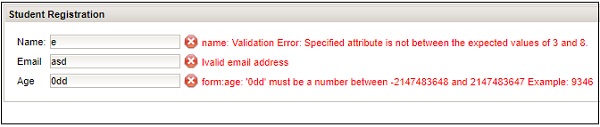
只要 < h:form > 中有错误,上述示例将在浏览器中产生以下输出。
资源加载
RichFaces 改进了 JSF 应用程序中的标准资源处理过程。通过对 ResourceServlet 进行配置或通过资源优化,可以实现这一点。要配置 ResourceServlet,我们需要在 web.xml 中添加以下代码段。
<servlet>
   <servlet-name>Resource Servlet</servlet-name>
   <servlet-class>org.richfaces.webapp.ResourceServlet</servlet-class>
   <load-on-startup>1</load-on-startup>
</servlet>

<servlet-mapping>
   <servlet-name>Resource Servlet</servlet-name>
   <url-pattern>/org.richfaces.resources/*</url-pattern>
</servlet-mapping>
我们还可以启用 JSF 应用程序中的优化,这将优化不同的 JavaScript 和 CSS 文件。我们需要添加以下代码才能在应用程序中实现优化。
<context-param>
   <param-name>org.richfaces.resourceOptimization.enabled</param-name>
   <param-value>true</param-value>
</context-param>
广告