
- Three.js 教程
- Three.js - 首页
- Three.js - 介绍
- Three.js - 安装
- Three.js - Hello Cube 应用
- Three.js - 渲染器和响应能力
- Three.js - 响应式设计
- Three.js - 调试器和状态
- Three.js - 摄像机
- Three.js - 控件
- Three.js - 光线和阴影
- Three.js - 几何
- Three.js - 材质
- Three.js - 纹理
- Three.js - 绘制线段
- Three.js - 动画
- Three.js - 创建文本
- Three.js - 加载 3D 模型
- Three.js - 库和插件
- Three.js 有用资源
- Three.js - 快速指南
- Three.js - 有用资源
- Three.js - 讨论
Three.js - 透视相机
Three.js 中有不同的相机。最常见的相机,也是我们一直在使用的相机是透视相机。
const camera = new THREE.PerspectiveCamera(fov, aspect, near, far)
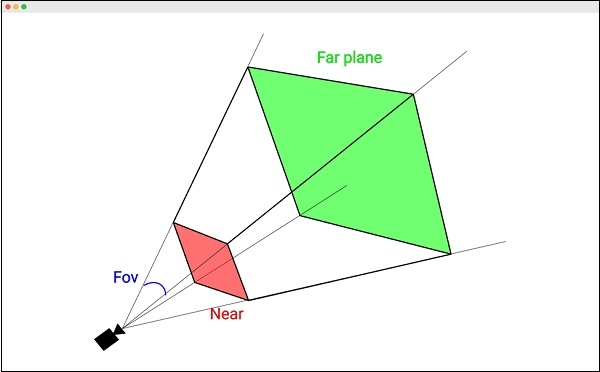
第一个属性是**视场 (FOV)**。FOV 是场景中在任何给定时刻显示的部分。该值以度为单位。人类的 FOV 接近 180 度。但是,由于普通的计算机屏幕不会填满我们的视野,因此通常会选择一个较小的值。通常,对于游戏,60 到 90 度的 FOV 是最佳的。
Good default: 50
第二个属性是宽高比——我们渲染输出区域的水平和垂直尺寸之间的比率。
Good default: window.innerWidth / window.innerHeight
以下两个属性是近裁剪平面和远裁剪平面。相机在屏幕上渲染近平面和远平面之间的区域。
near 属性定义Three.js 应该从多近开始渲染场景。通常,我们会将其设置为最小值,以便直接渲染相机位置的一切内容。
Good default: 0.1
far 属性定义从相机的位置,相机可以观察多远。如果我们将其设置得太低,场景的一部分可能不会被渲染,如果将其设置得太高,在某些情况下,它可能会影响渲染性能。
Good default: 1000
示例
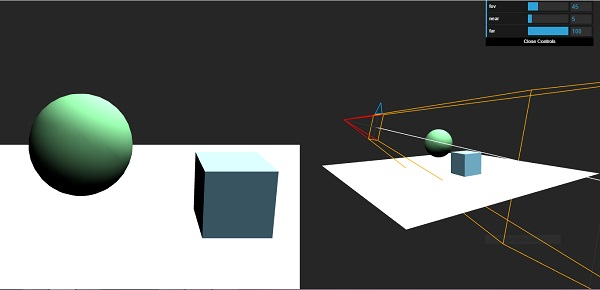
查看以下示例,并尝试修改变量。
prespective-cam.html
<!DOCTYPE html>
<html lang="en">
   <head>
      <meta charset="UTF-8" />
      <meta http-equiv="X-UA-Compatible" content="ie=edge" />
      <meta name="viewport" content="width=device-width, initial-scale=1.0" />
      <title>Three.js - Prespective camera</title>
      <style>
         html,
         body {
            margin: 0;
            height: 100%;
         }
         #threejs-container {
            width: 100%;
            height: 100%;
            display: block;
         }
         .split {
            position: absolute;
            left: 0;
            top: 0;
            width: 100%;
            height: 100%;
            display: flex;
         }
         .split > div {
            width: 100%;
            height: 100%;
         }
      </style>
      <script src="https://cdnjs.cloudflare.com/ajax/libs/three.js/r128/three.min.js"></script>
      <script src="https://cdnjs.cloudflare.com/ajax/libs/dat-gui/0.7.7/dat.gui.js"></script>
   </head>
   <body>
      <canvas id="threejs-container"></canvas>
      <div class="split">
         <div id="view1" tabindex="1"></div>
         <div id="view2" tabindex="2"></div>
      </div>
      <script type="module">
         // Three.js - Cameras - Prespective 2 views
         // from https://threejsfundamentals.org/threejs/threejs-camerasprespective-2-scenes.html
         import { OrbitControls } from "https://threejs.org/examples/jsm/contro
         ls/OrbitControls.js"
         function main() {
            const canvas = document.querySelector('#threejs-container')
            const view1Elem = document.querySelector('#view1')
            const view2Elem = document.querySelector('#view2')
            const renderer = new THREE.WebGLRenderer({ canvas, antialias: true })
            const fov = 45
            const aspect = 2 // the canvas default
            const near = 5
            const far = 100
            const camera = new THREE.PerspectiveCamera(fov, aspect, near, far)
            camera.position.set(0, 10, 20)
            const cameraHelper = new THREE.CameraHelper(camera)
            class MinMaxGUIHelper {
               constructor(obj, minProp, maxProp, minDif) {
                  this.obj = obj
                  this.minProp = minProp
                  this.maxProp = maxProp
                  this.minDif = minDif
               }
               get min() {
                  return this.obj[this.minProp]
               }
               set min(v) {
                  this.obj[this.minProp] = v
                  this.obj[this.maxProp] = Math.max(this.obj[this.maxProp], v + th
               is.minDif)
               }
               get max() {
                  return this.obj[this.maxProp]
               }
               set max(v) {
                  this.obj[this.maxProp] = v
                  this.min = this.min // this will call the min setter
               }
            }
            const gui = new dat.GUI()
            gui.add(camera, 'fov', 1, 180)
            const minMaxGUIHelper = new MinMaxGUIHelper(camera, 'near', 'far', 0.1)
            gui.add(minMaxGUIHelper, 'min', 0.1, 50, 0.1).name('near')
            gui.add(minMaxGUIHelper, 'max', 0.1, 50, 0.1).name('far')
            const controls = new OrbitControls(camera, view1Elem)
            controls.target.set(0, 5, 0)
            controls.update()
            const camera2 = new THREE.PerspectiveCamera(
               60, // fov
               2, // aspect
               0.1, // near
               500 // far
            )
            camera2.position.set(40, 10, 30)
            camera2.lookAt(0, 5, 0)
            const controls2 = new OrbitControls(camera2, view2Elem)
            controls2.target.set(0, 5, 0)
            controls2.update()
            const scene = new THREE.Scene()
            scene.background = new THREE.Color(0x262626)
            scene.add(cameraHelper) {
               const planeSize = 40
               const planeGeo = new THREE.PlaneGeometry(planeSize, planeSize)
               const planeMat = new THREE.MeshLambertMaterial({
                  color: 0xffffff,
                  side: THREE.DoubleSide
               })
               const mesh = new THREE.Mesh(planeGeo, planeMat)
               mesh.rotation.x = Math.PI * -0.5
               scene.add(mesh)
            }
            {
               const cubeSize = 4
               const cubeGeo = new THREE.BoxGeometry(cubeSize, cubeSize, cubeSize)
               const cubeMat = new THREE.MeshLambertMaterial({ color: 0x87ceeb })
               const mesh = new THREE.Mesh(cubeGeo, cubeMat)
               mesh.position.set(cubeSize + 1, cubeSize / 2, 0)
               scene.add(mesh)
            }
            {
               const sphereRadius = 3
               const sphereWidthDivisions = 32
               const sphereHeightDivisions = 16
               const sphereGeo = new THREE.SphereGeometry(
                  sphereRadius,
                  sphereWidthDivisions,
                  sphereHeightDivisions
               )
               const sphereMat = new THREE.MeshLambertMaterial({ color: 0x71ba80 })
               const mesh = new THREE.Mesh(sphereGeo, sphereMat)
               mesh.position.set(-sphereRadius - 1, sphereRadius + 2, 0)
               scene.add(mesh)
            }
            {
               const color = 0xffffff
               const intensity = 1
               const light = new THREE.DirectionalLight(color, intensity)
               light.position.set(0, 10, 5)
               light.target.position.set(-5, 0, 0)
               scene.add(light)
               scene.add(light.target)
               const light2 = new THREE.DirectionalLight(color, intensity)
               light2.position.set(0, 10, -5)
               light2.target.position.set(-5, 0, 0)
               scene.add(light2)
               scene.add(light2.target)
            }
            function resizeRendererToDisplaySize(renderer) {
               const canvas = renderer.domElement
               const width = canvas.clientWidth
               const height = canvas.clientHeight
               const needResize = canvas.width !== width || canvas.height !== height
               if (needResize) {
                  renderer.setSize(width, height, false)
               }
               return needResize
            }
            function setScissorForElement(elem) {
               const canvasRect = canvas.getBoundingClientRect()
               const elemRect = elem.getBoundingClientRect()
               // compute a canvas relative rectangle
               const right = Math.min(elemRect.right, canvasRect.right) - canvasR
               ect.left
               const left = Math.max(0, elemRect.left - canvasRect.left)
               const bottom = Math.min(elemRect.bottom, canvasRect.bottom) - canv
               asRect.top
               const top = Math.max(0, elemRect.top - canvasRect.top)
               const width = Math.min(canvasRect.width, right - left)
               const height = Math.min(canvasRect.height, bottom - top)
               // setup the scissor to only render to that part of the canvas
               const positiveYUpBottom = canvasRect.height - bottom
               renderer.setScissor(left, positiveYUpBottom, width, height)
               renderer.setViewport(left, positiveYUpBottom, width, height)
               // return the aspect
               return width / height
            }
            function render() {
               resizeRendererToDisplaySize(renderer)
               // turn on the scissor
               renderer.setScissorTest(true)
               // render the original view
               {
                  const aspect = setScissorForElement(view1Elem)
                  // adjust the camera for this aspect
                  camera.aspect = aspect
                  camera.updateProjectionMatrix()
                  cameraHelper.update()
                  // don't draw the camera helper in the original view
                  cameraHelper.visible = false
                  scene.background.set(0x262626)
                  // render
                  renderer.render(scene, camera)
               }
               // render from the 2nd camera
               {
                  const aspect = setScissorForElement(view2Elem)
                  // adjust the camera for this aspect
                  camera2.aspect = aspect
                  camera2.updateProjectionMatrix()
                  // draw the camera helper in the 2nd view
                  cameraHelper.visible = true
                  scene.background.set(0x262626)
                  renderer.render(scene, camera2)
               }
               requestAnimationFrame(render)
            }
            requestAnimationFrame(render)
         }
         main()
      </script>
   </body>
</html>
输出
threejs_cameras.htm
广告