
- Three.js 教程
- Three.js - 主页
- Three.js - 简介
- Three.js - 安装
- Three.js - Hello Cube 应用
- Three.js - 渲染器与响应性
- Three.js - 响应式设计
- Three.js - 调试与统计
- Three.js - 相机
- Three.js - 控件
- Three.js - 光照与阴影
- Three.js - 几何体
- Three.js - 材质
- Three.js - 纹理
- Three.js - 绘制线条
- Three.js - 动画
- Three.js - 创建文本
- Three.js - 加载 3D 模型
- Three.js - 库与插件
- Three.js 实用资源
- Three.js - 快速指南
- Three.js - 实用资源
- Three.js - 讨论
Three.js - 轨道球控件
轨道球控件与轨道控件类似。不过,它没有保持恒定的相机向上向量。这意味着相机可以绕过其极点轨道。它不会翻转以保持正确的方向。你可以像之前那一个一样添加它。
const controls = new THREE.TrackballControls(camera, render.domElement)
示例
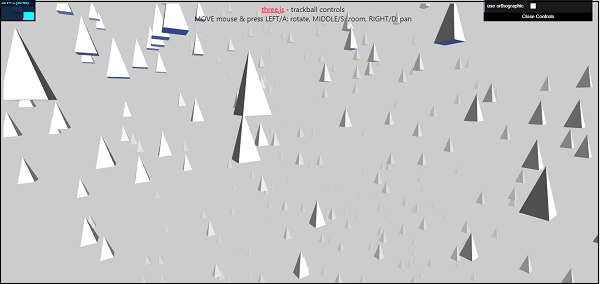
查看以下示例。
trackball-controls.html
<!DOCTYPE html>
<html lang="en">
   <head>
      <title>Three.js - Trackball controls</title>
      <meta charset="utf-8" />
      <meta name="viewport" content="width=device-width, user-scalable=no, minimumscale=1.0, maximum-scale=1.0"/>
      <style>
         body {
            background-color: #ccc;
            color: #000;
            font-family: -applesystem, BlinkMacSystemFont, 'Segoe UI', Roboto, Oxygen, Ubuntu,
            Cantarell, 'Open Sans', 'Helvetica Neue', sans-serif;
         }
         a {
            color: #f00;
         }
         #info {
            position: absolute;
            top: 0px;
            width: 100%;
            padding: 10px;
            box-sizing: border-box;
            text-align: center;
            -moz-user-select: none;
            -webkit-user-select: none;
            -ms-user-select: none;
            user-select: none;
            pointer-events: none;
            z-index: 1; /* TODO Solve this in HTML */
         }
         a,
         button,
         input,
         select {
            pointer-events: auto;
         }
      </style>
      <script src="https://cdnjs.cloudflare.com/ajax/libs/three.js/r128/three.min.js"></script>
      <script src="https://cdnjs.cloudflare.com/ajax/libs/dat-gui/0.7.7/dat.gui.js"></script>
      <script src="http://mrdoob.github.io/stats.js/build/stats.min.js"></script>
   </head>
   <body>
      <div id="info">
         <a href="https://threejs.org" target="_blank" rel="noopener">three.js</a> - trackball controls<br /> MOVE mouse & press LEFT/A: rotate, MIDDLE/S: zoom, RIGHT/D: pan
      </div>
      <script type="module">
         // Adding trackball controls
         // You can rotate camera any direction you want using Trackball controls
         import { TrackballControls } from 'https://threejs.org/examples/jsm/controls/TrackballControls.js'
         let perspectiveCamera, orthographicCamera, controls, scene, renderer, stats
         const params = {
            orthographicCamera: false
         }
         const frustumSize = 400
         init()
         animate()
         function init() {
            const aspect = window.innerWidth / window.innerHeight
            perspectiveCamera = new THREE.PerspectiveCamera(60, aspect, 1, 1000)
            perspectiveCamera.position.z = 500
            orthographicCamera = new THREE.OrthographicCamera(
               (frustumSize * aspect) / -2,
               (frustumSize * aspect) / 2,
               frustumSize / 2,
               frustumSize / -2,
               1,
               1000
            )
            orthographicCamera.position.z = 500
            // world
            scene = new THREE.Scene()
            scene.background = new THREE.Color(0xcccccc)
            scene.fog = new THREE.FogExp2(0xcccccc, 0.002)
            const geometry = new THREE.CylinderGeometry(0, 10, 30, 4, 1)
            const material = new THREE.MeshPhongMaterial({ color: 0xffffff, flat
            Shading: true })
            for (let i = 0; i < 500; i++) {
               const mesh = new THREE.Mesh(geometry, material)
               mesh.position.x = (Math.random() - 0.5) * 1000
               mesh.position.y = (Math.random() - 0.5) * 1000
               mesh.position.z = (Math.random() - 0.5) * 1000
               mesh.updateMatrix()
               mesh.matrixAutoUpdate = false
               scene.add(mesh)
            }
            // lights
            const dirLight1 = new THREE.DirectionalLight(0xffffff)
            dirLight1.position.set(1, 1, 1)
            scene.add(dirLight1)
            const dirLight2 = new THREE.DirectionalLight(0x002288)
            dirLight2.position.set(-1, -1, -1)
            scene.add(dirLight2)
            const ambientLight = new THREE.AmbientLight(0x222222)
            scene.add(ambientLight)
            // renderer
            renderer = new THREE.WebGLRenderer({ antialias: true })
            renderer.setPixelRatio(window.devicePixelRatio)
            renderer.setSize(window.innerWidth, window.innerHeight)
            document.body.appendChild(renderer.domElement)
            stats = new Stats()
            document.body.appendChild(stats.dom)
            //
            const gui = new dat.GUI()
            gui
            .add(params, 'orthographicCamera')
            .name('use orthographic')
            .onChange(function (value) {
               controls.dispose()
               createControls(value ? orthographicCamera : perspectiveCamera)
            })
            //
            window.addEventListener('resize', onWindowResize)
            createControls(perspectiveCamera)
         }
         function createControls(camera) {
            controls = new TrackballControls(camera, renderer.domElement)
            controls.rotateSpeed = 1.0
            controls.zoomSpeed = 1.2
            controls.panSpeed = 0.8
            controls.keys = ['KeyA', 'KeyS', 'KeyD']
         }
         function onWindowResize() {
            const aspect = window.innerWidth / window.innerHeight
            perspectiveCamera.aspect = aspect
            perspectiveCamera.updateProjectionMatrix()
            orthographicCamera.left = (-frustumSize * aspect) / 2
            orthographicCamera.right = (frustumSize * aspect) / 2
            orthographicCamera.top = frustumSize / 2
            orthographicCamera.bottom = -frustumSize / 2
            orthographicCamera.updateProjectionMatrix()
            renderer.setSize(window.innerWidth, window.innerHeight)
            controls.handleResize()
         }
         function animate() {
            requestAnimationFrame(animate)
            controls.update()
            stats.update()
            render()
         }
         function render() {
            const camera = params.orthographicCamera ? orthographicCamera : pers
            pectiveCamera
            renderer.render(scene, camera)
         }
      </script>
   </body>
</html>
输出
广告