
- Angular 6 教程
- Angular 6 - 首页
- Angular 6 - 概述
- Angular 6 - 环境搭建
- Angular 6 - 项目搭建
- Angular 6 - 组件
- Angular 6 - 模块
- Angular 6 - 数据绑定
- Angular 6 - 事件绑定
- Angular 6 - 模板
- Angular 6 - 指令
- Angular 6 - 管道
- Angular 6 - 路由
- Angular 6 - 服务
- Angular 6 - Http 服务
- Angular 6 - Http 客户端
- Angular 6 - 表单
- Angular 6 - 动画
- Angular 6 - 材料设计
- Angular 6 - 命令行界面 (CLI)
- Angular 6 有用资源
- Angular 6 - 快速指南
- Angular 6 - 有用资源
- Angular 6 - 讨论
Angular 6 - 组件
Angular 6 开发中的大部分工作都在组件中完成。组件基本上是与组件的 .html 文件交互的类,该文件显示在浏览器上。我们在之前的章节中已经了解了文件结构。文件结构包含 app 组件,它包含以下文件:
app.component.css
app.component.html
app.component.spec.ts
app.component.ts
app.module.ts
以上文件是在我们使用 angular-cli 命令创建新项目时默认创建的。
如果您打开 **app.module.ts** 文件,它会导入一些库,并声明将 appcomponent 分配如下:
import { BrowserModule } from '@angular/platform-browser';
import { NgModule } from '@angular/core';
import { AppComponent } from './app.component';
@NgModule({
   declarations: [
      AppComponent
   ],
   imports: [
      BrowserModule
   ],
   providers: [],
   bootstrap: [AppComponent]
})
export class AppModule { }
声明包括我们已经导入的 AppComponent 变量。这成为父组件。
现在,angular-cli 有一个命令可以创建您自己的组件。但是,默认创建的 app 组件将始终保持为父组件,以后创建的组件将形成子组件。
现在让我们运行命令来创建组件。
ng generate component new-cmp
当您在命令行中运行上述命令时,您将收到以下输出:
D:\Node\Angular6App>ng generate component new-cmp
CREATE src/app/new-cmp/new-cmp.component.html (26 bytes)
CREATE src/app/new-cmp/new-cmp.component.spec.ts (629 bytes)
CREATE src/app/new-cmp/new-cmp.component.ts (272 bytes)
CREATE src/app/new-cmp/new-cmp.component.css (0 bytes)
UPDATE src/app/app.module.ts (398 bytes)
现在,如果我们去检查文件结构,我们将在 src/app 文件夹下看到新创建的 new-cmp 文件夹。
在 new-cmp 文件夹中创建了以下文件:
new-cmp.component.css - 创建了新组件的 css 文件。
new-cmp.component.html - 创建了 html 文件。
new-cmp.component.spec.ts - 这可以用于单元测试。
new-cmp.component.ts - 在这里,我们可以定义模块、属性等。
对 app.module.ts 文件的更改如下:
import { BrowserModule } from '@angular/platform-browser';
import { NgModule } from '@angular/core';
import { AppComponent } from './app.component';
import { NewCmpComponent } from './new-cmp/new-cmp.component';
// includes the new-cmp component we created
@NgModule({
   declarations: [
      AppComponent,
      NewCmpComponent // here it is added in declarations and will behave as a child component
   ],
   imports: [
      BrowserModule
   ],
   providers: [],
   bootstrap: [AppComponent] //for bootstrap the AppComponent the main app component is given.
})

export class AppModule { }
**new-cmp.component.ts** 文件生成如下:
import { Component, OnInit } from '@angular/core'; // here angular/core is imported .
@Component({
   // this is a declarator which starts with @ sign. The component word marked in bold needs to be the same.
   selector: 'app-new-cmp', //
   templateUrl: './new-cmp.component.html',
   // reference to the html file created in the new component.
   styleUrls: ['./new-cmp.component.css'] // reference to the style file.
})
export class NewCmpComponent implements OnInit {
   constructor() { }
   ngOnInit() {}
}
如果您看到上面的 new-cmp.component.ts 文件,它会创建一个名为 NewCmpComponent 的新类,该类实现 OnInit 接口,其中包含构造函数和名为 ngOnInit() 的方法。当类执行时,默认情况下会调用 ngOnInit。
让我们检查流程是如何工作的。现在,默认创建的 app 组件成为父组件。任何后来添加的组件都成为子组件。
当我们在 **https://:4200/** 浏览器中访问 url 时,它首先执行如下所示的 index.html 文件:
<!doctype html>
<html lang = "en">
   <head>
      <meta charset = "utf-8">
      <title>Angular 6 Application</title>
      <base href = "/">
      <meta name = "viewport" content = "width = device-width, initial-scale = 1">
      <link rel = "icon" type = "image/x-icon" href = "favicon.ico">
   </head>
   <body>
      <app-root></app-root>
   </body>
</html>
以上是普通的 html 文件,我们没有看到任何打印在浏览器上的内容。看一下 body 部分的标签。
<app-root></app-root>
这是 Angular 默认创建的根标签。此标签在 **main.ts** 文件中具有引用。
import { enableProdMode } from '@angular/core';
import { platformBrowserDynamic } from '@angular/platform-browser-dynamic';
import { AppModule } from './app/app.module';
import { environment } from './environments/environment';
if (environment.production) {
   enableProdMode();
}
platformBrowserDynamic().bootstrapModule(AppModule);
AppModule 从主父模块的 app 中导入,并将其提供给 bootstrap 模块,这使得 appmodule 加载。
现在让我们看看 **app.module.ts** 文件:
import { BrowserModule } from '@angular/platform-browser';
import { NgModule } from '@angular/core';
import { AppComponent } from './app.component';
import { NewCmpComponent } from './new-cmp/new-cmp.component';
@NgModule({
   declarations: [
      AppComponent,
      NewCmpComponent
   ],
   imports: [
      BrowserModule
   ],
   providers: [],
   bootstrap: [AppComponent]
})

export class AppModule { }
这里,AppComponent 是给定的名称,即存储 **app.Component.ts** 引用的变量,并将相同的变量提供给 bootstrap。现在让我们看看 **app.component.ts** 文件。
import { Component } from '@angular/core';
@Component({
   selector: 'app-root',
   templateUrl: './app.component.html',
   styleUrls: ['./app.component.css']
})
export class AppComponent {
   title = 'Angular 6 Project!';
}
导入 Angular core 并将其称为 Component,并在声明器中使用它:
@Component({
   selector: 'app-root',
   templateUrl: './app.component.html',
   styleUrls: ['./app.component.css']
})
在声明器的引用中,给出了选择器、**templateUrl** 和 **styleUrl**。这里的选择器只不过是我们在上面看到的 index.html 文件中放置的标签。
AppComponent 类有一个名为 title 的变量,该变量显示在浏览器中。
**@Component** 使用名为 app.component.html 的 templateUrl,内容如下:
<!--The content below is only a placeholder and can be replaced.-->
<div style = "text-align:center">
   <h1>
      Welcome to {{title}}.
   </h1>
</div>
它只有 html 代码和花括号中的 title 变量。它将被替换为 **app.component.ts** 文件中存在的 value。这称为绑定。我们将在后续章节中讨论绑定的概念。
现在我们已经创建了一个名为 **new-cmp** 的新组件。当运行创建新组件的命令时,它将包含在 **app.module.ts** 文件中。
**app.module.ts** 引用了创建的新组件。
现在让我们检查在 new-cmp 中创建的新文件。
new-cmp.component.ts
import { Component, OnInit } from '@angular/core';
@Component({
   selector: 'app-new-cmp',
   templateUrl: './new-cmp.component.html',
   styleUrls: ['./new-cmp.component.css']
})
export class NewCmpComponent implements OnInit {
   constructor() { }
   ngOnInit() {}
}
在这里,我们也必须导入 core。组件的引用在声明器中使用。
声明器具有名为 **app-new-cmp** 的选择器以及 **templateUrl** 和 **styleUrl**。
名为 **new-cmp.component.html** 的 .html 文件如下:
<p>
   new-cmp works!
</p>
如上所示,我们有 html 代码,即 p 标签。样式文件为空,因为我们目前不需要任何样式。但是当我们运行项目时,我们没有看到任何与新组件在浏览器中显示相关的内容。现在让我们添加一些内容,稍后可以在浏览器中看到。
需要在 **app.component.html** 文件中添加选择器,即 **app-new-cmp**,如下所示:
<!--The content below is only a placeholder and can be replaced.-->
<div style = "text-align:center">
   <h1>
      Welcome to {{title}}.
   </h1>
</div>
<app-new-cmp></app-new-cmp>
当添加 **<app-new-cmp></app-new-cmp>** 标签时,新组件的 .html 文件中存在的所有内容都将与父组件数据一起显示在浏览器上。
让我们看看 **new component .html** 文件和 **new-cmp.component.ts** 文件。
new-cmp.component.ts
import { Component, OnInit } from '@angular/core';
@Component({
   selector: 'app-new-cmp',
   templateUrl: './new-cmp.component.html',
   styleUrls: ['./new-cmp.component.css']
})
export class NewCmpComponent implements OnInit {
   newcomponent = "Entered in new component created";
   constructor() {}
   ngOnInit() { }
}
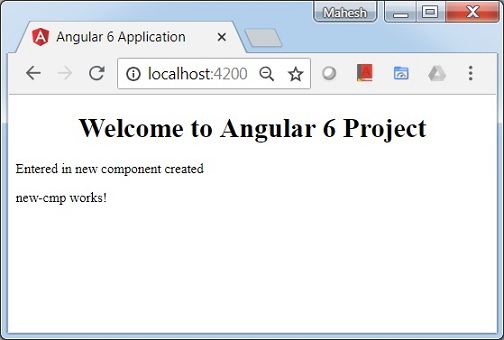
在类中,我们添加了一个名为 new component 的变量,其值为“**Entered in new component created**”。
上述变量在 **.new-cmp.component.html** 文件中绑定如下:
<p>
   {{newcomponent}}
</p>
<p>
   new-cmp works!
</p>
现在,由于我们在 **app.component.html**(父组件的 .html)中包含了 **<app-new-cmp></app-new-cmp>** 选择器,因此新组件 .html 文件 (new-cmp.component.html) 中存在的内容将如下显示在浏览器上:
类似地,我们可以根据我们的需求创建组件并使用 **app.component.html** 文件中的选择器链接它们。