
- Angular 6 教程
- Angular 6 - 首页
- Angular 6 - 概述
- Angular 6 - 环境搭建
- Angular 6 - 项目设置
- Angular 6 - 组件
- Angular 6 - 模块
- Angular 6 - 数据绑定
- Angular 6 - 事件绑定
- Angular 6 - 模板
- Angular 6 - 指令
- Angular 6 - 管道
- Angular 6 - 路由
- Angular 6 - 服务
- Angular 6 - Http 服务
- Angular 6 - Http 客户端
- Angular 6 - 表单
- Angular 6 - 动画
- Angular 6 - 材料设计
- Angular 6 - CLI
- Angular 6 有用资源
- Angular 6 - 快速指南
- Angular 6 - 有用资源
- Angular 6 - 讨论
Angular 6 - 指令
Angular 中的指令是一个js类,声明为@directive。Angular 中有 3 种指令。指令列出如下:
组件指令
这些构成了主类,包含了组件如何在运行时被处理、实例化和使用。
结构指令
结构指令主要用于操作 DOM 元素。结构指令在指令前有一个 * 号。例如,*ngIf 和 *ngFor。
属性指令
属性指令用于更改 DOM 元素的外观和行为。您可以创建自己的指令,如下所示。
如何创建自定义指令?
在本节中,我们将讨论在组件中使用的自定义指令。自定义指令是我们创建的,不是标准指令。
让我们看看如何创建自定义指令。我们将使用命令行创建指令。使用命令行创建指令的命令是:
ng g directive nameofthedirective
e.g
ng g directive changeText
这是它在命令行中的显示方式
C:\projectA6\Angular6App>ng g directive changeText
CREATE src/app/change-text.directive.spec.ts (241 bytes)
CREATE src/app/change-text.directive.ts (149 bytes)
UPDATE src/app/app.module.ts (486 bytes)
以上文件,即 change-text.directive.spec.ts 和 change-text.directive.ts 被创建,并且 app.module.ts 文件被更新。
app.module.ts
import { BrowserModule } from '@angular/platform-browser';
import { NgModule } from '@angular/core';
import { AppComponent } from './app.component';
import { NewCmpComponent } from './new-cmp/new-cmp.component';
import { ChangeTextDirective } from './change-text.directive';
@NgModule({
   declarations: [
      AppComponent,
      NewCmpComponent,
      ChangeTextDirective
   ],
   imports: [
      BrowserModule
   ],
   providers: [],
   bootstrap: [AppComponent]
})
export class AppModule { }
ChangeTextDirective 类包含在上述文件中的声明中。该类也从下面给出的文件中导入。
change-text.directive
import { Directive } from '@angular/core';
@Directive({
   selector: '[appChangeText]'
})
export class ChangeTextDirective {
   constructor() { }
}
以上文件包含一个指令,并且它还有一个选择器属性。我们在选择器中定义的内容必须与我们在视图中分配自定义指令的位置相匹配。
在 app.component.html 视图中,让我们添加如下指令:
<div style = "text-align:center">
   <span appChangeText >Welcome to {{title}}.</span>
</div>
我们将如下修改 change-text.directive.ts 文件:
change-text.directive.ts
import { Directive, ElementRef} from '@angular/core';
@Directive({
   selector: '[appChangeText]'
})
export class ChangeTextDirective {
   constructor(Element: ElementRef) {
      console.log(Element);
      Element.nativeElement.innerText = "Text is changed by changeText Directive. ";
   }
}
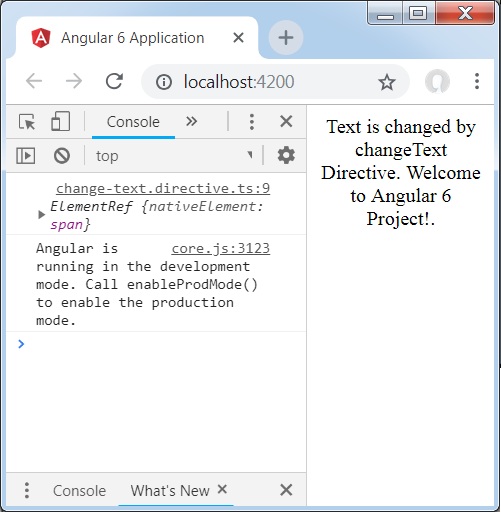
在上述文件中,有一个名为 ChangeTextDirective 的类和一个构造函数,它接收类型为 ElementRef 的元素,这是必需的。该元素包含应用 Change Text 指令的所有详细信息。
我们添加了 console.log 元素。可以在浏览器控制台中看到其输出。元素的文本也如上所示更改。
现在,浏览器将显示以下内容。
广告