
- Angular 6 教程
- Angular 6 - 首页
- Angular 6 - 概述
- Angular 6 - 环境设置
- Angular 6 - 项目设置
- Angular 6 - 组件
- Angular 6 - 模块
- Angular 6 - 数据绑定
- Angular 6 - 事件绑定
- Angular 6 - 模板
- Angular 6 - 指令
- Angular 6 - 管道
- Angular 6 - 路由
- Angular 6 - 服务
- Angular 6 - Http 服务
- Angular 6 - Http 客户端
- Angular 6 - 表单
- Angular 6 - 动画
- Angular 6 - Material
- Angular 6 - CLI
- Angular 6 有用资源
- Angular 6 - 快速指南
- Angular 6 - 有用资源
- Angular 6 - 讨论
Angular 6 - 数据绑定
数据绑定从 AngularJS、Angular 2、4 开始就可用,现在 Angular 6 也可用。我们使用花括号进行数据绑定 - {{}}; 此过程称为插值。我们已经在之前的示例中看到过如何将值声明为变量 title,并在浏览器中打印出来。
app.component.html 文件中的变量被称为 {{title}},title 的值在 app.component.ts 文件中初始化,并在 app.component.html 中显示其值。
现在让我们在浏览器中创建一个月份下拉列表。为此,我们在 app.component.ts 中创建了一个月份数组,如下所示:
import { Component } from '@angular/core';
@Component({
   selector: 'app-root',
   templateUrl: './app.component.html',
   styleUrls: ['./app.component.css']
})
export class AppComponent {
   title = 'Angular 6 Project!';
   // declared array of months.
   months = ["January", "Feburary", "March", "April", "May",
            "June", "July", "August", "September",
            "October", "November", "December"];
}
上面显示的月份数组需要在浏览器中的下拉列表中显示。为此,我们将使用以下代码行:
<!--The content below is only a placeholder and can be replaced. -->
<div style = "text-align:center">
   <h1>
      Welcome to {{title}}.
   </h1>
</div>
<div> Months :
   <select>
      <option *ngFor = "let i of months">{{i}}</option>
   </select>
</div>
我们创建了带有 option 的普通 select 标签。在 option 中,我们使用了 for 循环。for 循环 用于迭代月份数组,这将依次创建带有月份中值的 option 标签。
Angular 中的语法 for 是 *ngFor = "let i of months",要获取月份的值,我们将其显示在 {{i}} 中。
两个花括号有助于数据绑定。您在 app.component.ts 文件中声明变量,然后使用花括号替换它们。
让我们看看上面月份数组在浏览器中的输出。
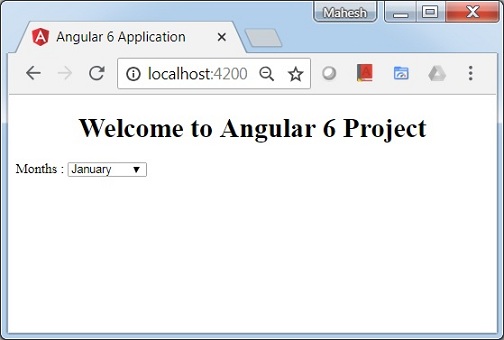
在 app.component.ts 中设置的变量可以使用花括号与 app.component.html 绑定;例如,{{}}。
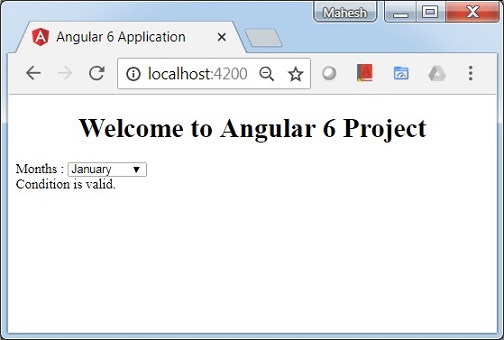
现在让我们根据条件在浏览器中显示数据。在这里,我们添加了一个变量并将值设置为 true。使用 if 语句,我们可以隐藏/显示要显示的内容。
示例
import { Component } from '@angular/core';
@Component({
   selector: 'app-root',
   templateUrl: './app.component.html',
   styleUrls: ['./app.component.css']
})
export class AppComponent {
   title = 'Angular 4 Project!';
   //array of months.
   months = ["January", "February", "March", "April",
            "May", "June", "July", "August", "September",
            "October", "November", "December"];
   isavailable = true;   //variable is set to true
}
<!--The content below is only a placeholder and can be replaced.-->
<div style = "text-align:center">
   <h1>
      Welcome to {{title}}.
   </h1>
</div>
<div> Months :
   <select>
      <option *ngFor = "let i of months">{{i}}</option>
   </select>
</div>
<br/>
<div>
   <span *ngIf = "isavailable">Condition is valid.</span>
  <!--over here based on if condition the text condition is valid is displayed.
  If the value of isavailable is set to false it will not display the text.-->
</div>
输出
让我们使用 IF THEN ELSE 条件尝试上述示例。
示例
import { Component } from '@angular/core';
@Component({
   selector: 'app-root',
   templateUrl: './app.component.html',
   styleUrls: ['./app.component.css']
})
export class AppComponent {
   title = 'Angular 4 Project!';
   //array of months.
   months = ["January", "February", "March", "April",
            "May", "June", "July", "August", "September",
            "October", "November", "December"];
   isavailable = false;
}
在这种情况下,我们将 isavailable 变量设置为 false。要打印 else 条件,我们将不得不创建 ng-template,如下所示:
<ng-template #condition1>Condition is invalid</ng-template>
完整的代码如下:
<!--The content below is only a placeholder and can be replaced.-->
<div style = "text-align:center">
   <h1>
      Welcome to {{title}}.
   </h1>
</div>
<div> Months :
   <select>
      <option *ngFor="let i of months">{{i}}</option>
   </select>
</div>
<br/>
<div>
   <span *ngIf = "isavailable; else condition1">Condition is valid.</span>
   <ng-template #condition1>Condition is invalid</ng-template>
</div>
If 用于 else 条件,使用的变量是 condition1。它被分配为 ng-template 的 id,当 available 变量设置为 false 时,将显示文本 Condition is invalid。
以下屏幕截图显示了浏览器中的显示。

现在让我们使用 if then else 条件。
import { Component } from '@angular/core';
@Component({
   selector: 'app-root',
   templateUrl: './app.component.html',
   styleUrls: ['./app.component.css']
})
export class AppComponent {
   title = 'Angular 4 Project!';
   //array of months.
   months = ["January", "February", "March", "April",
            "May", "June", "July", "August", "September",
            "October", "November", "December"];
   isavailable = true;
}
现在,我们将变量 isavailable 设置为 true。在 html 中,条件按如下方式编写:
<!--The content below is only a placeholder and can be replaced.-->
<div style = "text-align:center">
   <h1>
   Welcome to {{title}}.
   </h1>
</div>
<div> Months :
   <select>
      <option *ngFor = "let i of months">{{i}}</option>
   </select>
</div>
<br/>
<div>
   <span *ngIf = "isavailable; then condition1 else condition2">Condition is valid.</span>
   <ng-template #condition1>Condition is valid</ng-template>
   <ng-template #condition2>Condition is invalid</ng-template>
</div>
如果变量为 true,则为 condition1,否则为 condition2。现在,创建了两个带有 id #condition1 和 #condition2 的模板。
浏览器中的显示如下: