
 数据结构
数据结构 网络
网络 RDBMS
RDBMS 操作系统
操作系统 Java
Java MS Excel
 iOS
iOS HTML
HTML CSS
CSS Android
 Python
 C 编程
C 编程 C++
C++ C#
C# MongoDB
 MySQL
MySQL JavaScript
 PHP
PHP 物理学
物理学 化学
化学 生物学
生物学 数学
数学 英语
英语 经济学
经济学 心理学
心理学 社会学
社会学 时尚学
时尚学 法学
法学使用 Python 将图像转换为 ASCII 图像
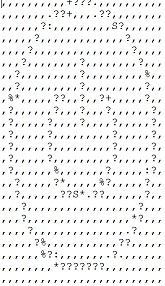
在本文中,我们想将给定的图像转换为文本基图像,也称为 ASCII 图像。
以下 Python 程序将采用输入图像以及各种函数,将其转换为灰度图片,然后应用 ASCII 字符创建不同的图案来插入图像。最后,电子邮件会生成文本基图像,这是一系列平面 ASCII 字符。
示例
from PIL import Image
import os
ASCII_CHARS = [ '#', '?', '%', '.', 'S', '+', '.', '*', ':', ',', '@']
def resize_image(image, new_width=25):
   (input__width, input__height) = image.size
   aspect_ratio = input__height/float(input__width)
   changed_height = int(aspect_ratio * new_width)
   changed_image = image.resize((new_width, changed_height))
   return changed_image
def make_grey(image):
   return image.convert('L')
def pixel_to_ascii(image, range_width=25):
   pixels_in_image = list(image.getdata())
   pixels_to_chars = [ASCII_CHARS[pixel_value//range_width] for pixel_value in
   pixels_in_image]
   return "".join(pixels_to_chars)
def image_to_ascii(image, new_width=25):
   image = resize_image(image)
   image = make_grey(image)
   pixels_to_chars = pixel_to_ascii(image)
   len_pixels_to_chars = len(pixels_to_chars)
   image_ascii = [pixels_to_chars[index: index + new_width] for index in
   range(0, len_pixels_to_chars, new_width)]
   return "\n".join(image_ascii)
def convert_image(image_filepath):
   # image = None
   try:
      image = Image.open(image_filepath)
   except Exception as e:
      print("Unable to open image file          {image_filepath}.".format(image_filepath=image_filepath))
   print(e)
   return
   image_ascii = image_to_ascii(image)
   f = open(os.path.splitext(image_filepath)[0]+'.txt','w')
   f.write(image_ascii)
   f.close()
convert_image('D:\button.jpg')
输出
运行上述代码,可得到以下结果 −
输入图像

输出图像

更新于: 2020 年 7 月 9 日
504 次浏览

广告