
 数据结构
数据结构 网络技术
网络技术 RDBMS
RDBMS 操作系统
操作系统 Java
Java MS Excel
 iOS
iOS HTML
HTML CSS
CSS Android
 Python
 C 编程
C 编程 C++
C++ C#
C# MongoDB
 MySQL
MySQL Javascript
 PHP
PHP 物理
物理 化学
化学 生物学
生物学 数学
数学 英语
英语 经济学
经济学 心理学
心理学 社会学
社会学 时尚研究
时尚研究 法律研究
法律研究解释 JavaFX 中二维图形的平滑属性
smooth 属性指定是否使用抗锯齿提示。可以使用 javafx.scene.shape.Shape 类的 setSmooth() 方法将值设为该属性。
此方法接受一个布尔值,如果传递 true,则形状的边缘将被平滑化。
示例
import javafx.application.Application;
import javafx.scene.Group;
import javafx.scene.Scene;
import javafx.scene.paint.Color;
import javafx.scene.shape.Polygon;
import javafx.scene.shape.StrokeLineJoin;
import javafx.scene.text.Font;
import javafx.scene.text.FontPosture;
import javafx.scene.text.FontWeight;
import javafx.scene.text.Text;
import javafx.stage.Stage;
public class SmoothExample extends Application {
   public void start(Stage stage) {
      Font font = Font.font("verdana", FontWeight.BOLD, FontPosture.REGULAR, 12);
      Text label2 = new Text("Smooth: true");
      label2.setFont(font);
      label2.setX(80.0);
      label2.setY(250.0);
      Polygon shape1 = new Polygon(100.0, 75.0, 50.0, 200.0, 200.0, 200.0);
      shape1.setStroke(Color.BLUE);
      shape1.setStrokeWidth(20);
      shape1.setStrokeLineJoin(StrokeLineJoin.MITER);
      shape1.setSmooth(true);
      Text label3 = new Text("Smooth: false");
      label3.setFont(font);
      label3.setX(370.0);
      label3.setY(250.0);
      Polygon shape2 = new Polygon(450.0, 75.0, 350.0, 200.0, 500.0, 200.0);
      shape2.setStroke(Color.BLUE);
      shape2.setStrokeWidth(20.0);
      shape2.setStrokeLineJoin(StrokeLineJoin.MITER);
      shape2.setSmooth(false);
      //Creating a Group object
      Group root = new Group(label2, label3, shape1, shape2);
      //Creating a scene object
      Scene scene = new Scene(root, 595, 310);
      //Setting title to the Stage
      stage.setTitle("Smooth Example");
      //Adding scene to the stage
      stage.setScene(scene);
      //Displaying the contents of the stage
      stage.show();
   }
   public static void main(String args[]){
      launch(args);
   }
}
输出
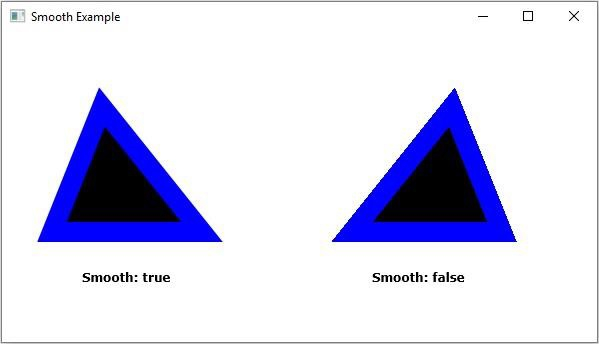

更新日期: 2020-4-14
251 浏览量

广告