
 数据结构
数据结构 网络
网络 RDBMS
RDBMS 操作系统
操作系统 Java
Java MS Excel
 iOS
iOS HTML
HTML CSS
CSS Android
 Python
 C 编程
C 编程 C++
C++ C#
C# MongoDB
 MySQL
MySQL Javascript
 PHP
PHP 物理
物理 化学
化学 生物
生物 数学
数学 英语
英语 经济学
经济学 心理学
心理学 社会学
社会学 时尚研究
时尚研究 法律研究
法律研究解释 JavaFX 中 3D 形状的面绘制模式属性
此绘制模式属性定义/指定用于绘制 3D 形状的模式。可以使用 **setDrawMode()** 方法(Shape 类)将值设置为 3D 对象的 draw mode 属性。
JavaFX 支持两种绘制模式,由名为 **DrawMode** 的枚举常量表示——FILL 和 LINE。
示例
import javafx.application.Application;
import javafx.scene.Group;
import javafx.scene.PerspectiveCamera;
import javafx.scene.Scene;
import javafx.scene.paint.Color;
import javafx.stage.Stage;
import javafx.scene.shape.DrawMode;
import javafx.scene.shape.Sphere;
import javafx.scene.text.Font;
import javafx.scene.text.FontPosture;
import javafx.scene.text.FontWeight;
import javafx.scene.text.Text;
public class DrawModeProperty extends Application {
   public void start(Stage stage) {
      //Drawing a Sphere
      Sphere sphere1 = new Sphere(100);
      sphere1.setTranslateX(80.0);
      sphere1.setTranslateY(180.0);
      sphere1.setTranslateZ(150.0);
      //Setting the property "draw mode"
      sphere1.setDrawMode(DrawMode.LINE);
      //Drawing a Sphere
      Sphere sphere2 = new Sphere(100);
      sphere2.setTranslateX(380.0);
      sphere2.setTranslateY(180.0);
      sphere2.setTranslateZ(150.0);
      //Setting the property "draw mode"
      sphere2.setDrawMode(DrawMode.FILL);
      //Setting the perspective camera
      PerspectiveCamera cam = new PerspectiveCamera();
      cam.setTranslateX(-50);
      cam.setTranslateY(50);
      cam.setTranslateZ(0);
      Font font = Font.font("verdana", FontWeight.BOLD, FontPosture.REGULAR, 15);
      Text label1 = new Text("Draw Mode: LINE");
      label1.setFont(font);
      label1.setX(40);
      label1.setY(300);
      Text label2 = new Text("Draw Mode: FILL");
      label2.setFont(font);
      label2.setX(280);
      label2.setY(300);
      //Setting the Scene
      Group root = new Group(sphere1, sphere2, label1, label2);
      Scene scene = new Scene(root, 595, 300, Color.BEIGE);
      scene.setCamera(cam);
      stage.setTitle("3D Shape Property: Draw Mode");
      stage.setScene(scene);
      stage.show();
   }
   public static void main(String args[]){
      launch(args);
   }
}
输出
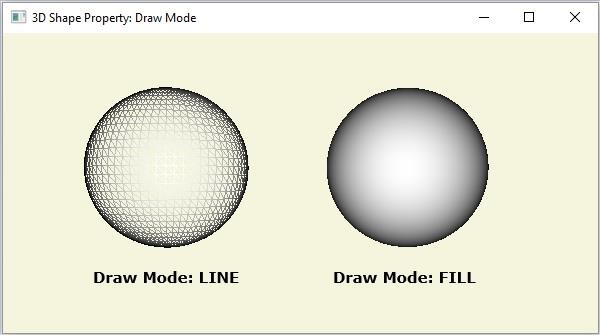

更新时间:2020 年 5 月 16 日
175 次浏览

广告