
 数据结构
数据结构 网络
网络 关系数据库管理系统
 操作系统
操作系统 Java
Java MS Excel
 iOS
iOS HTML
HTML CSS
CSS Android
 Python
 C 编程
C 编程 C++
C++ C#
C# MongoDB
 MySQL
MySQL Javascript
 PHP
PHP 物理学
物理学 化学
化学 生物学
生物学 数学
数学 英语
英语 经济学
经济学 心理学
心理学 社会学
社会学 服装学
服装学 法律学
法律学解释 JavaFX 中 3D 对象的属性?
以下是 3D 对象的各种属性 -
剔除面 - 通常,剔除是指移除形状中方向不正确的部件(在视区中不可见)。
可以使用 setCullFace() 方法(Shape 类)将值设置为 3d 对象的剔除面属性。
JavaFX 支持三种剔除面类型,用名为 CullFace 的枚举中的三个常量表示,即 NONE、FRONT、BACK。
绘图模式 - 此属性定义/指定用于绘制 3D 形状的模式。
可以使用 setDrawMode() 方法(Shape 类)将值设置为 3d 对象的绘图模式属性。
JavaFX 支持两种绘图模式,由名为 DrawMode 的枚举的常量表示,即 FILL 和 LINE。
材质 - 该属性指定 3D 对象应该用什么类型的材质覆盖。可以使用 setMaterial() 方法为该属性设置值。
示例
import javafx.application.Application;
import javafx.scene.Group;
import javafx.scene.PerspectiveCamera;
import javafx.scene.Scene;
import javafx.scene.paint.Color;
import javafx.scene.paint.PhongMaterial;
import javafx.stage.Stage;
import javafx.scene.shape.Box;
import javafx.scene.shape.CullFace;
import javafx.scene.shape.Cylinder;
import javafx.scene.shape.DrawMode;
import javafx.scene.shape.Sphere;
import javafx.scene.text.Font;
import javafx.scene.text.FontPosture;
import javafx.scene.text.FontWeight;
import javafx.scene.text.Text;
public class JavaFX3DShapesProperties extends Application {
   public void start(Stage stage) {
      //Drawing a Box
      Box cube = new Box(100, 120, 100);
      cube.setTranslateX(30.0);
      cube.setTranslateY(180.0);
      cube.setTranslateZ(150.0);
      //Setting the property "cull face"
      cube.setCullFace(CullFace.FRONT);
      //Drawing a Cylinder
      Cylinder cylinder = new Cylinder(50, 150);
      //Setting the properties of the cylinder
      cylinder.setTranslateX(250.0);
      cylinder.setTranslateY(180.0);
      cylinder.setTranslateZ(150.0);
      //Setting the cull face "material"
      PhongMaterial material = new PhongMaterial();
      material.setDiffuseColor(Color.DARKRED);
      cylinder.setMaterial(material);
      //Drawing a Sphere
      Sphere sphere = new Sphere(75);
      sphere.setTranslateX(480.0);
      sphere.setTranslateY(180.0);
      sphere.setTranslateZ(150.0);
      //Setting the property "draw mode"
      sphere.setDrawMode(DrawMode.LINE);
      //Setting the perspective camera
      PerspectiveCamera cam = new PerspectiveCamera();
      cam.setTranslateX(-50);
      cam.setTranslateY(50);
      cam.setTranslateZ(0);
      Font font = Font.font("verdana", FontWeight.BOLD, FontPosture.REGULAR, 15);
      Text label1 = new Text("CullFace: front");
      label1.setFont(font);
      label1.setX(10);
      label1.setY(270);
      Text label2 = new Text("Material: colored");
      label2.setFont(font);
      label2.setX(180);
      label2.setY(270);
      Text label3 = new Text("Draw Mode: line");
      label3.setFont(font);
      label3.setX(370);
      label3.setY(270);
      //Setting the Scene
      Group root = new Group(cube, cylinder, sphere, label1, label2, label3);
      Scene scene = new Scene(root, 595, 300, Color.BEIGE);
      scene.setCamera(cam);
      stage.setTitle("JavaFX 3D Shape properties");
      stage.setScene(scene);
      stage.show();
   }
   public static void main(String args[]){
      launch(args);
   }
}
输出
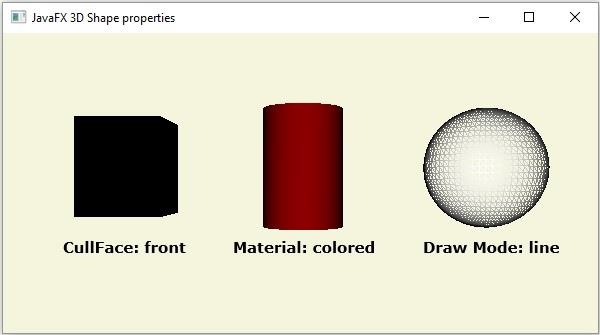

更新时间: 16-05-2020
107 次浏览

广告