
 数据结构
数据结构 网络
网络 关系数据库管理系统 (RDBMS)
 操作系统
操作系统 Java
Java MS Excel
 iOS
iOS HTML
HTML CSS
CSS Android
 Python
 C 语言编程
 C++
C++ C#
C# MongoDB
 MySQL
MySQL Javascript
 PHP
PHP 物理学
物理学 化学
化学 生物学
生物学 数学
数学 英语
英语 经济学
经济学 心理学
心理学 社会学
社会学 服装设计
服装设计 法学
法学如何在 Excel 中输入时自动完成文本框?
我们可以使用 Excel 中的自动完成功能将文本框中的元素与列表中已存在的元素关联起来。由于此过程无法默认完成,因此我们需要对工作簿进行一些更改才能实现自动完成。阅读本教程,了解如何在 Excel 中输入时自动完成文本框。
输入时自动完成文本框
在这里,我们将为文本框分配一个宏。让我们来看一个简单的过程,了解如何在 Excel 中输入时自动完成文本框。我们需要使用注释框并列出 ActiveX 命令。
步骤 1
让我们考虑一个新的 Excel 表格,要插入文本框和列表框,请单击“开发工具”,然后单击“插入”,并绘制如下所示的框边界。

现在,右键单击工作表名称并选择“查看代码”以打开 VBA 应用程序,然后在文本框中键入程序,如下所示。
程序
Dim xRg As Range
'Updated By Nirmal
Dim xDic As New Dictionary
Private Sub ListBox1_DblClick(ByVal Cancel As MSForms.ReturnBoolean)
   Me.TextBox1.Value = Me.ListBox1.Value
End Sub
Private Sub Worksheet_Change(ByVal Target As Range)
   Dim xVal As String
   On Error Resume Next
   If IsNumeric(Target.Value) Then
      xVal = Str(Target.Value)
   Else
      xVal = Target.Value
   End If
   If xVal <> "" Then
      If Not xDic.Exists(xVal) Then
         xDic.Add xVal, xVal
      End If
   End If
End Sub
Private Sub Worksheet_SelectionChange(ByVal Target As Range)
   Me.ListBox1.Visible = False
End Sub
Private Sub Worksheet_Activate()
   Dim I As Long
   Dim xStr As String
   On Error Resume Next
   If xRg Is Nothing Then
      Set xRg = ActiveSheet.UsedRange
   End If
   Me.ListBox1.Visible = False
   xDic.RemoveAll
   With Me.ListBox1
      For I = 1 To xRg.Count
         xStr = xRg(I).Value
         If xStr <> "" Then
            .AddItem xStr
            If Not xDic.Exists(xStr) Then
               xDic.Add xStr, xStr
            End If
         End If
      Next
   End With
End Sub
Private Sub TextBox1_KeyUp(ByVal KeyCode As MSForms.ReturnInteger, ByVal Shift As Integer)
   With Me.ListBox1
      .Top = Me.TextBox1.Top
      .Left = Me.TextBox1.Left + Me.TextBox1.Width
      .Width = Me.TextBox1.Width
   End With
   TextBoxVal Me.TextBox1.Object
End Sub
Sub TextBoxVal(xTextBox As Variant)
   Dim I As Long
   Dim xStr As String
   On Error Resume Next
   Application.ScreenUpdating = False
   If xRg Is Nothing Then Exit Sub
   Me.ListBox1.Clear
   xStr = xTextBox.Value
   If xStr = "" Then
      Me.ListBox1.Visible = False
      Application.EnableEvents = True
      Exit Sub
   End If
   For I = 0 To UBound(xDic.Items)
      If Left(xDic.Items(I), Len(xStr)) = xStr Then
         Me.ListBox1.AddItem xDic.Items(I)
      End If
   Next
   Me.ListBox1.Visible = True
   If Me.ListBox1.ListCount > 0 Then
      With xTextBox
         .Value = Me.ListBox1.List(0)
         .SelStart = Len(xStr)
         .SelLength = Len(Me.ListBox1.List(0))
      End With
   End If
   Me.ListBox1.Activate
   Me.ListBox1.Selected(0) = True
   Application.ScreenUpdating = True
End Sub
Private Sub ListBox1_KeyDown(ByVal KeyCode As MSForms.ReturnInteger, ByVal Shift As Integer)
   If KeyCode = 13 Then
      Me.TextBox1.Value = Me.ListBox1.Value
   End If
End Sub
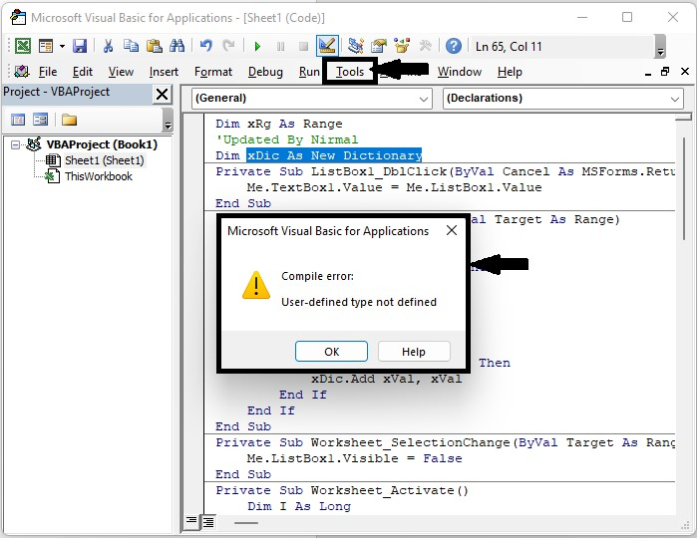
我们得到一个错误,如上图所示。要清除错误,请单击“工具”并选择“引用”以打开一个弹出窗口,然后选中“Microsoft Scripting Runtime”复选框,如下所示。

步骤 2
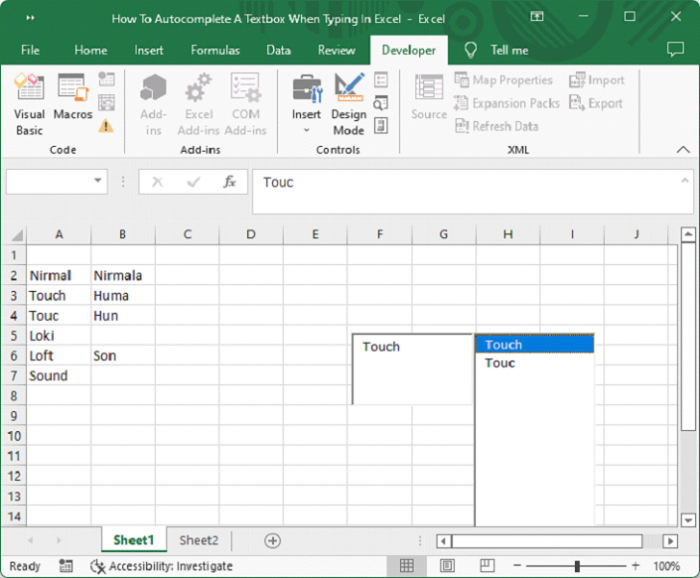
将工作表另存为宏启用模板,并在 Excel 工作表的列表中键入数据,如下所示。
结论
在本教程中,我们使用一个简单的示例演示了如何在 Excel 中输入时自动完成文本框。

更新于:2023年1月3日
浏览量 583 次

广告