
 数据结构
数据结构 网络
网络 关系数据库管理系统
 操作系统
操作系统 Java
Java MS Excel
 iOS
iOS HTML
HTML CSS
CSS Android
 Python
 C 编程
C 编程 C++
C++ C#
C# MongoDB
 MySQL
MySQL Javascript
 PHP
PHP 物理学
物理学 化学
化学 生物学
生物学 数学
数学 英语
英语 经济学
经济学 心理学
心理学 社会学
社会学 时尚研究
时尚研究 法律研究
法律研究如何在 OpenCV 中使用 C++ 裁剪检测到的面部?
我们将学习如何在 OpenCV 中裁剪检测到的面部。要裁剪检测到的面部,我们需要多个矩阵。最合适的方法是使用图像数组。在这个程序中,使用以下两行代码,我们声明了两个图像矩阵:
- Mat cropped_faces[4];
- Mat faceROI[4];
第一个矩阵用于存储裁剪后的图像,第二个矩阵用于定义感兴趣区域。在检测过程中,程序首先定位面部并将它们存储在向量中。在我们的程序中,向量的名称为“faces”。向量可以包含多个元素。
使用以下两行代码,我们识别向量并定位它们在图像中的位置,最后在“faceROI[i]”矩阵中裁剪面部区域。
- faceROI[]=image_with_humanface(faces[i]);
- cropped_faces[i]=faceROI[i];
第一行定位包含名为“image_with_humanface”图像上面部的向量,裁剪它并将其存储到名为“faceROI[i]”的矩阵中。在第二行中,裁剪后的图像被传递到另一个矩阵数组。此矩阵数组已用于显示裁剪后的图像。
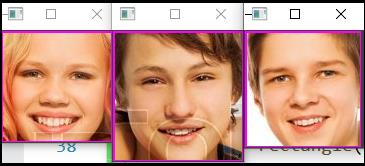
以下程序裁剪检测到的面部并在单独的窗口中显示它们。
示例
#include<iostream>
#include<opencv2/highgui/highgui.hpp>
#include<opencv2/imgproc/imgproc.hpp>
//This header includes definition of 'rectangle()' function//
#include<opencv2/objdetect/objdetect.hpp>
//This header includes the definition of Cascade Classifier//
#include<string>
using namespace std;
using namespace cv;
int main(int argc, char** argv) {
   Mat image_with_humanface;//Declaring a matrix to load image with human faces//
   Mat cropped_faces[3];//Declaring an array of matrix of 4 elements to show the cropped faces//
   Mat faceROI[3];//Declaring an array of matrix of 4 elements to hold the cropped faces//
   image_with_humanface = imread("friends3.jpg");//loading an image that contains human face in it//
   namedWindow("Face1");//Declaring an window to show 1st cropped face//
   namedWindow("Face2");//Declaring an window to show 2nd cropped face//
   namedWindow("Face3");//Declaring an window to show 3rd cropped face//
   string trained_classifier_location = "C:/opencv/sources/data/haarcascades/haarcascade_frontalface_alt.xml";//Defining the location our XML Trained Classifier in a string//
   CascadeClassifier faceDetector;//Declaring an object named 'face detector' of CascadeClassifier class//
   faceDetector.load(trained_classifier_location);//loading the XML trained classifier in the object//
   vector<Rect>faces;//Declaring a rectangular vector named faces//
   vector<Rect>boundary;//Declaring a rectangular vector named rectangle//
   faceDetector.detectMultiScale(image_with_humanface, faces, 1.1, 4, CASCADE_SCALE_IMAGE, Size(20, 20));//Detecting the faces in 'image_with_humanfaces' matrix//
   for (size_t i = 0; i < faces.size(); i++){ //Loop to draw rectangle around the faces//
      faceROI[i] = image_with_humanface(faces[i]);
      cropped_faces[i] = faceROI[i];
      int x = faces[i].x;//Getting the initial row value of face rectangle's starting point//
      int y = faces[i].y;//Getting the initial column value of face rectangle's starting point//
      int h = y + faces[i].height;//Calculating the height of the rectangle//
      int w = x + faces[i].width;//Calculating the width of the rectangle//
      rectangle(image_with_humanface, Point(x, y), Point(w, h), Scalar(255, 0, 255), 2, 8, 0);//Drawing a rectangle using around the faces//
   }
   imshow("Face1", cropped_faces[0]);//Showing the 1st cropped face//
   imshow("Face2", cropped_faces[1]);//Showing the 2nd cropped face//
   imshow("Face3", cropped_faces[2]);//Showing the 3rd cropped face//
   waitKey(0);//To wait for a keystroke to terminate the program
   return 0;
}
输出

更新于: 2021年3月10日
655 次浏览

广告